







Question: 1. UNIX cat command has three functions with regard to text files: displaying them, combining copies of them and creating new ones. Write a C
1. UNIX cat command has three functions with regard to text files: displaying them, combining copies of them and creating new ones.
Write a C program to implement a command called displaycontent that takes a (text) file name as argument and display its contents. Report an appropriate message if the file does not exist or cant be opened (i.e. the file doesnt have read permission). You are to use open(), read(), write() and close() system calls.
NOTE: Name your executable file as displaycontent and execute your program as ./displaycontent file_name
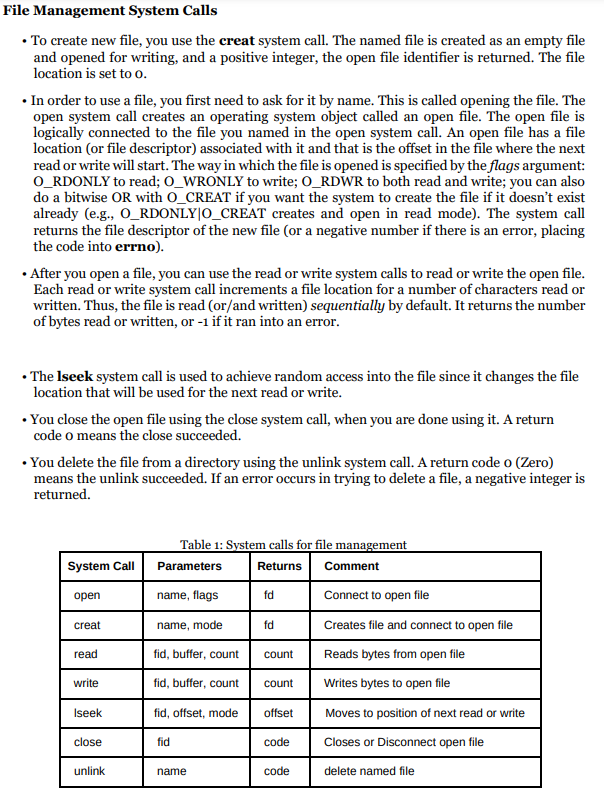
ile Management System Calls - To create new file, you use the creat system call. The named file is created as an empty file and opened for writing, and a positive integer, the open file identifier is returned. The file location is set to 0 . - In order to use a file, you first need to ask for it by name. This is called opening the file. The open system call creates an operating system object called an open file. The open file is logically connected to the file you named in the open system call. An open file has a file location (or file descriptor) associated with it and that is the offset in the file where the next read or write will start. The way in which the file is opened is specified by the flags argument: O_RDONLY to read; O_WRONLY to write; O_RDWR to both read and write; you can also do a bitwise OR with O_CREAT if you want the system to create the file if it doesn't exist already (e.g., O_RDONLY|O_CREAT creates and open in read mode). The system call returns the file descriptor of the new file (or a negative number if there is an error, placing the code into errno). - After you open a file, you can use the read or write system calls to read or write the open file. Each read or write system call increments a file location for a number of characters read or written. Thus, the file is read (or/and written) sequentially by default. It returns the number of bytes read or written, or 1 if it ran into an error. - The lseek system call is used to achieve random access into the file since it changes the file location that will be used for the next read or write. - You close the open file using the close system call, when you are done using it. A return code o means the close succeeded. - You delete the file from a directory using the unlink system call. A return code o (Zero) means the unlink succeeded. If an error occurs in trying to delete a file, a negative integer is returned
Step by Step Solution
There are 3 Steps involved in it

Get step-by-step solutions from verified subject matter experts
 Study Help