







Question: 1- Use histogram equalization to enhance the image shown in the following matrix.: input image= 10 10 10 10 10 10 10 10 6 6
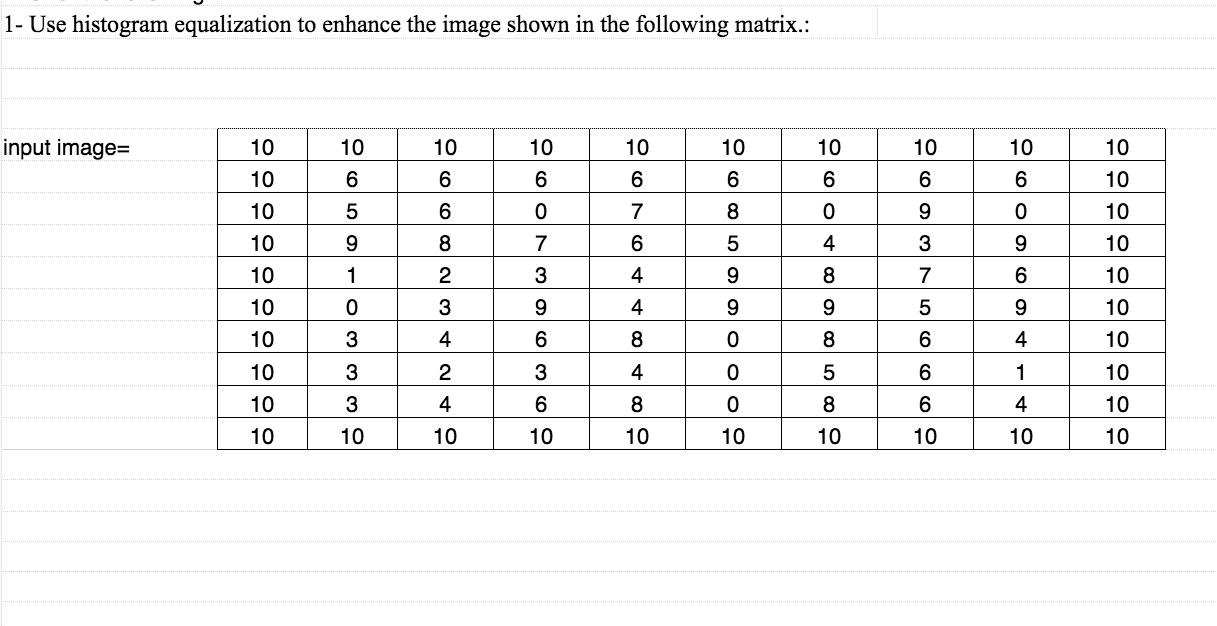


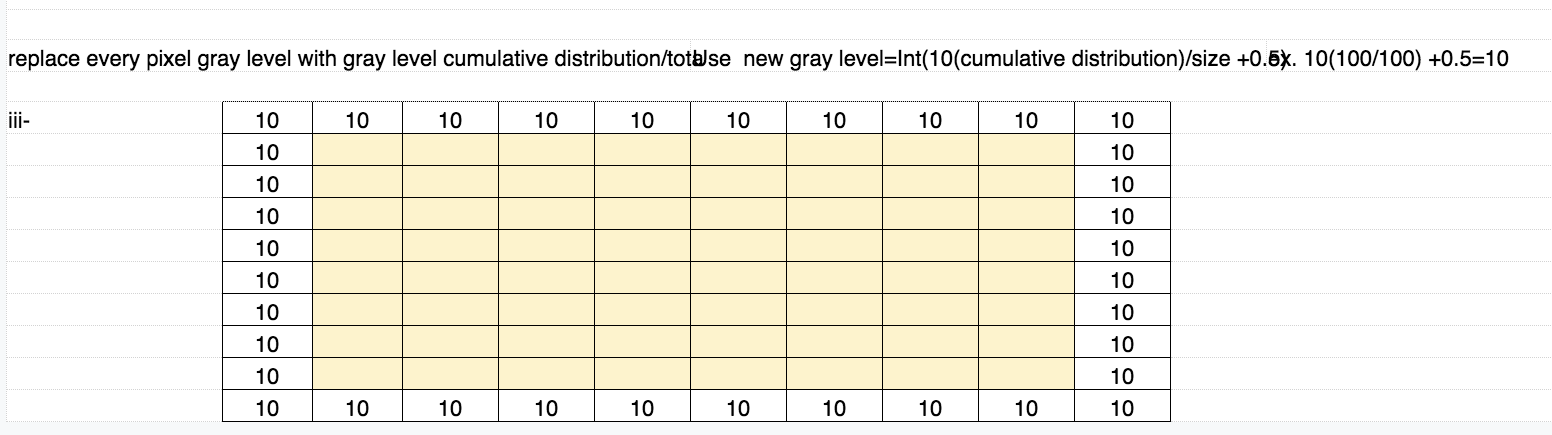
1- Use histogram equalization to enhance the image shown in the following matrix.: input image= 10 10 10 10 10 10 10 10 6 6 6 6 6 5 6 7 9 9 8 3 68599 0 0 1 2. 1000 7 17 | 39 636 0 3 4 696914114 0 62 0 48 9 858 5 1 4484 8 3 4 6 3 2. 6 10. 3 4 0 6 10 10 10 10 10 10 10 10 10 10 1 2 3 4 5 6 7 8 9 10 Gray leveo Number of pixel 36 1 2 3 4 5 6 7 8 9 Gray leveo Cumulative distributo 10 100 replace every pixel gray level with gray level cumulative distribution/totalse new gray level=Int(10(cumulative distribution)/size +0.5x. 10(100/100) +0.5=10 10 10 10 10 10 10 10 10 10 10 10, 10 10 10 10, 10 10 10 10 10 10 10 10 10 10 10 10 10 10 10 10 10 10 10 10 10 1- Use histogram equalization to enhance the image shown in the following matrix.: input image= 10 10 10 10 10 10 10 10 6 6 6 6 6 5 6 7 9 9 8 3 68599 0 0 1 2. 1000 7 17 | 39 636 0 3 4 696914114 0 62 0 48 9 858 5 1 4484 8 3 4 6 3 2. 6 10. 3 4 0 6 10 10 10 10 10 10 10 10 10 10 1 2 3 4 5 6 7 8 9 10 Gray leveo Number of pixel 36 1 2 3 4 5 6 7 8 9 Gray leveo Cumulative distributo 10 100 replace every pixel gray level with gray level cumulative distribution/totalse new gray level=Int(10(cumulative distribution)/size +0.5x. 10(100/100) +0.5=10 10 10 10 10 10 10 10 10 10 10 10, 10 10 10 10, 10 10 10 10 10 10 10 10 10 10 10 10 10 10 10 10 10 10 10 10 10
Step by Step Solution
There are 3 Steps involved in it

Get step-by-step solutions from verified subject matter experts
 Study Help