







Question: 1. Use the product table from this module (do not modify table or column names) and modify the EventLog trigger that it will store all
1.
Use the product table from this module (do not modify table or column names) and
modify the EventLog trigger that it will store all changed (deleted or updated) values
from the Product table in the ProductHistory table.
Provide the code of your working trigger (2 points), code you used to create the ProductHistory
table (3 points). The code will be copied from your report and tested.
Test your code and include your test case in the report (code and screenshots of the results) (1
point for each successful test case). To receive points for testing, the test cases must test different
aspects of your code.
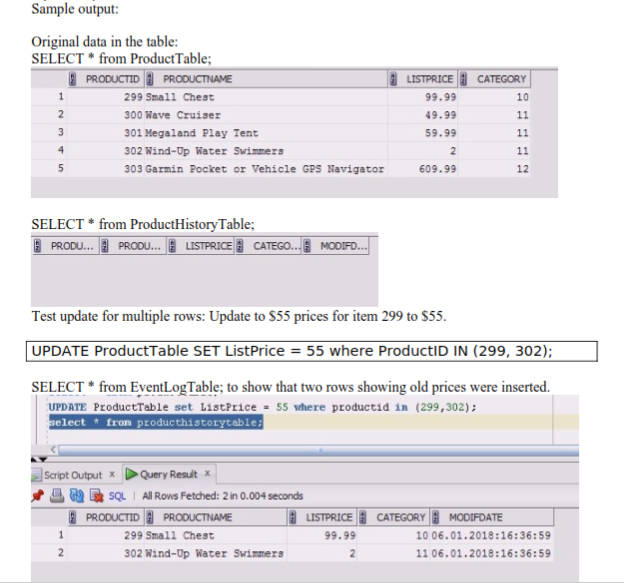
Sample output: CATEGORY Original data in the table: SELECT * from Product Table; PRODUCTID PRODUCTNAME 299 Small Chest 300 Wave Cruiser 301 Megaland Play Tent 302 Wind-Up Water Swimmers 303 Garmin Pocket or Vehicle GPS Navigator Nm LISTPRICE 99.99 49.99 59.99 609.99 SELECT * from Product History Table; 3 PRODU... PRODU... LISTPRICE CATEGO... MODIFD... Test update for multiple rows: Update to $55 prices for item 299 to $55. UPDATE ProductTable SET ListPrice = 55 where ProductID IN (299, 302); SELECT * from EventLogTable; to show that two rows showing old prices were inserted. UPDATE ProductTable set ListPrice = 55 where productid in (299,302); select * from producthistorytable; Script Output x Query Result + W SQL All Rows Fetched: 2 in 0.004 seconds PRODUCTID PRODUCTNAME LISTPRICE 1 299 Small Chest 99.99 302 Wind-Up Water Swimmers CATEGORY MODIFDATE 10 06.01.2018:16:36:59 11 06.01.2018:16:36:59
Step by Step Solution
There are 3 Steps involved in it

Get step-by-step solutions from verified subject matter experts
 Study Help