







Question: (1) Using an rscript window, create a new file called (exactly) Challenge23DF.R, and save it in the /Workspace directory in R Studio. Use the following
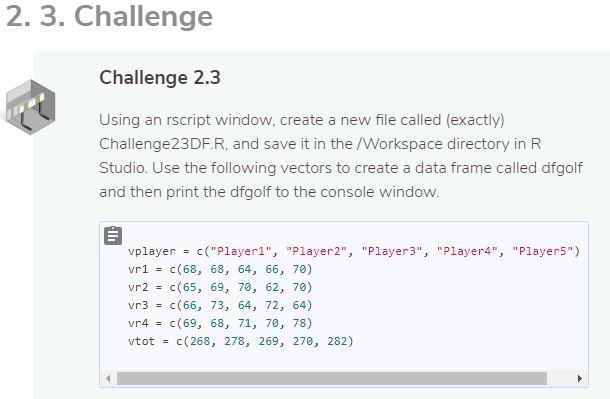
(1) Using an rscript window, create a new file called (exactly) Challenge23DF.R, and save it in the /Workspace directory in R Studio. Use the following vectors to create a data frame called dfgolf and then print the dfgolf to the console window.
(2) Using the file Challenge23DF.R and the dfgolf data frame you created in the last challenge, select the r4 (round 4) scores for all players.Then, select the first round score player 2. Before you click Check it!, be sure you 1) save your file, and 2) run the script in RStudio and view your output. Is it what you expected?
(3) Using the file from the last challenge (Challenge23DF.R) and the dfgolf data frame you created previously, select columns vplayer, vtot where vtot>mean(vtot) from the dfgolf data frame Recall that in R, the mean function is the average.
(4) Continuing with your file Challenge23DF.R, and the dfgolf data frame you created previously, use the order function to sort the data by vtot in ascending order to rank the players by lowest to highest total score. Be sure to highlight and run the R script so that you can examine the output before submitting your answer. When you have finished, save your file, and click CheckIt! to submit.
2. 3. Challenge Challenge 2.3 Using an rscript window, create a new file called (exactly) Challenge 23DFR, and save it in the /Workspace directory in R Studio. Use the following vectors to create a data frame called dfgolf and then print the dfgolf to the console window. vplayer c("Playeri", "Player2", "Player3", "Player4", "Player5") vri = c(68, 68, 64, 66, 70) vr2 c(65, 69, 70, 62, 70) vr3 = c(66, 73, 64, 72, 64) vr4 = C(69, 68, 71, 70, 78) vtot = c(268, 278, 269, 270, 282)
Step by Step Solution
There are 3 Steps involved in it

Get step-by-step solutions from verified subject matter experts
 Study Help