







Question: 1. Using MS Access, create a product table, a customer table, and an order table according to the following specifications. Use the names, data types,
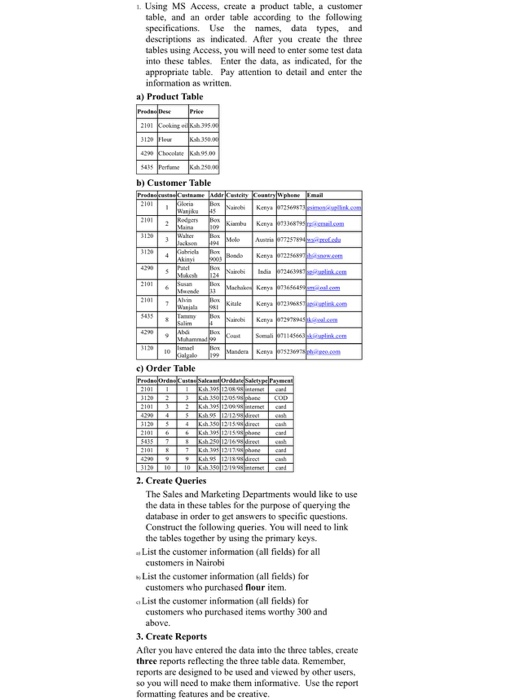
1. Using MS Access, create a product table, a customer table, and an order table according to the following specifications. Use the names, data types, and descriptions as indicated. After you create the three tables using Access, you will need to enter some test data into these tables. Enter the data, as indicated, for the appropriate table. Pay attention to detail and enter the a) Product Table 2101 eeking b) Customer Table 1012 c) Order Table 2. Create Queries The Sales and Marketing Departments would like to use the data in these tables for the purpose of querying the database in order to get answers to specific questions. Construct the following queries. You will need to link the tables together by using the primary keys. List the customer information (all fields) for all customers in Nairobi List the customer information (all fields) for customers who purchased flour item. a List the customer information (all fields) for customers who purchased items worthy 300 and 3. Create Reports After you have entered the data into the three tables, create three reports reflecting the three table data. Remember, reports are designed to be used and viewed by other users, so you will need to make them informative. Use the report formatting features and be creative
Step by Step Solution
There are 3 Steps involved in it

Get step-by-step solutions from verified subject matter experts
 Study Help