







Question: 1. Using one nested query/ subquery, find out the customers who have placed orders with more than 150 in item quantity. Include the customers name,
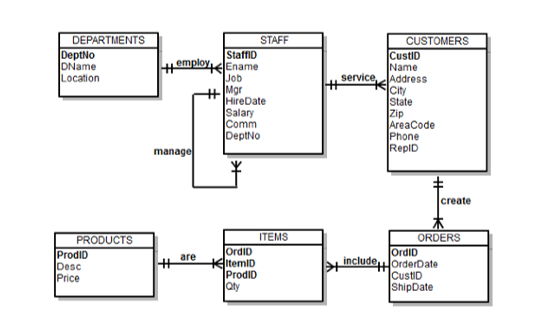
1. Using one nested query/ subquery, find out the customers who have placed orders with more than 150 in item quantity. Include the customers name, address, city, state, and zip code. Display the customers full address in one column by concatenating the street address, city, state, and zip code (the street address, city, state, and zip code need to be separated by a punctuation mark, for example, 345 Viewridge, Belmont, CA, 96711). Sort the customers name in alphabetical order.
2. Using join operations and analytical functions, display the sales amount as well as the cumulative sales amount by order ID. Note that the sales amount of each order is calculated by item quantity times price. Sort the order by order ID.
3. Write the SQL syntax to create a procedure named welcome_msg, once executed, display the message Welcome in tandem with your first name. For example, Welcome Bisi. After executing the procedure, write a code to remove the procedure from the DBMS.
Tips:
- Query from the SP_CUSTOMERS, SP_ORDERS, and SP_ITEMS tables. User the || concatenation operator. Use || ', ' || to add punctuation marks.
- Query from the SP_ORDERS, SP_ITEMS and SP_PRODUCTS tables, using JOIN ON . Use GROUP BY and ORDER BY... The cumulative sales syntax follows the format as SUM(SUM()) OVER (ORDER BY ROWS BETWEEN UNBOUNDED PRECEDING AND CURRENT ROW) AS "CUMULATIVE SALES"
- Only need to write the SQL syntax. No need to actually create the procedure on the database server. To add input parameter, use code welcome_msg (u_name IN VARCHAR2). The procedure syntax follows the format of DBMS_OUTPUT.PUT_LINE ('Welcome '|| u_name);
Step by Step Solution
There are 3 Steps involved in it

Get step-by-step solutions from verified subject matter experts
 Study Help