







Question: > Instructions In this assignment, you are required to create a PHP project that uses PDO to retrieve and display records in a database table.
>
Instructions
In this assignment, you are required to create a PHP project that uses PDO to retrieve and display records in a database table. The database (pcparts) will be provided. An index.html file will also be provided for the project. The project initially displays a web page with a form for specifying a city. Submitting the form should output all fields in the customers table for customers in the specified city.
Setup
- Download index.zip from Module 2.
- It holds the file index.html. Unzip and set it aside for now.
- Download pcparts.sql from Module 2. Use PHPMyAdmin to import pcparts.sql.
- The database has three tables. Only customers is involved in the assignment.
- Create a pcparts user named parts_dude with password P@rtzer. Give this user privileges select, insert, update, and delete for the pcparts database only.
Use NetBeans to create a new project that includes your name in the title (eg. smithasst2).
- Delete the index.php file from the new project.
- In NetBeans, drag and drop index.html into the project's "Source Files"folder.
- Create the files database.php, database_error.php, and cust_city.php as below:
database.php
- This file is executed by a require_once call in cust_city.php.
- It should create a PDO object and connect parts_dude to the pcparts database.
- The file should have exception-handling code to cope with errors.
- Modify the file of the same name in Product Viewer application (page 141).
database_error.php
- Copy the file from the Product Viewer application into your project.
- Only one change is required; modify the title tag.
cust_city.php
- This file is called by the action attribute of the form in index.html.
- Call the database.php file with the require_once() function.
- Safely read the city into a variable from the index.html form.
- Create a query to retrieve all fields from customers for the specified city.
- The city field will be a named parameter beginning with a colon.
- Prepare the query and return a PDOStatement object.
- Use bindValue() to bind the city variable to the city field.
- Execute the statement and use fetchAll() to make a result set.
- Use an HTML table to process the result set and display the cities.
- Use a foreach loop to display each result set row as a table row.
- See Sample Outputs
- ______________________________________________________________________________ files needed in the assignment: index.html from Module 2
Customers by City Customers by City
______________________________________________________________
pcparts.sql :-- phpMyAdmin SQL Dump -- version 4.2.7.1 -- http://www.phpmyadmin.net -- -- Host: 127.0.0.1 -- Generation Time: Dec 28, 2015 at 09:57 PM -- Server version: 5.6.20 -- PHP Version: 5.5.15
SET SQL_MODE = "NO_AUTO_VALUE_ON_ZERO"; SET time_zone = "+00:00";
/*!40101 SET @OLD_CHARACTER_SET_CLIENT=@@CHARACTER_SET_CLIENT */; /*!40101 SET @OLD_CHARACTER_SET_RESULTS=@@CHARACTER_SET_RESULTS */; /*!40101 SET @OLD_COLLATION_CONNECTION=@@COLLATION_CONNECTION */; /*!40101 SET NAMES utf8 */;
-- -- Database: `pcparts` --
CREATE DATABASE IF NOT EXISTS `pcparts` DEFAULT CHARACTER SET latin1 COLLATE latin1_swedish_ci; USE `pcparts`;
-- --------------------------------------------------------
-- -- Table structure for table `customers` --
CREATE TABLE IF NOT EXISTS `customers` ( `custid` int(10) NOT NULL, `name` char(20) NOT NULL, `address` char(20) NOT NULL, `city` char(16) NOT NULL, `state` char(2) NOT NULL, `zip` char(5) NOT NULL ) ENGINE=MyISAM DEFAULT CHARSET=latin1 AUTO_INCREMENT=9 ;
-- -- Dumping data for table `customers` --
INSERT INTO `customers` (`custid`, `name`, `address`, `city`, `state`, `zip`) VALUES (1, 'Smith, Tim', '12 Elm St', 'Tampa', 'FL', '34567'), (2, 'Jones, Tom', '435 Oak Dr', 'Dunedin', 'FL', '33245'), (3, 'Avery, Bill', '623 Ash Ave', 'Clearwater', 'FL', '33655'), (4, 'Kerr, Debra', '1573 Yew Crt', 'Clearwater', 'FL', '33442'), (5, 'Mattik, Otto', '15 Fir Ct', 'Dunedin', 'FL', '33333'), (6, 'Nate, Mary', '22 54th St', 'St Pete', 'FL', '36565'), (7, 'Tater, Dick', '77 Gunn Hwy', 'Tampa', 'FL', '39844'), (8, 'Forth, Sally', '555 Pine St', 'Tampa', 'FL', '39812');
-- --------------------------------------------------------
-- -- Table structure for table `orders` --
CREATE TABLE IF NOT EXISTS `orders` ( `orderid` int(10) NOT NULL, `custid` int(10) NOT NULL, `sku` char(5) NOT NULL, `quantity` int(10) NOT NULL, `date` date NOT NULL ) ENGINE=MyISAM DEFAULT CHARSET=latin1 AUTO_INCREMENT=10 ;
-- -- Dumping data for table `orders` --
INSERT INTO `orders` (`orderid`, `custid`, `sku`, `quantity`, `date`) VALUES (1, 2, 'C7615', 2, '2015-08-24'), (2, 2, 'K9907', 1, '2015-09-22'), (3, 3, 'C7615', 1, '2015-11-25'), (4, 3, 'F0993', 1, '2015-10-25'), (5, 1, 'B2245', 1, '2015-12-26'), (6, 5, 'H2243', 2, '2015-12-21'), (7, 5, 'K9907', 1, '2015-12-24'), (8, 7, 'U8872', 1, '2015-12-23'), (9, 7, 'B2245', 1, '2015-12-24');
-- --------------------------------------------------------
-- -- Table structure for table `parts` --
CREATE TABLE IF NOT EXISTS `parts` ( `sku` char(5) NOT NULL, `descrip` char(16) NOT NULL, `manuf` char(16) NOT NULL, `price` float(5,2) DEFAULT NULL ) ENGINE=MyISAM DEFAULT CHARSET=latin1;
-- -- Dumping data for table `parts` --
INSERT INTO `parts` (`sku`, `descrip`, `manuf`, `price`) VALUES ('B2245', 'DVD Drive', 'Sony', 79.99), ('C7615', '1 GB Flash Dr', 'Sandisk', 49.95), ('F0993', 'Laptop Mouse', 'Logitech', 29.99), ('H2243', 'G router', 'Linksys', 59.99), ('U8872', 'G PC Card', 'Linksys', 54.95), ('K9907', '4 port USB Hub', 'Acer', 12.95);
-- -- Indexes for dumped tables --
-- -- Indexes for table `customers` -- ALTER TABLE `customers` ADD PRIMARY KEY (`custid`);
-- -- Indexes for table `orders` -- ALTER TABLE `orders` ADD PRIMARY KEY (`orderid`);
-- -- Indexes for table `parts` -- ALTER TABLE `parts` ADD PRIMARY KEY (`sku`);
-- -- AUTO_INCREMENT for dumped tables --
-- -- AUTO_INCREMENT for table `customers` -- ALTER TABLE `customers` MODIFY `custid` int(10) NOT NULL AUTO_INCREMENT,AUTO_INCREMENT=9; -- -- AUTO_INCREMENT for table `orders` -- ALTER TABLE `orders` MODIFY `orderid` int(10) NOT NULL AUTO_INCREMENT,AUTO_INCREMENT=10; /*!40101 SET CHARACTER_SET_CLIENT=@OLD_CHARACTER_SET_CLIENT */; /*!40101 SET CHARACTER_SET_RESULTS=@OLD_CHARACTER_SET_RESULTS */; /*!40101 SET COLLATION_CONNECTION=@OLD_COLLATION_CONNECTION */;
______________________________________________________________________
Sample Outputs: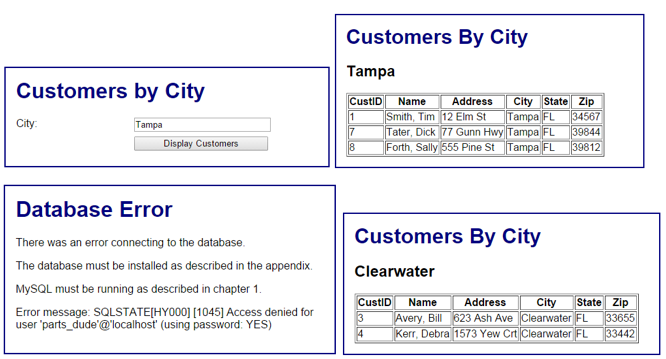
Step by Step Solution
There are 3 Steps involved in it

Get step-by-step solutions from verified subject matter experts
 Study Help