







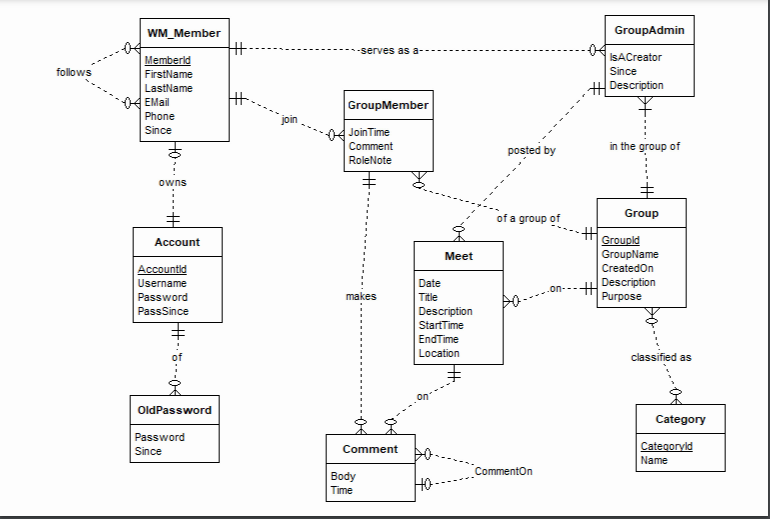
Question: (1) Using the suggested ERD solution (not your own solution) construct the relation schema to implement the ER diagram). For each relation, underline the PK
(1) Using the suggested ERD solution (not your own solution) construct the relation schema to implement the ER diagram).
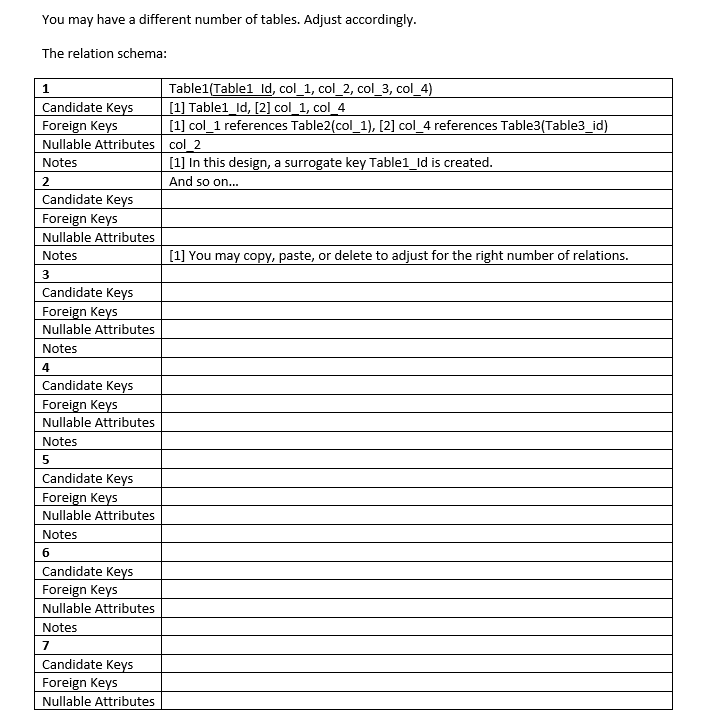
For each relation, underline the PK and list:
1. all candidate keys: e.g. [1] FacultyId, [2] {FirstName, LastName, DepartmentNumber}
2. all foreign key references: e.g. [1] ChairFacultyId references Faculty[FacultyId], [2] StudentId references Student[StudentId]
3. Attributes known for sure that can be null [i.e. Nullable]: e.g. [1] MiddleInitial, [2] Phone
****This is the template *****
![PK and list: 1. all candidate keys: e.g. [1] FacultyId, [2] {FirstName,](https://dsd5zvtm8ll6.cloudfront.net/si.experts.images/questions/2024/09/66f51f00608a1_28866f51f00038f4.jpg)
-serves as a WM_Member Memberld FirstName LastName 04 EMail Phone Since GroupAdmin ISACreator Since # Description follows Group Member JoinTime Comment RoleNote posted by in the group of owns . of a group of Group Account Meet Accountld Username Password PassSince Groupld GroupName Created on Description Purpose on--- makes Date Title Description StartTime EndTime Location classified as Category OldPassword Password Since Comment Categorvid Name CommentOn Body Time HO You may have a different number of tables. Adjust accordingly. The relation schema: 2 1 Table1(Tablel id, col_1, col_2, col_3, col_4) Candidate Keys [1] Tablel_Id, [2] col_1, col_4 Foreign Keys [1] col_1 references Table2(col_1), [2] col_4 references Table3(Table3_id) Nullable Attributes col 2 Notes [1] In this design, a surrogate key Table1_id is created. And so on... Candidate Keys Foreign Keys Nullable Attributes Notes [1] You may copy, paste, or delete to adjust for the right number of relations. 3 Candidate Keys Foreign Keys Nullable Attributes Notes 4 Candidate Keys Foreign Keys Nullable Attributes Notes 5 Candidate Keys Foreign Keys Nullable Attributes Notes 6 Candidate Keys Foreign Keys Nullable Attributes Notes 7 Candidate Keys Foreign Keys Nullable Attributes Notes 8 Candidate Keys Foreign Keys Nullable Attributes Notes 9 Candidate Keys Foreign Keys Nullable Attributes Notes 10 Candidate Keys Foreign Keys Nullable Attributes Notes 11 Candidate Keys Foreign Keys Nullable Attributes Notes 12 Candidate Keys Foreign Keys Nullable Attributes Notes 13 Candidate Keys Foreign Keys Nullable Attributes Notes 14 Candidate Keys Foreign Keys Nullable Attributes Notes 15 Candidate Keys Foreign Keys Nullable Attributes Notes
Step by Step Solution
There are 3 Steps involved in it

Get step-by-step solutions from verified subject matter experts
 Study Help