







Question: 1. Using the touch/mkdir & chmod command, create the following Files Or Directories within your lab6 directory witl Type | Name File | Grid File
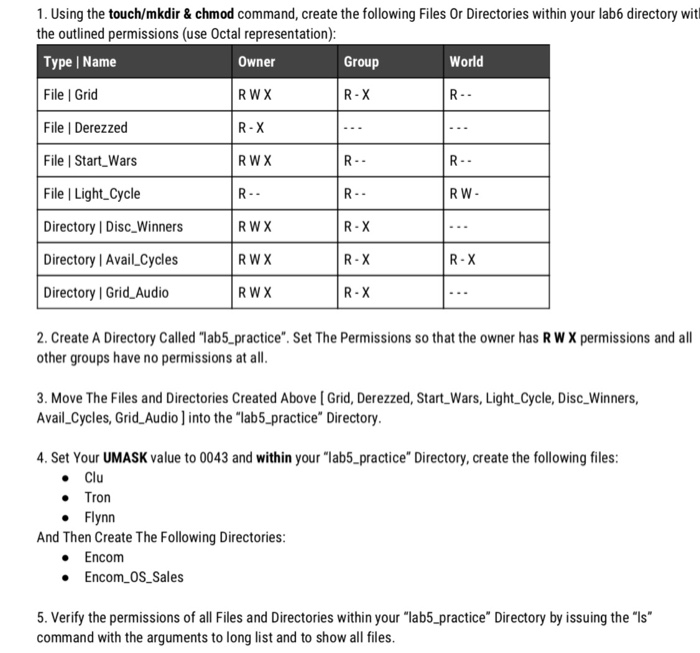
1. Using the touch/mkdir & chmod command, create the following Files Or Directories within your lab6 directory witl Type | Name File | Grid File | Derezzed File | Start_Wars File | Light Cycle Directory I Disc_Winners Directory l Avail Cycles Directory I Grid_Audio the outlined permissions (use Octal representation) Owner RWX R- X RWX Group World R-X R W RWX R- X R-X R- X R W X R-X 2. Create A Directory Called "lab5_practice". Set The Permissions so that the owner has R W X permissions and all other groups have no permissions at all 3. Move The Files and Directories Created Above [Grid, Derezzed, Start_Wars, Light_Cycle, Disc_Winners, Avail Cycles, Grid_Audio ] into the "lab5 practice" Directory 4. Set Your UMASK value to 0043 and within your "lab5_practice" Directory, create the following files Tron Flynn And Then Create The Following Directories Encom Encom OS Sales 5. Verify the permissions of all Files and Directories within your "lab5_practice" Directory by issuing the "ls command with the arguments to long list and to show all files
Step by Step Solution
There are 3 Steps involved in it

Get step-by-step solutions from verified subject matter experts
 Study Help