







Question: 1) Write a JavaFX application called Seven. It has a name label and two buttons: previous and next. Use the buttons to cycle through

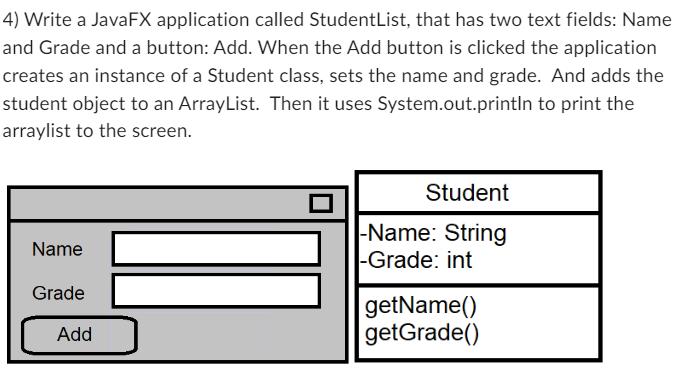
1) Write a JavaFX application called Seven. It has a name label and two buttons: previous and next. Use the buttons to cycle through the seven names: Doc, Happy, Sleepy, Sneezy, Bashful, Grumpy, and Dopey Name Grade Add 4) Write a JavaFX application called StudentList, that has two text fields: Name and Grade and a button: Add. When the Add button is clicked the application creates an instance of a Student class, sets the name and grade. And adds the student object to an ArrayList. Then it uses System.out.println to print the arraylist to the screen. Name Grade Add Student -Name: String -Grade: int getName() getGrade()
Step by Step Solution
3.47 Rating (150 Votes )
There are 3 Steps involved in it
1 import javafxapplicationApplication import javafxsceneScene import javafxscenecontrolButton import javafxscenecontrolLabel import javafxscenelayoutH... View full answer

Get step-by-step solutions from verified subject matter experts
 Study Help