







Question: 1) Write html file with one button Read JSON. When a userclicks the button, an AJAX call will be made to get the JSON file(register
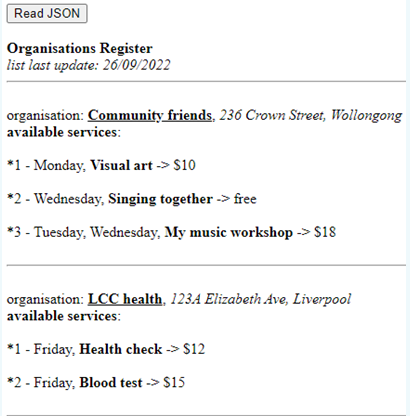
1) Write html file with one button "Read JSON". When a userclicks the button, an AJAX call will be made to get the JSON file(register records) created. Received JSON should be parsed into aJavaScript object and the JavaScript object should be displayed onthe web in the following format:
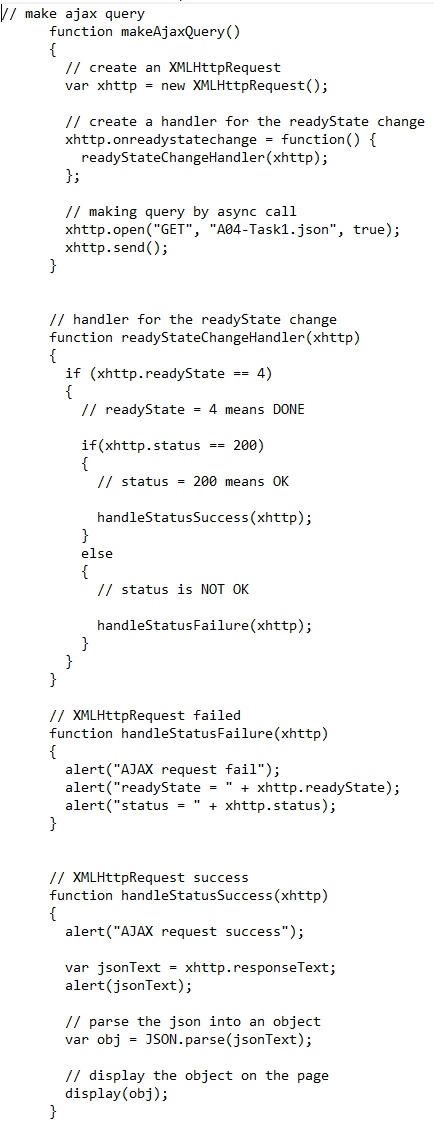
2) Only use the method (see sample below) to make the AJAXcall. Other ajax library is not allowed.
3) Use the below JSON file register records
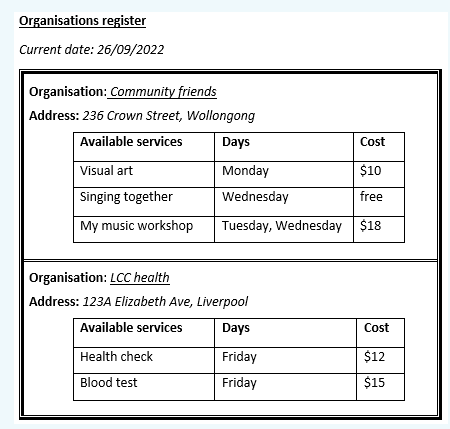
Read JSON Organisations Register list last update: 26/09/2022 organisation: Community friends, 236 Crown Street, Wollongong available services: *1 - Monday, Visual art -> $10 *2- Wednesday, Singing together -> free *3 - Tuesday, Wednesday, My music workshop -> $18 organisation: LCC health, 123A Elizabeth Ave, Liverpool available services: *1 - Friday, Health check -> $12 *2 - Friday, Blood test -> $15 // make ajax query function makeAjaxQuery() { // create an XMLHttpRequest var xhttp = new XMLHttpRequest(); } // create a handler for the readyState change xhttp.onreadystatechange = function() { readyStateChangeHandler (xhttp); // handler for the readyState change function readyStateChangeHandler(xhttp) }; // making query by async call xhttp.open( GET , A04-Task1.json , true); xhttp.send(); { if (xhttp.readyState == 4) { // readyState = 4 means DONE if(xhttp.status == 200) } } { // status = 200 means OK handleStatusSuccess (xhttp); } else { } } // XMLHttpRequest failed function handleStatus Failure (xhttp) { // status is NOT OK handleStatusFailure (xhttp); alert( AJAX request fail ); alert( readyState = + xhttp.readyState); alert( status = + xhttp.status); // XMLHttpRequest success function handleStatusSuccess (xhttp) { alert( AJAX request success ); var jsonText = xhttp.responseText; alert (jsonText); // parse the json into an object var obj = JSON.parse(jsonText); // display the object on the page display(obj); Organisations register Current date: 26/09/2022 Organisation: Community friends Address: 236 Crown Street, Wollongong Available services Days Monday Wednesday Tuesday, Wednesday Visual art Singing together My music workshop Organisation: LCC health Address: 123A Elizabeth Ave, Liverpool Available services Days Friday Friday Health check Blood test Cost $10 free $18 Cost $12 $15
Step by Step Solution
3.42 Rating (155 Votes )
There are 3 Steps involved in it
ANSWER AND STEP BY STEP EXPLANATION Step 1 Create an HTML file and add th... View full answer

Get step-by-step solutions from verified subject matter experts
 Study Help