







Question: 1. Write the SELECT command to display all records in the COURSE table 2. Write the DESC command to show all attribute data types in
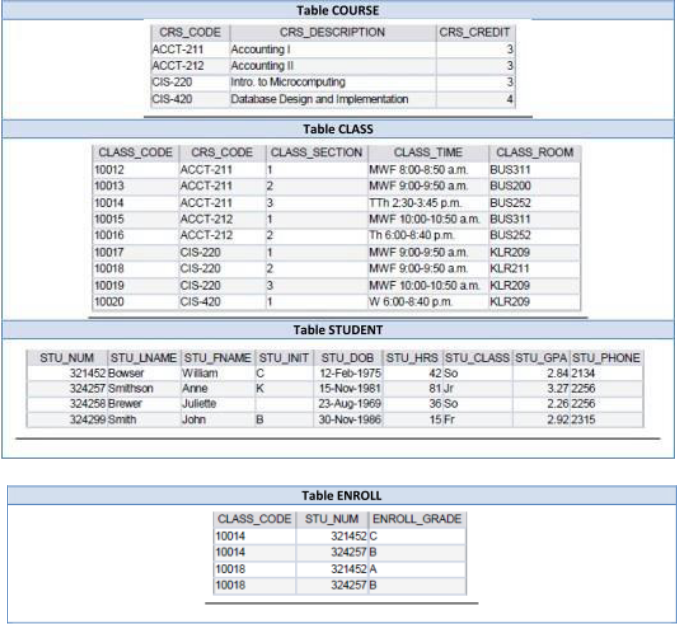
1. Write the SELECT command to display all records in the COURSE table 2. Write the DESC command to show all attribute data types in COURSE table 3. Write the SELECT command to display all records in the CLASS table 4. Write the DESC command to show all attribute data types in CLASS table 5. Write the SELECT command to display all records in the STUDENT table 6. Write the DESC command to show all attribute data types in STUDENT table 7. Write the SELECT command to display all records in the ENROLL table 8. Write the DESC command to show all attribute data types in ENROLL table 9. Write the SELECT command to display all attributes of the record of the student whose STU_NUM is 321452from the STUDENT table 10. Write the SELECT command to display the last name only of students who have a GPA of 2.8 or worse from the STUDENT table 11. Write the SELECT command to display the grades and student number only of those students who have a grade of 'A' from the ENROLL table 12. Write the UPDATE command to change the grade from a C to a B for student 321452 and class code 10014. 13. Write the SELECT command to verify your change for the students whose grade was changed in the previous question. 14. Write the DELETE command to remove the class code 10019 from the CLASS table. 15. Write the SELECT command to verify that the class code was removed in the previous question.
Table COURSE \begin{tabular}{|l|l|l|} \hline CRS_CODE & \multicolumn{1}{|c|}{ CRS_DESCRIPTION } & CRS_CREDIT \\ \hline ACCT-211 & Accourting I & 3 \\ \hline ACCT-212 & Accounting II & 3 \\ \hline CIS-220 & Intro. to MCrocomputing & 3 \\ \hline CIS-420 & Datatase Design and Inplementation & 4 \\ \hline \end{tabular} Table CLASS Table STUDENT Table ENROLL
Step by Step Solution
There are 3 Steps involved in it

Get step-by-step solutions from verified subject matter experts
 Study Help