







Question: in SQL, using MAMP Part 1: Creating Tables Write all SQL in a document first and save it, since you will need to submit each
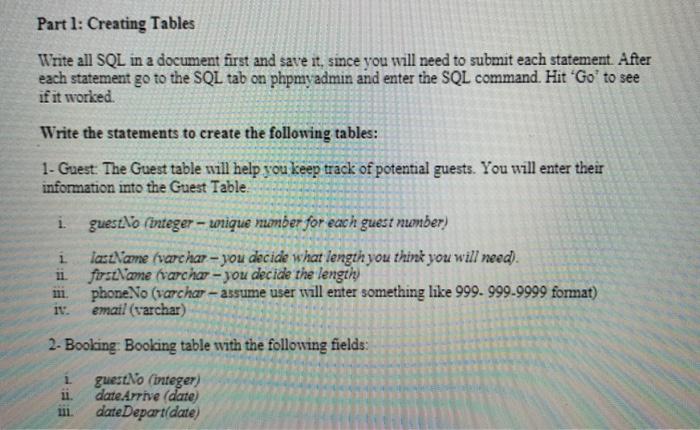
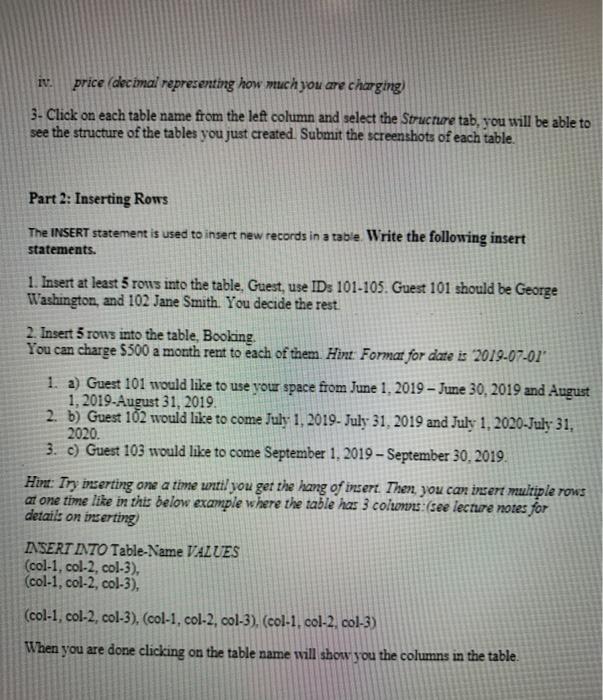
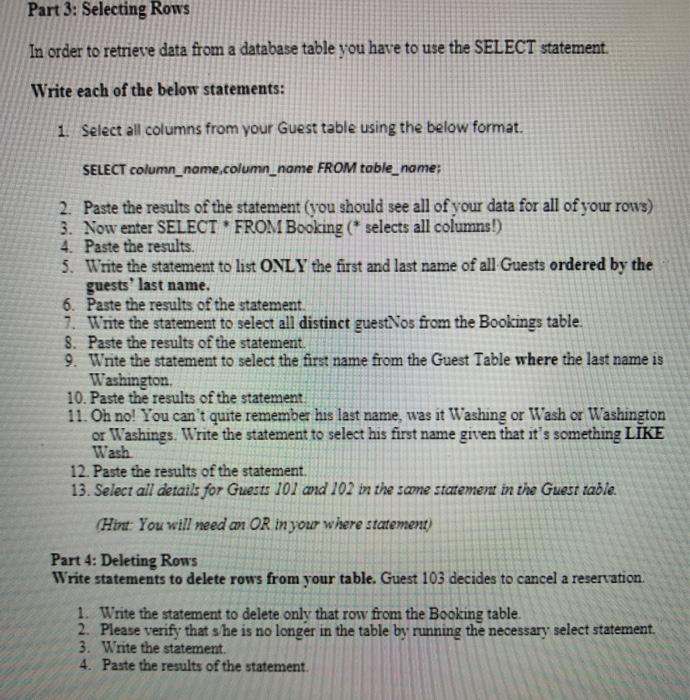
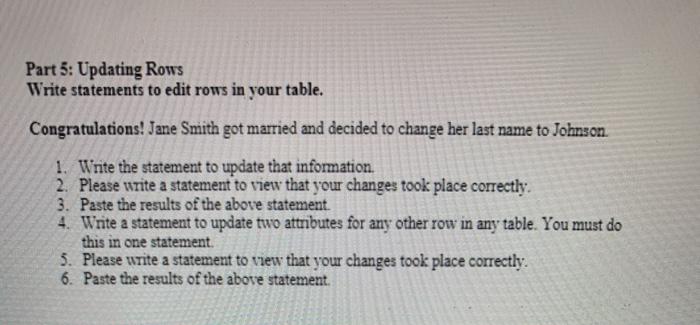
Part 1: Creating Tables Write all SQL in a document first and save it, since you will need to submit each statement. After each statement go to the SQL tab on phpmyadmin and enter the SQL command. Hit 'Go' to see if it worked Write the statements to create the following tables: 1- Guest. The Guest table will help you keep track of potential guests. You will enter their information into the Guest Table 1 i gues.No integer - wrique number for each guest number) ia:Name (varchar - you decide what length you think you will need). forseNcne varcha - you decide the length phoneNo (varchar - assume user will enter something like 999.999.9999 format) email (varchar) 2- Booking: Booking table with the following fields: 1 EF: guest:No (integer) date Arrive (date) date Depart(date) price decimal representing how much you are charging) 3. Click on each table name from the left column and select the Structure tab, you will be able to see the structure of the tables you just created. Submit the screenshots of each table. Part 2: Inserting Rows The INSERT statement is used to insert new records in a table Write the following insert statements. 1. Insert at least 5 rous into the table, Guest, use ID: 101-105. Guest 101 should be George Washington, and 102 Jane Smith. You decide the rest. 2. Insert 5 rows into the table, Booking. You can charge $500 a month rent to each of them. Hint Format for date is 2019-07-01" 1. a) Guest 101 would like to use your space from June 1, 2019 - June 30, 2019 and August 1, 2019-August 31, 2019. 2. b) Guest 102 would like to come July 1, 2019- July 31, 2019 and July 1, 2020-July 31, 2020 3. c) Guest 103 would like to come September 1, 2019 - September 30, 2019. Hint: Try inserting on a time until you get the hang of insert. Then, you can insert multiple rows at one time like in this below example where the table has 3 columns (see lecture notes for details on inserting INSERT INTO Table-Name VALUES (col-1, col-2, col-3), (col-1, col-2 col-3), (col-1, col-2, col-3). (col-1, col-2, col-3), (col-1. col-2 col-3) When you are done clicking on the table name will show you the columns in the table. Part 3: Selecting Rows In order to retrieve data from a database table you have to use the SELECT statement. Write each of the below statements: 1. Select all columns from your Guest table using the below format. SELECT column_name.column_name FROM table_name; 2. Paste the results of the statement (you should see all of your data for all of your rows) 3. Now enter SELECT * FROM Booking (* selects all columns!) 4. Paste the results. 5. Write the statement to list ONLY the first and last name of all Guests ordered by the guests' last name. 6. Paste the results of the statement. 7. Write the statement to select all distinct guest:Nos from the Bookings table. 8. Paste the results of the statement. 9. Write the statement to select the first name from the Guest Table where the last name is Washington 10. Paste the results of the statement 11. Oh no! You can't quite remember his last name, was it Washing or Wash or Washington or Washings. Write the statement to select his first name given that it's something LIKE Wash 12. Paste the results of the statement, 13. Select all details for Guests 101 and 102 in the same statement in the Guest table. (Hint: You will need on OR in your where statement) Part 4: Deleting Rows Write statements to delete rows from your table. Guest 103 decides to cancel a reservation. 1. Write the statement to delete only that row from the Booking table. 2. Please verify that she is no longer in the table by running the necessary select statement. 3. Write the statement. 4. Paste the results of the statement. Part 5: Updating Rows Write statements to edit rows in your table. Congratulations! Jane Smith got married and decided to change her last name to Johnson 1. Write the statement to update that information 2. Please write a statement to view that your changes took place correctly. 3. Paste the results of the above statement. 4. Write a statement to update two attributes for any other row in any table. You must do this in one statement. 5. Please write a statement to view that your changes took place correctly. 6. Paste the results of the above statement
Step by Step Solution
There are 3 Steps involved in it

Get step-by-step solutions from verified subject matter experts
 Study Help