





Question: 11. Given the codes as shown below: (10 marks) noPB is a NO pushbutton and ncPB is a NC pushbutton. Both red LED and yellowLED
11. Given the codes as shown below: (10 marks)

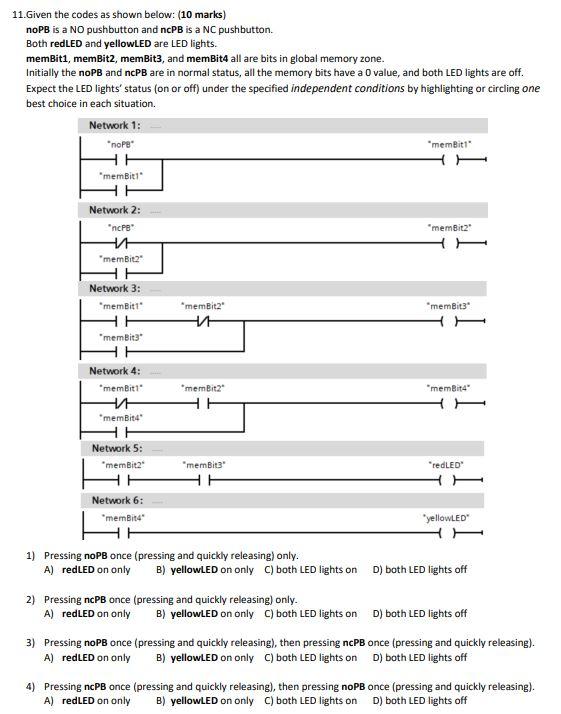
11. Given the codes as shown below: (10 marks) noPB is a NO pushbutton and ncPB is a NC pushbutton. Both red LED and yellowLED are LED lights. memBit1, memBit2, memBit3, and memBit4 all are bits in global memory zone. Initially the noPB and ncPB are in normal status, all the memory bits have a value, and both LED lights are off. Expect the LED lights' status (on or off) under the specified independent conditions by highlighting or circling one best choice in each situation. Network 1: nope memBit1 HH memBit1 HH Network 2: memBit2 ncPB 'memBit2 Network 3: membit memBit3 membit membit3 "memBit4" Network 4: *memBit1 HT memBit4 memBit2 HH Network 5: memBit2 "redLED membit3 HH Network 6: memBite yellowLED 1) Pressing noPB once (pressing and quickly releasing) only. A) redLED on only B) yellowLED on only C) both LED lights on D) both LED lights off 2) Pressing ncPB once (pressing and quickly releasing) only. A) redLED on only B) yellowLED on only C) both LED lights on D) both LED lights off 3) Pressing noPB once (pressing and quickly releasing), then pressing ncPB once (pressing and quickly releasing). A) redLED on only B) yellowLED on only C) both LED lights on D) both LED lights off 4) Pressing ncPB once (pressing and quickly releasing), then pressing noPB once (pressing and quickly releasing). A) redLED on only B) yellowLED on only C) both LED lights on D) both LED lights off

Step by Step Solution

There are 3 Steps involved in it

1 Expert Approved Answer
Step: 1 Unlock blur-text-image

Question Has Been Solved by an Expert!

Get step-by-step solutions from verified subject matter experts

Step: 2 Unlock
Step: 3 Unlock

Students Have Also Explored These Related General Management Questions!