







Question: 1.1 Objective To configure the basic operation of a Layer 2 switch 1.2 Networking and Service Description TOOLS/EQUIPMENT REQUIRED Huawei S3700 Series Switch DESCRIPTION A
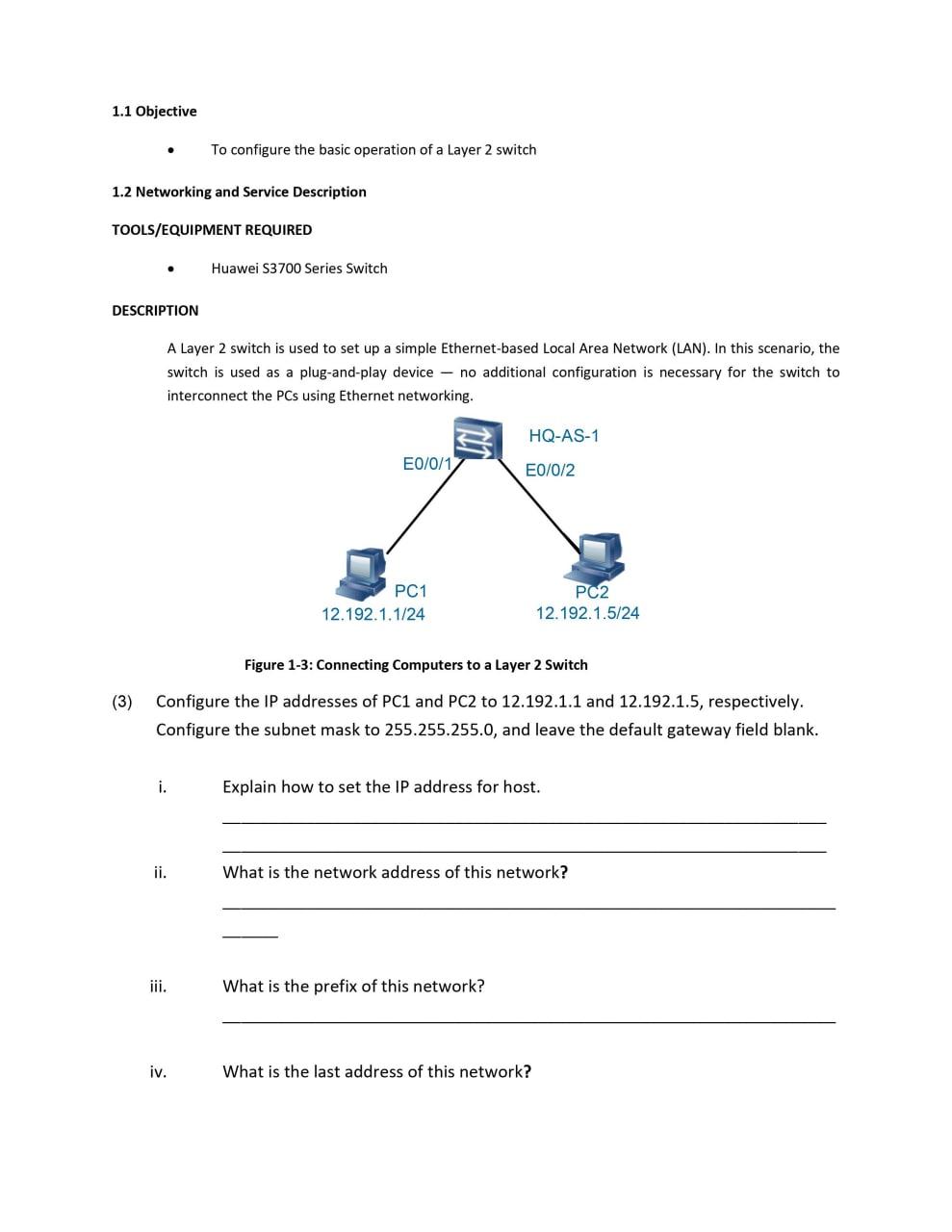
1.1 Objective To configure the basic operation of a Layer 2 switch 1.2 Networking and Service Description TOOLS/EQUIPMENT REQUIRED Huawei S3700 Series Switch DESCRIPTION A Layer 2 switch is used to set up a simple Ethernet-based Local Area Network (LAN). In this scenario, the switch is used as a plug-and-play device no additional configuration is necessary for the switch to interconnect the PCs using Ethernet networking. HQ-AS-1 E0/0/1 E0/0/2 PC1 12.192.1.1/24 PC2 12.192.1.5/24 Figure 1-3: Connecting Computers to a Layer 2 Switch (3) Configure the IP addresses of PC1 and PC2 to 12.192.1.1 and 12.192.1.5, respectively. Configure the subnet mask to 255.255.255.0, and leave the default gateway field blank. i. Explain how to set the IP address for host. ii. What is the network address of this network? What is the prefix of this network? iv. What is the last address of this network
Step by Step Solution
There are 3 Steps involved in it

Get step-by-step solutions from verified subject matter experts
 Study Help