







Question: 13. Which custom number format will display negative values with only a negative sign and a red font color? A. $#,##0_); [Red]-$#,##0 B. -$#,##0;[Red];$#,##0_)
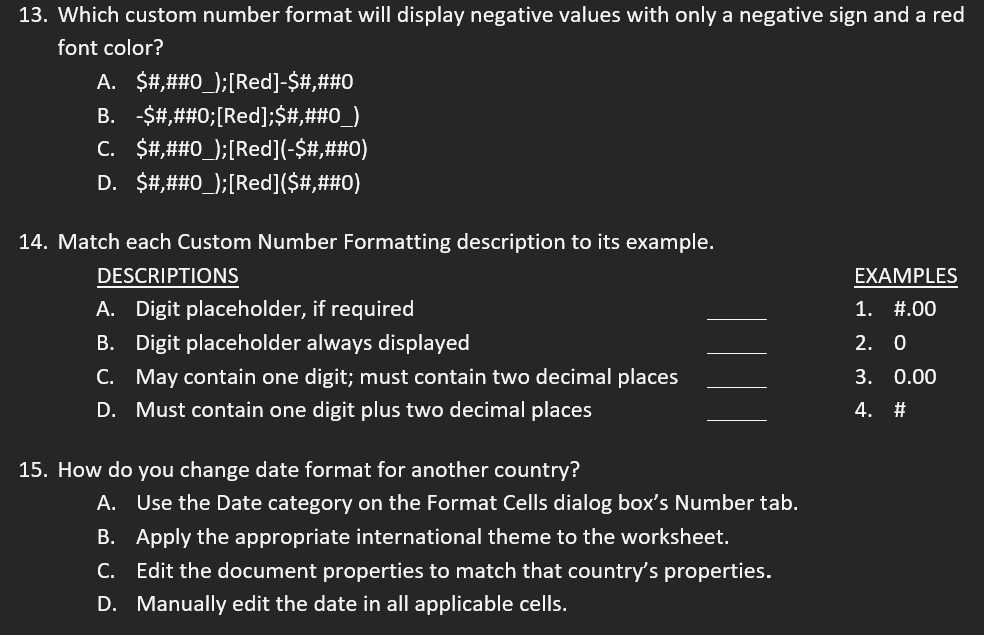
13. Which custom number format will display negative values with only a negative sign and a red font color? A. $#,##0_); [Red]-$#,##0 B. -$#,##0;[Red];$#,##0_) C. $#,##0); [Red](-$#,##0) D. $#,##0_); [Red]($#,##0) 14. Match each Custom Number Formatting description to its example. DESCRIPTIONS A. Digit placeholder, if required B. Digit placeholder always displayed C. May contain one digit; must contain two decimal places D. Must contain one digit plus two decimal places 15. How do you change date format for another country? A. Use the Date category on the Format Cells dialog box's Number tab. B. Apply the appropriate international theme to the worksheet. C. Edit the document properties to match that country's properties. D. Manually edit the date in all applicable cells. EXAMPLES 1. #.00 2. 0 3. 0.00 4. #
Step by Step Solution
There are 3 Steps involved in it

Get step-by-step solutions from verified subject matter experts
 Study Help