







Question: 1.Below is a sample sequence diagram for Adding a user associated to an AddressBook application. Add a user This process is initiated when the user
1.Below is a sample sequence diagram for Adding a user associated to an AddressBook application.
Add a user This process is initiated when the user clicks the "Add" button in the main window. A dialog box appears, with title "New Person", containing fields for the user to fill in the new person's first and last names and other information. The box can be dismissed by clicking either "OK" or "Cancel". If the "OK" button is clicked, a new person is added to the end of the address book, and the person's name is added to the end of the list of names in the main window. If the "Cancel" button is clicked, no changes are made either to the address book or to the main window.
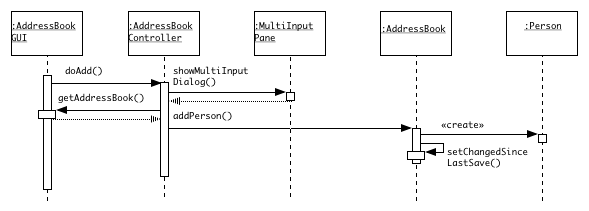
Draw a similar sequence diagram for the following scenario:
The Delete a user use case or scenario is initiated when the user highlights a name in the list of names in the main window and then clicks the "Delete" button. A dialog box appears, asking the user to confirm deleting this particular individual. The box can be dismissed by clicking either "OK" or "Cancel". If the "OK" button is clicked, the entry in the address book for the selected person is deleted, and the person's name is deleted from the list of names in the main window. If the "Cancel" button is clicked, no changes are made either to the address book or to the main window.
Draw a collaboration diagram of the same process described in Exercise 1.
MultiInput AddressBook UI AddressBook ontroller AddressBook Person doAdd) showMultiInput Dialog) getAddressBookb addPerson) create setChangedSince LastSaveO
Step by Step Solution
There are 3 Steps involved in it

Get step-by-step solutions from verified subject matter experts
 Study Help