







Question: 1.const mysql = require('mysql2'); const connection = mysql.createConnection({ host: localhost, user: root, password: Reset2015 }); connection.connect((err)=>{ if
1.const mysql = require('mysql2');
const connection = mysql.createConnection({
host: "localhost",
user: "root",
password: "Reset2015"
});
connection.connect((err)=>{
if (err){
return console.log('error' + err.message);
}
console.log('Connected!!!');
});
connection.end((err)=>{
if (err){
return console.log('error' + err.message);
}
console.log('Closing the database connection');
});
2.Change the name of the database connection object to a shorter name, such as db, for convenience.
3. Creating the Database: To manage a database from within a .js file, you need first to make a string that holds the SQL command and then call the query() method on the database connection object passing to it as a parameter the string that holds the SQL command and a callback function.
a. Declare the string variable sql to hold the SQL command for creating a new database called StudTracking.

b. Pass sql and a call back function to the query() function
c. Save connect1.js and execute it from the command prompt.
d. Check that the new database has been created on the MySQL server. e. If you execute connect1.js again you will receive the following error that indicates that the database already exists. Error: Can't create database 'StudTrack'; database exists
f. To avoid this error, add the clause IF NOT EXISTS to the sql command creating the database. Check the MySQL Cheat sheet for the correct syntax.
4. Creating the Database Table: The code for creating the tables in the database will be written after the code for creating the Database developed in the previous step and before the call to the end().
a. Creating the Student Table: assign the string variable sql to hold the SQL command for creating the student table. Note that for the S-code, it is assumed that the student code will be composed of at most 5 characters provided by the user.

b. Call the query() function again passing to it the SQL command stored in sql and a callback function as before. Note that you might receive the following errors: i. Error: No database selected. (Hint: you need to specify the database used. One solution is to precede the table name with the database name or check the online manual for another solution) ii. Error: Table 'students' already exists. (Hint: the solution is similar to that used for the database above. Check the online manual for syntax) c. Run your script twice to ensure that you handled all errors
d. Create the Course table applying similar steps as before.
e. Create StudentCourse table applying similar steps as before.
f. After correctly executing your code, check the database and the tables on the MySQL server to ensure that you have created all tables correctly including constraints for let sql = "Fill in SQL COMMAND TO CREATEs A DATABASE"; sql = "Fill in SQL COMMAND TO CREATE Student TABLE"; the primary keys and foreign keys. If there are any errors, delete the table that has an error and update the SQL command accordingly. Then run your code again.
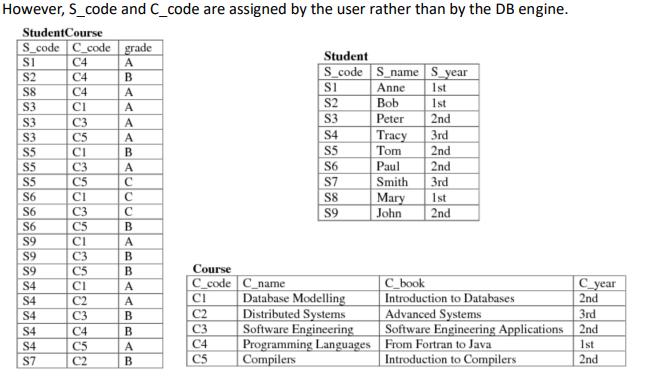
However, S_code and C_code are assigned by the user rather than by the DB engine. StudentCourse S_code C code grade S1 C4 Student A S2 C4 B S_code S_name S year $8 S1 Anne 1st C4 A S3 S2 Bob CI A 1st S3 C3 S3 A Peter 2nd $3 C5 A S4 Tracy 3rd $5 CI B S5 Tom 2nd $5 C3 A S6 Paul 2nd S5 C5 C S7 Smith 3rd $6 CI C S8 Mary 1st S6 C3 C $9 John 2nd S6 C5 B S9 CI A $9 C3 B $9 C5 B Course S4 CI A C_code C_name C_book $4 C2 A CI Database Modelling S4 C3 B C2 Distributed Systems Introduction to Databases Advanced Systems C_year 2nd 3rd S4 S4 S7 C4 B C3 Software Engineering Software Engineering Applications 2nd C5 A C4 Programming Languages From Fortran to Java 1st C2 B C5 Compilers Introduction to Compilers 2nd
Step by Step Solution
There are 3 Steps involved in it

Get step-by-step solutions from verified subject matter experts
 Study Help