







Question: 2 3 . 1 Project 1 : Filtered temperature data Requirements Summary Create a C + + program that first reads the time stamp and
Project: Filtered temperature data
Requirements Summary
Create a C program that first reads the time stamp and temperature data from the input testfile
testilexx and produces a smoothed curve of timestamped temperature data. The result should be
placed in the output files called outputfilexx.
Input Temperature Log Format
The input temperature log format provides a log of recorded times and temperature readings, in which
one reading will be specified per line, using the following format:
: TTT
where
HH:MM represents the time at which the temperature was recorded and is specified in hour format.
The time format used in the file is : through :
TTT represents the recorded temperature reported in Fahrenheit
The time and temperature will be separated by one or more whitespace characters. Each input file
contains several hours worth of temperature readings.
Note: The temperature log may be missing data and may not contain a complete log of temperature
for every minute.
The following is a simple example of the input file format:
Data structure
The following data structure MUST be used for storing data.
struct timetemp
string Eimestamp;
double temperature;
;
You may modify or add other data in the given struct as you see fit.
Temperature Filtering Part : Removing Erroneous Data
Your program should first remove any erroneous temperature readings.
An erroneous temperature reading is defined as a temperature reading that is either more than
degrees above or less than degrees below the temperature recorded in the previous minute.
All erroneous temperature readings should be removed.
For example, given the data above, after Filtering Part it should look as follows observe that :
is removed since is more than degrees of at :
Temperature Filtering Part : Simple LowPass Filter of Consecutive
Samples
As temperature sensor readings may be noisy, we would like to apply a simple lowpass filter to filter
any sequences of consecutive temperature readings. The following defines a simple lowpass filter
that can be used for these purposes:
utput nput
utput utput
nput
Note: After removing the erroneous data, your program should apply a lowpass filter to sequences
of temperature readings for consecutive times. The filter should restart if any gaps in timestamp
are found within the recorded data.
Filtered Output File Format
The filtered output log should be formatted with one entry per line using the following format:
:MM TTTTTTTT
where
HH:MM represents the time at which the temperature was recorded and is specified in hour format.
The time format used in the file is : through :
TTTTTTTT represents the filtered temperature value in Fahrenheit as a floatingpoint value with
decimal digits of precision. Each entry should be separate by a single tab character t t
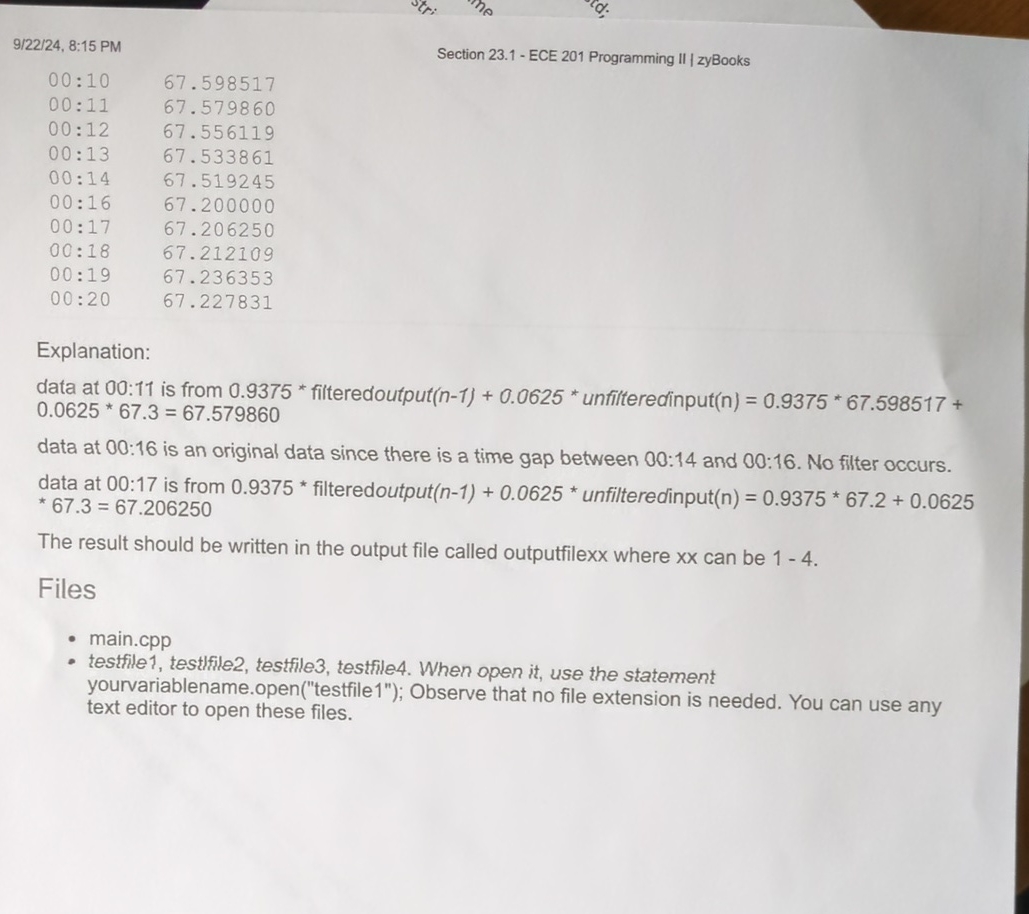
For example, consider the data given in Filtering Part the output is
:
:
:
:
:
:
:
:
:
:
Explanation:
data at : is from filteredoutput unfilteredinput
data at : is an original data since there is a time gap between : and : No filter occurs.
data at : is from filteredoutput unfilteredinput
The result should be written in the output file called outputfilexx where can be
Files
main.cpp
testfile testfile testfile testfile When open it use the statement
yourvariablename.opentestfile; Observe that no file extension is needed. You can use any
text editor to open these files.
Step by Step Solution
There are 3 Steps involved in it
1 Expert Approved Answer
Step: 1 Unlock

Question Has Been Solved by an Expert!
Get step-by-step solutions from verified subject matter experts
Step: 2 Unlock
Step: 3 Unlock
 Study Help