







Question: 2. (a) Create a new file using gedit, Gedit is a text editor similar to notepad which we use in windows, simply type gedit in
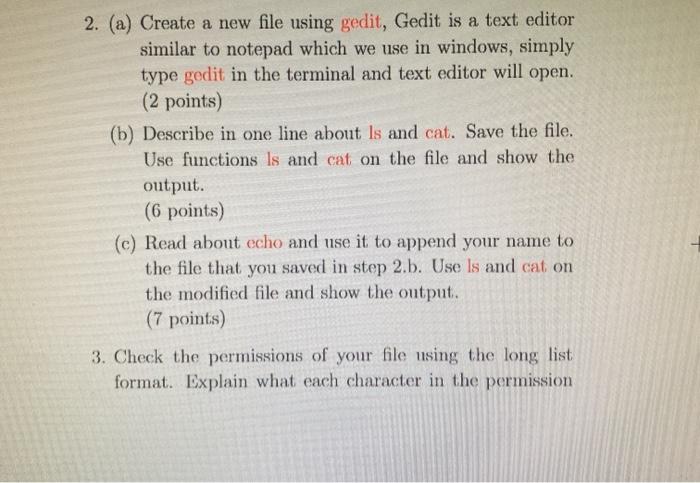
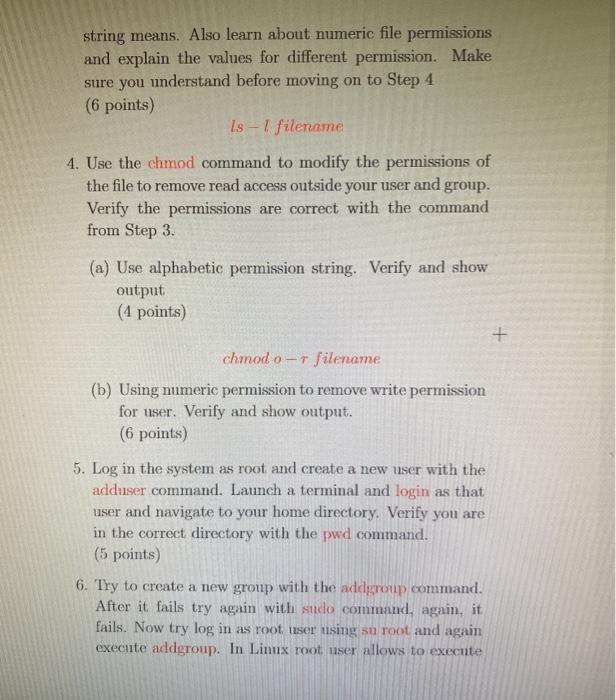
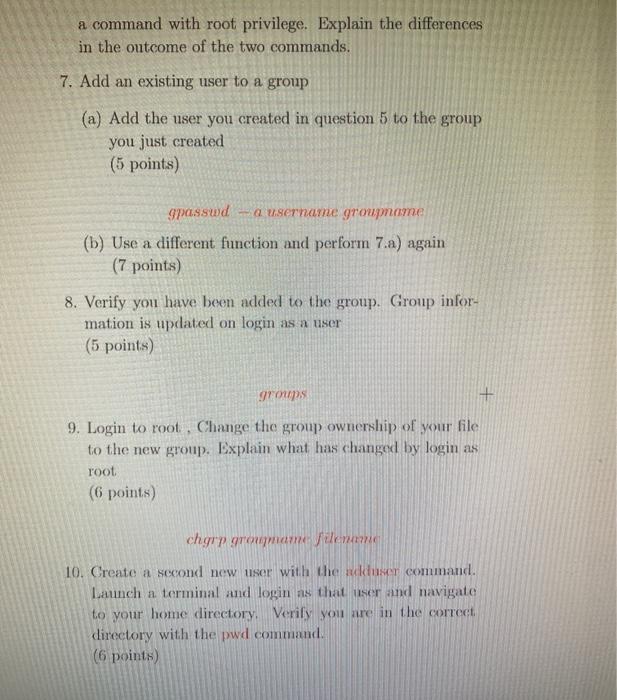
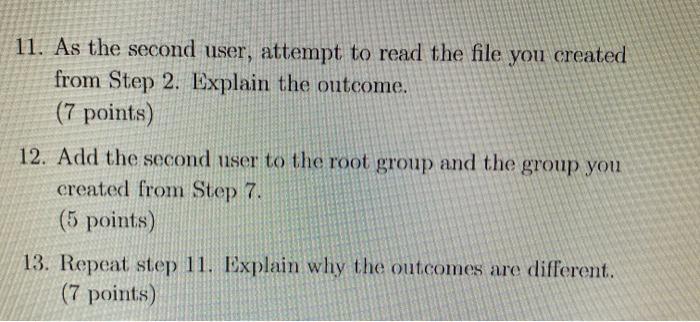
2. (a) Create a new file using gedit, Gedit is a text editor similar to notepad which we use in windows, simply type gedit in the terminal and text editor will open. (2 points) (b) Describe in one line about Is and cat. Save the file. Use functions is and cat on the file and show the output. (6 points) (c) Read about echo and use it to append your name to the file that you saved in step 2.b. Use Is and cat on the modified file and show the output. (7 points) 3. Check the permissions of your file using the long list format. Explain what each character in the permission string means. Also learn about numeric file permissions and explain the values for different permission. Make sure you understand before moving on to Step 4 (6 points) Is - filename 4. Use the chmod command to modify the permissions of the file to remove read access outside your user and group. Verify the permissions are correct with the command from Step 3. (a) Use alphabetic permission string. Verify and show output (4 points) + chmod o- + filename (b) Using numeric permission to remove write permission for user. Verify and show output. (6 points) 5. Log in the system as root and create a new user with the adduser command. Launch a terminal and login as that user and navigate to your home directory. Verify you are in the correct directory with the pwd command. (5 points) 6. Try to create a new group with the addgroup command. After it fails try again with sido command, again, it fails. Now try log in as root user using su root and again execute addgroup. In Linux root nser allows to execute a command with root privilege. Explain the differences in the outcome of the two commands. 7. Add an existing user to a group (a) Add the user you created in question 5 to the group you just created (5 points) gpasswd - a username groupname (b) Use a different function and perform 7.a) again (7 points) 8. Verify you have been added to the group. Group infor- mation is updated on login as a user (5 points) groups 9. Login to root. Change the group ownership of your file to the new group. Explain what has changed by login as root (6 points) chgry grorigami 10. Create a second new user with the user command Launch a terminal and login ns that user and navigate to your home directory. Verily you are in the correct directory with the pwd command. (6 points) 11. As the second user, attempt to read the file you created from Step 2. Explain the outcome. (7 points) 12. Add the second user to the root group and the group you created from Step 7. (5 points) 13. Repeat step 11. Explain why the outcomes are different. (7 points)
Step by Step Solution
There are 3 Steps involved in it

Get step-by-step solutions from verified subject matter experts
 Study Help