







Question: Task 2 - Unclosed Files This task simply demonstrates the importance of closing a file once you have finished using it. Create a new file
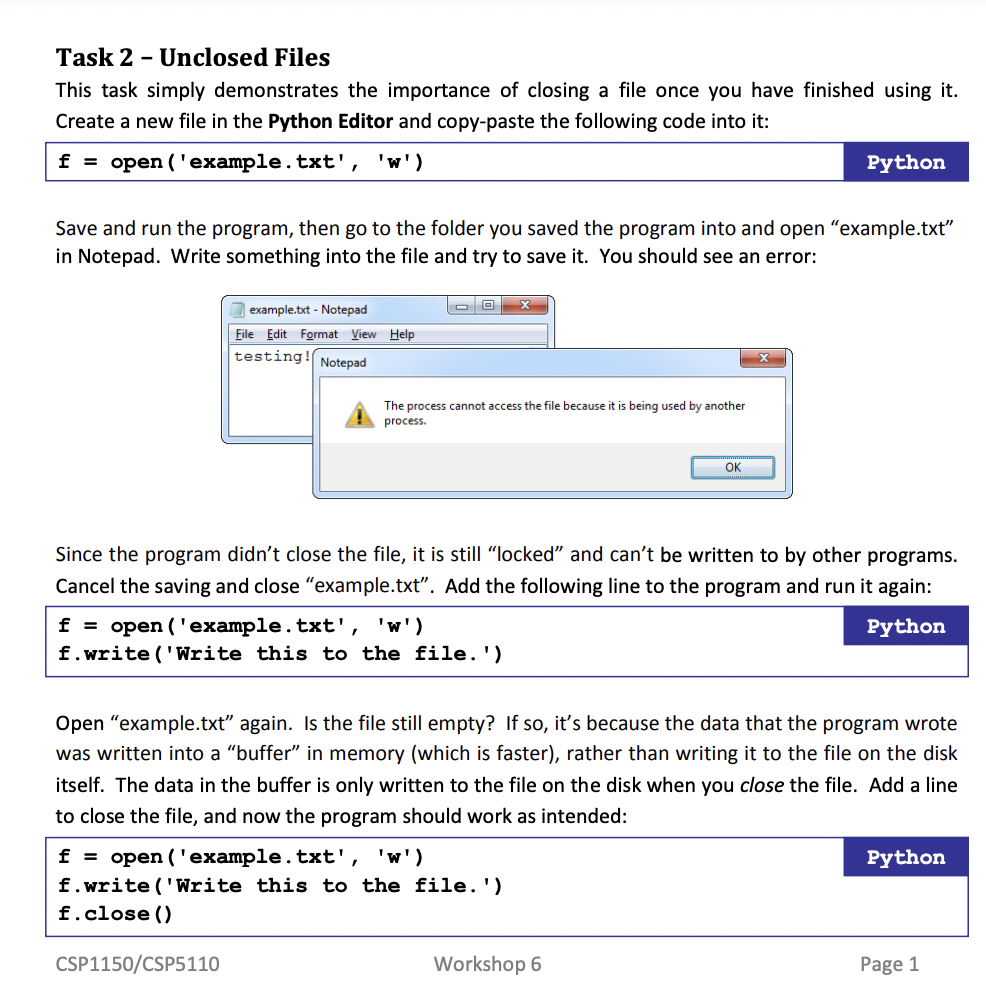
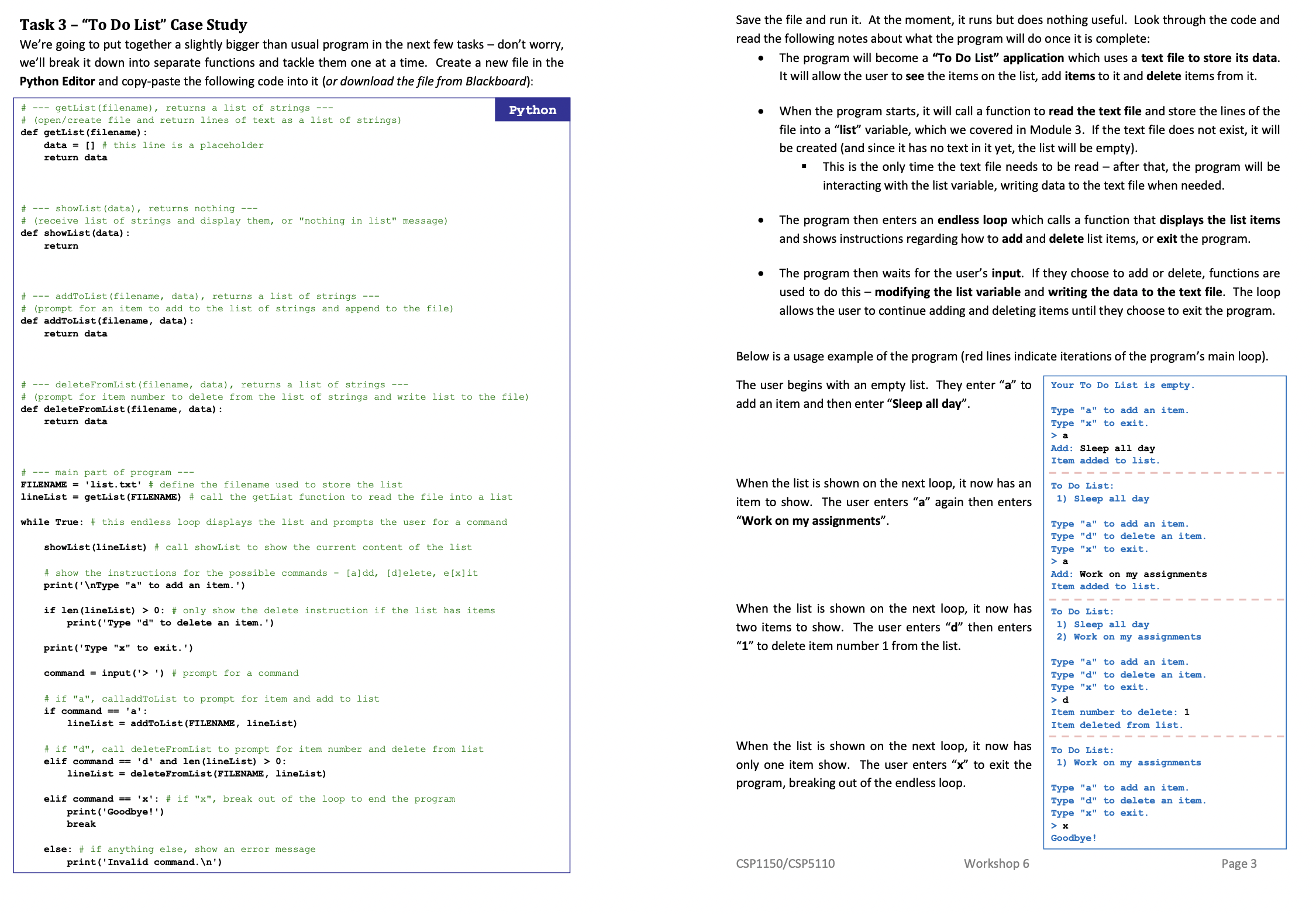
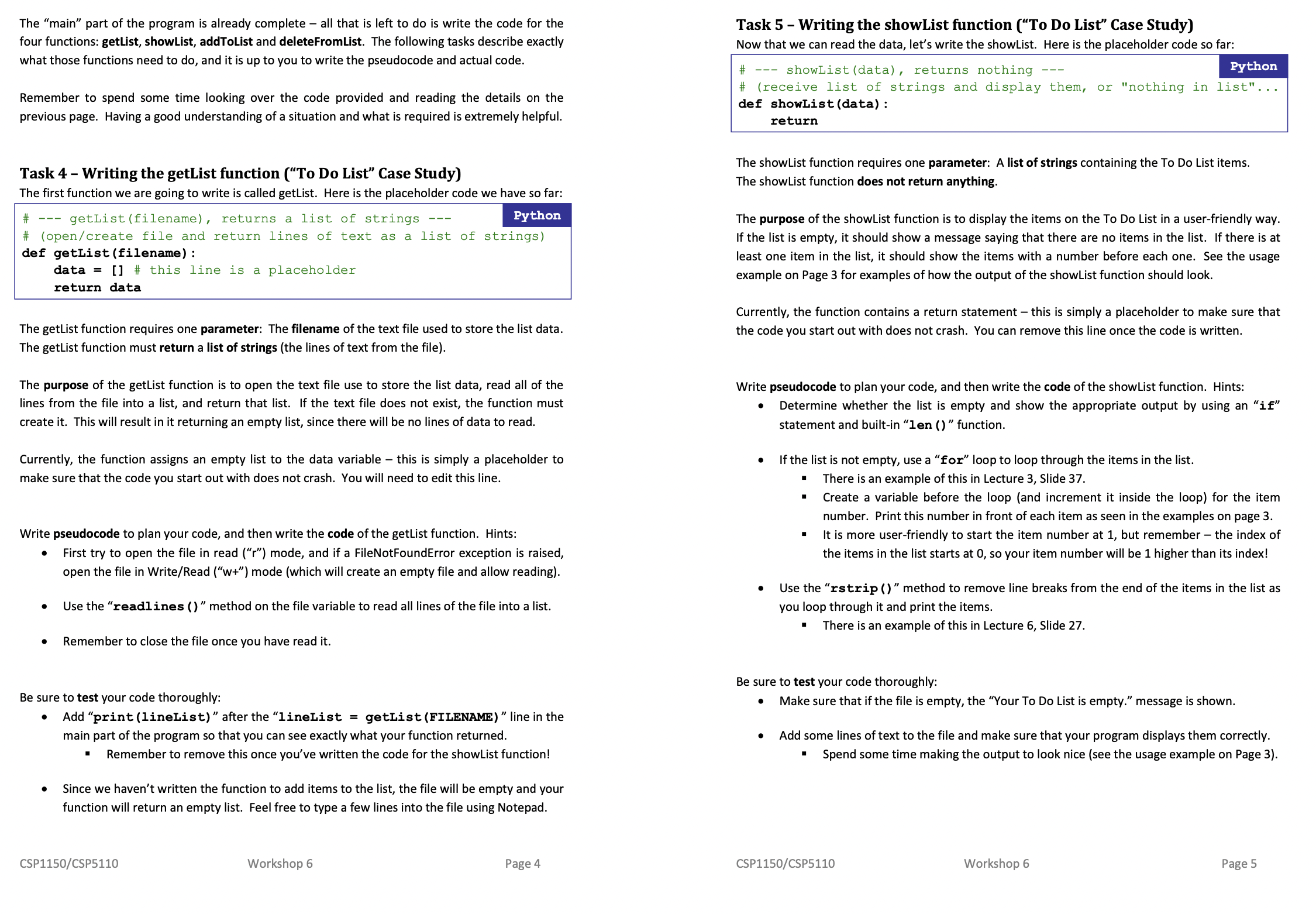
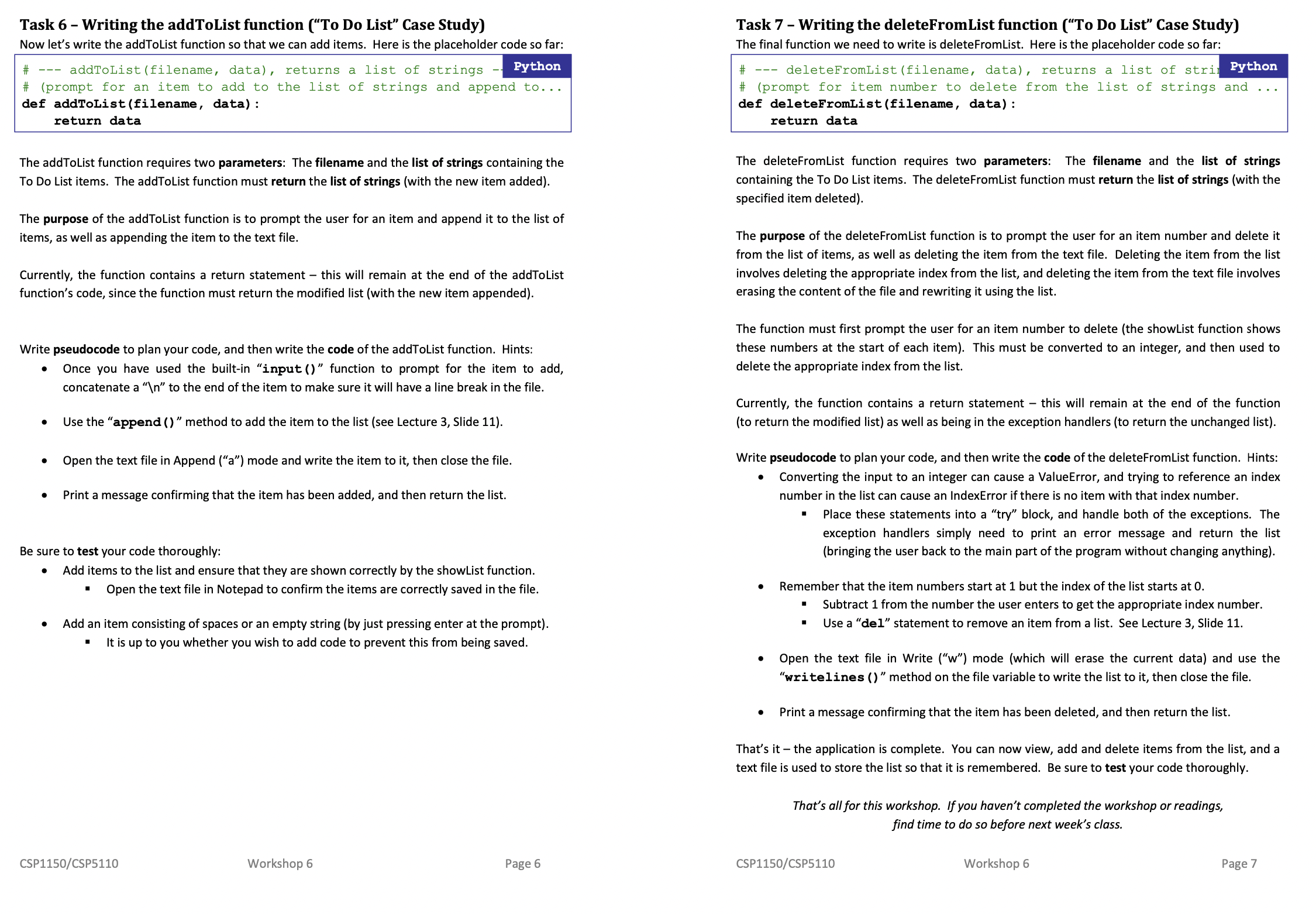
Task 2 - Unclosed Files This task simply demonstrates the importance of closing a file once you have finished using it. Create a new file in the Python Editor and copy-paste the following code into it: f = open ( ' example . txt' , 'w' ) Python Save and run the program, then go to the folder you saved the program into and open "example.txt" in Notepad. Write something into the file and try to save it. You should see an error: example.txt - Notepad -O X File Edit Format View Help testing. Notepad X The process cannot access the file because it is being used by another process. OK Since the program didn't close the file, it is still "locked" and can't be written to by other programs. Cancel the saving and close "example.txt". Add the following line to the program and run it again: f = open ( ' example . txt' , 'w') Python f. write ( 'Write this to the file. ') Open "example.txt" again. Is the file still empty? If so, it's because the data that the program wrote was written into a "buffer" in memory (which is faster), rather than writing it to the file on the disk itself. The data in the buffer is only written to the file on the disk when you close the file. Add a line to close the file, and now the program should work as intended: f = open ( ' example . txt' , 'w' ) Python f. write ( 'Write this to the file. ') f. close () CSP1150/CSP5110 Workshop 6 Page 1Task 3 - "To Do List" Case Study Save the file and run it. At the moment, it runs but does nothing useful. Look through the code and We're going to put together a slightly bigger than usual program in the next few tasks - don't worry, read the following notes about what the program will do once it is complete: we'll break it down into separate functions and tackle them one at a time. Create a new file in the . The program will become a "To Do List" application which uses a text file to store its data. Python Editor and copy-paste the following code into it (or download the file from Blackboard) It will allow the user to see the items on the list, add items to it and delete items from it. --- getList (filename), returns a list of strings --- Python (open/create file and return lines of text as a list of strings) When the program starts, it will call a function to read the text file and store the lines of the def getList (filename) : file into a "list" variable, which we covered in Module 3. If the text file does not exist, it will data = # this line is a placeholder return data be created (and since it has no text in it yet, the list will be empty). This is the only time the text file needs to be read - after that, the program will be interacting with the list variable, writing data to the text file when needed. -- showList (data) , returns nothing --- # (receive list of strings and display them, or "nothing in list" message) The program then enters an endless loop which calls a function that displays the list items lef showList (data) : return and shows instructions regarding how to add and delete list items, or exit the program. The program then waits for the user's input. If they choose to add or delete, functions are addToList (filename, data) , returns a list of strings --- used to do this - modifying the list variable and writing the data to the text file. The loop (prompt for an item to add to the list of strings and append to the file) allows the user to continue adding and deleting items until they choose to exit the program. def addToList (filename, data) : return data Below is a usage example of the program (red lines indicate iterations of the program's main loop). --- deleteFromList (filename, data), returns a list of strings --- The user begins with an empty list. They enter "a" to Your To Do List is empty . (prompt for item number to delete from the list of strings and write list to the file) def deleteFromList (filename, data) : add an item and then enter "Sleep all day". Type "a" to add an item. return data Type "x" to exit. > a Add: Sleep all day Item added to list. -- main part of program --- FILENAME = 'list. txt' # define the filename used to store the list When the list is shown on the next loop, it now has an To Do List: lineList = getList (FILENAME) # call the getList function to read the file into a list tem to show. The user enters "a" again then enters 1) Sleep all day while True: # this endless loop displays the list and prompts the user for a command "Work on my assignments". Type "a" to add an item. Type "d" to delete an item. showList (lineList) # call showList to show the current content of the list Type "x" to exit. > a # show the instructions for the possible commands - [a]dd, [djelete, e[x]it Add: Work on my assignments print ( ' \ Type "a" to add an item. ') Item added to list. if len (lineList) > 0: # only show the delete instruction if the list has items When the list is shown on the next loop, it now has To Do List: print ( 'Type "d" to delete an item. ') two items to show. The user enters "d" then enters 1) Sleep all day 2) Work on my assignments print ( 'Type "x" to exit. ' ) "1" to delete item number 1 from the list. Type "a" to add an item. command = input ('> ' ) # prompt for a command Type "d" to delete an item. Type "x" to exit. # if "a", calladdToList to prompt for item and add to list > d f command = = 'a': Item number to delete: 1 lineList = addToList (FILENAME, lineList) Item deleted from list. # if "d", call deleteFromList to prompt for item number and delete from list When the list is shown on the next loop, it now has To Do List: elif command == 'd' and len (lineList) > 0: only one item show. The user enters "x" to exit the 1) Work on my assignments lineList = deleteFromList (FILENAME, lineList program, breaking out of the endless loop. Type "a" to add an item. elif command == 'x' : # if "x", break out of the loop to end the program Type "d" to delete an item. print ( ' Goodbye! ' ) Type "x" to exit. break > x Goodbye ! else: # if anything else, show an error message print ( ' Invalid command. \ ') CSP1150/CSP5110 Workshop 6 Page 3The "main" part of the program is already complete - all that is left to do is write the code for the Task 5 - Writing the showList function ("To Do List" Case Study) four functions: getList, showList, addToList and deleteFromList. The following tasks describe exactly Now that we can read the data, let's write the showList. Here is the placeholder code so far: what those functions need to do, and it is up to you to write the pseudocode and actual code. --- showList (data) , returns nothing Python # (receive list of strings and display them, or "nothing in list"... Remember to spend some time looking over the code provided and reading the details on the def showList (data) : previous page. Having a good understanding of a situation and what is required is extremely helpful. return Task 4 - Writing the getList function ("To Do List" Case Study) The showList function requires one parameter: A list of strings containing the To Do List items. The showList function does not return anything. The first function we are going to write is called getList. Here is the placeholder code we have so far: # --- getList (filename), returns a list of strings --- Python The purpose of the showList function is to display the items on the To Do List in a user-friendly way. (open/create file and return lines of text as a list of strings If the list is empty, it should show a message saying that there are no items in the list. If there is at def getList (filename) : least one item in the list, it should show the items with a number before each one. See the usage data = # this line is a placeholder example on Page 3 for examples of how the output of the showList function should look. return data Currently, the function contains a return statement - this is simply a placeholder to make sure that The getList function requires one parameter: The filename of the text file used to store the list data. the code you start out with does not crash. You can remove this line once the code is written The getList function must return a list of strings (the lines of text from the file). The purpose of the getList function is to open the text file use to store the list data, read all of the Write pseudocode to plan your code, and then write the code of the showList function. Hints: ines from the file into a list, and return that list. If the text file does not exist, the function must Determine whether the list is empty and show the appropriate output by using an "if" create it. This will result in it returning an empty list, since there will be no lines of data to read. statement and built-in "len () " function. Currently, the function assigns an empty list to the data variable - this is simply a placeholder to If the list is not empty, use a "for" loop to loop through the items in the list. make sure that the code you start out with does not crash. You will need to edit this line. There is an example of this in Lecture 3, Slide 37. Create a variable before the loop (and increment it inside the loop) for the item number. Print this number in front of each item as seen in the examples on page 3. Write pseudocode to plan your code, and then write the code of the getList function. Hints: It is more user-friendly to start the item number at 1, but remember - the index of First try to open the file in read ("r") mode, and if a FileNotFoundError exception is raised, the items in the list starts at 0, so your item number will be 1 higher than its index! open the file in Write/Read ("w+") mode (which will create an empty file and allow reading) Use the "rstrip ()" method to remove line breaks from the end of the items in the list as Use the "readlines ()" method on the file variable to read all lines of the file into a list. you loop through it and print the items. " There is an example of this in Lecture 6, Slide 27. Remember to close the file once you have read it. Be sure to test your code thoroughly: Be sure to test your code thoroughly: Make sure that if the file is empty, the "Your To Do List is empty." message is shown. Add "print (lineList) " after the "lineList = getList (FILENAME) " line in the main part of the program so that you can see exactly what your function returned. Add some lines of text to the file and make sure that your program displays them correctly. Remember to remove this once you've written the code for the showList function! Spend some time making the output to look nice (see the usage example on Page 3). Since we haven't written the function to add items to the list, the file will be empty and your function will return an empty list. Feel free to type a few lines into the file using Notepad. CSP1150/CSP5110 Workshop 6 Page 4 CSP1150/CSP5110 Workshop 6 Page 5Task 6 - Writing the addToList function ("To Do List" Case Study) Task 7 - Writing the deleteFromList function ("To Do List" Case Study) Now let's write the addToList function so that we can add items. Here is the placeholder code so far: The final function we need to write is deleteFromList. Here is the placeholder code so far: --- addToList (filename, data) , returns a list of strings Python deleteFromList (filename, data) , returns a list of stri Python # (prompt for an item to add to the list of strings and append to . . . # (prompt for item number to delete from the list of strings and .. . def addToList (filename, data) : def deleteFromList (filename, data) : return data return data The addToList function requires two parameters: The filename and the list of strings containing the The deleteFromList function requires two parameters: The filename and the list of strings To Do List items. The addToList function must return the list of strings (with the new item added). containing the To Do List items. The deleteFromList function must return the list of strings (with the specified item deleted). The purpose of the addToList function is to prompt the user for an item and append it to the list of items, as well as appending the item to the text file. The purpose of the deleteFromList function is to prompt the user for an item number and delete it from the list of items, as well as deleting the item from the text file. Deleting the item from the list Currently, the function contains a return statement - this will remain at the end of the addToList involves deleting the appropriate index from the list, and deleting the item from the text file involves function's code, since the function must return the modified list (with the new item appended). erasing the content of the file and rewriting it using the list. The function must first prompt the user for an item number to delete (the showList function shows Write pseudocode to plan your code, and then write the code of the addToList function. Hints: these numbers at the start of each item). This must be converted to an integer, and then used to Once you have used the built-in "input ()" function to prompt for the item to add, delete the appropriate index from the list. concatenate a "\ " to the end of the item to make sure it will have a line break in the file. Currently, the function contains a return statement - this will remain at the end of the function Use the "append () " method to add the item to the list (see Lecture 3, Slide 11). (to return the modified list) as well as being in the exception handlers (to return the unchanged list). Open the text file in Append ("a") mode and write the item to it, then close the file. Write pseudocode to plan your code, and then write the code of the deleteFromList function. Hints: Converting the input to an integer can cause a ValueError, and trying to reference an index Print a message confirming that the item has been added, and then return the list. number in the list can cause an IndexError if there is no item with that index number. " Place these statements into a "try" block, and handle both of the exceptions. The exception handlers simply need to print an error message and return the list Be sure to test your code thoroughly: (bringing the user back to the main part of the program without changing anything). . Add items to the list and ensure that they are shown correctly by the showList function. Open the text file in Notepad to confirm the items are correctly saved in the file. Remember that the item numbers start at 1 but the index of the list starts at 0. Subtract 1 from the number the user enters to get the appropriate index number. Add an item consisting of spaces or an empty string (by just pressing enter at the prompt). Use a "del" statement to remove an item from a list. See Lecture 3, Slide 11 It is up to you whether you wish to add code to prevent this from being saved Open the text file in Write ("w") mode (which will erase the current data) and use the "writelines ()" method on the file variable to write the list to it, then close the file. Print a message confirming that the item has been deleted, and then return the list. That's it - the application is complete. You can now view, add and delete items from the list, and a text file is used to store the list so that it is remembered. Be sure to test your code thoroughly. That's all for this workshop. If you haven't completed the workshop or readings, find time to do so before next week's class. CSP1150/CSP5110 Workshop 6 Page 6 CSP1150/CSP5110 Workshop 6 Page 7
Step by Step Solution
There are 3 Steps involved in it

Get step-by-step solutions from verified subject matter experts
 Study Help