







Question: 2 Assignment Specification This assignment is to parse Tiny programs using JavaCUP. You need to write a JavaCUP file and a JLex file so that
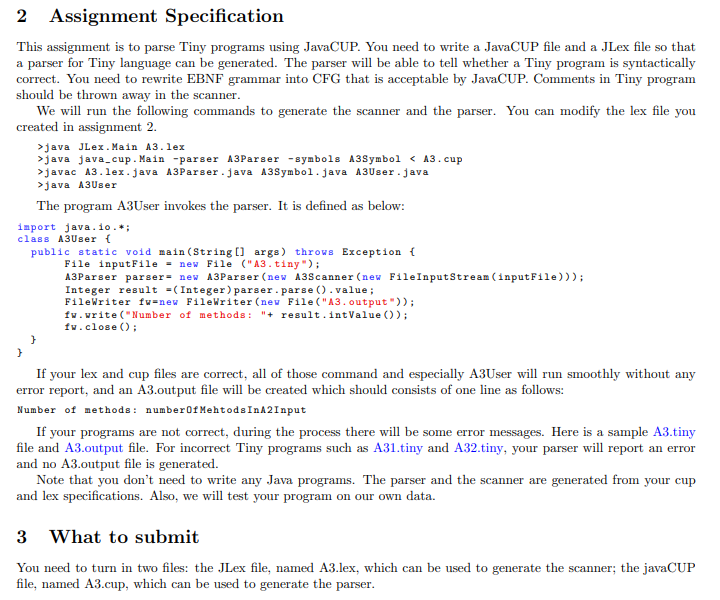
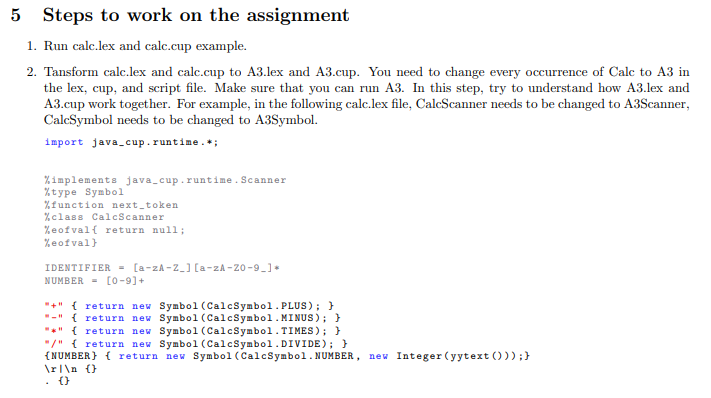
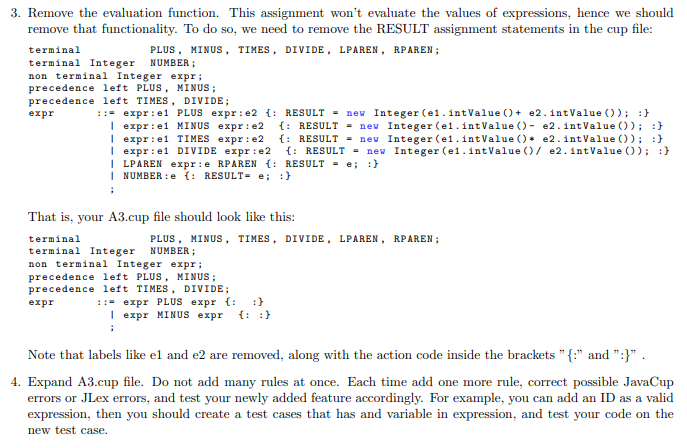
2 Assignment Specification This assignment is to parse Tiny programs using JavaCUP. You need to write a JavaCUP file and a JLex file so that a parser for Tiny language can be generated. The parser will be able to tell whether a Tiny program is syntactically correct. You need to rewrite EBNF grammar into CFG that is acceptable by JavaCUP. Comments in Tiny program should be thrown away in the scanner. We will run the following commands to generate the scanner and the parser. You can modify the lex file you created in assignment 2. >java JLex. Main A3. lex >java java_cup.Main -parser A3Parser -symbols A3Symbol javac A3.lex.java A3Parser.java A3Symbol.java A3User.java >java A3User The program A3User invokes the parser. It is defined as below: import java.io.*; class A3User { public static void main(String[] args) throws Exception { File inputFile = new File ("A3.tiny"); A3Parser parser= new A3Parser(new A3Scanner(new FileInputStream(inputFile))); Integer result = (Integer) parser.parse().value; FileWriter fu=new FileWriter (new File("A3. output")); fv.write("Number of methods : "+ result intValue()); fw.close(); } } If your lex and cup files are correct, all of those command and especially A3User will run smoothly without any error report, and an A3.output file will be created which should consists of one line as follows: Number of methods: number Of Mehtods InA2 Input If your programs are not correct, during the process there will be some error messages. Here is a sample A3.tiny file and A3.output file. For incorrect Tiny programs such as A31.tiny and A32.tiny, your parser will report an error and no A3.output file is generated. Note that you don't need to write any Java programs. The parser and the scanner are generated from your cup and lex specifications. Also, we will test your program on our own data. 3 What to submit You need to turn in two files: the JLex file, named A3.lex, which can be used to generate the scanner; the javaCUP file, named A3.cup, which can be used to generate the parser. 5 Steps to work on the assignment 1. Run calc.lex and calc.cup example. 2. Tansform calc.lex and calc.cup to A3.lex and A3.cup. You need to change every occurrence of Calc to A3 in the lex, cup, and script file. Make sure that you can run A3. In this step, try to understand how A3.lex and A3.cup work together. For example, in the following calc.lex file, CalcScanner needs to be changed to A3Scanner, CalcSymbol needs to be changed to A3Symbol. import java_cup.runtime.*; %implements java_cup.runtime. Scanner %type Symbol %function next_token %class CalcScanner %eofval{ return null; %eofval) IDENTIFIER = [a-zA-Z_) [a-zA-Z0-9_]* NUMBER = [0-9]+ "+" { return new Symbol (CalcSymbol.PLUS); } "-" { return new Symbol (CalcSymbol.MINUS); } "*" { return new Symbol (CalcSymbol.TIMES); } "/" { return new Symbol (CalcSymbol.DIVIDE); } {NUMBER} { return new Symbol (CalcSymbol. NUMBER, new Integer (yytext())); } () 3. Remove the evaluation function. This assignment won't evaluate the values of expressions, hence we should remove that functionality. To do so, we need to remove the RESULT assignment statements in the cup file: terminal PLUS, MINUS, TIMES, DIVIDE, LPAREN, RPAREN ; terminal Integer NUMBER: non terminal Integer expr; precedence left PLUS, MINUS ; precedence left TIMES, DIVIDE; expr ::= expr:e1 PLUS expr:e2 {: RESULT = new Integer (el.intValue() + e2.intValue()); } | expr:e1 MINUS expr:e2 { : RESULT = new Integer (e. int Value () - e2.intValue()); } | expr:e1 TIMES expr:e2 {: RESULT = new Integer (el.int Value ()* e2.intValue()); } | expr:e1 DIVIDE expr:e2 {: RESULT = new Integer (el.int Value (e2.intValue()); } | LPAREN expr:e RPAREN {: RESULT = e; :} | NUMBER: e {: RESULT- e; } : That is, your A3.cup file should look like this: terminal PLUS, MINUS, TIMES, DIVIDE, LPAREN, RPAREN; terminal Integer NUMBER: non terminal Integer expr; precedence left PLUS, MINUS; precedence left TIMES, DIVIDE; expr ::= expr PLUS expr {: | expr MINUS expr : Note that labels like el and e2 are removed, along with the action code inside the brackets" {:" and ":}" 4. Expand A3.cup file. Do not add many rules at once. Each time add one more rule, correct possible JavaCup errors or JLex errors, and test your newly added feature accordingly. For example, you can add an ID as a valid expression, then you should create a test cases that has and variable in expression, and test your code on the new test case. 2 Assignment Specification This assignment is to parse Tiny programs using JavaCUP. You need to write a JavaCUP file and a JLex file so that a parser for Tiny language can be generated. The parser will be able to tell whether a Tiny program is syntactically correct. You need to rewrite EBNF grammar into CFG that is acceptable by JavaCUP. Comments in Tiny program should be thrown away in the scanner. We will run the following commands to generate the scanner and the parser. You can modify the lex file you created in assignment 2. >java JLex. Main A3. lex >java java_cup.Main -parser A3Parser -symbols A3Symbol javac A3.lex.java A3Parser.java A3Symbol.java A3User.java >java A3User The program A3User invokes the parser. It is defined as below: import java.io.*; class A3User { public static void main(String[] args) throws Exception { File inputFile = new File ("A3.tiny"); A3Parser parser= new A3Parser(new A3Scanner(new FileInputStream(inputFile))); Integer result = (Integer) parser.parse().value; FileWriter fu=new FileWriter (new File("A3. output")); fv.write("Number of methods : "+ result intValue()); fw.close(); } } If your lex and cup files are correct, all of those command and especially A3User will run smoothly without any error report, and an A3.output file will be created which should consists of one line as follows: Number of methods: number Of Mehtods InA2 Input If your programs are not correct, during the process there will be some error messages. Here is a sample A3.tiny file and A3.output file. For incorrect Tiny programs such as A31.tiny and A32.tiny, your parser will report an error and no A3.output file is generated. Note that you don't need to write any Java programs. The parser and the scanner are generated from your cup and lex specifications. Also, we will test your program on our own data. 3 What to submit You need to turn in two files: the JLex file, named A3.lex, which can be used to generate the scanner; the javaCUP file, named A3.cup, which can be used to generate the parser. 5 Steps to work on the assignment 1. Run calc.lex and calc.cup example. 2. Tansform calc.lex and calc.cup to A3.lex and A3.cup. You need to change every occurrence of Calc to A3 in the lex, cup, and script file. Make sure that you can run A3. In this step, try to understand how A3.lex and A3.cup work together. For example, in the following calc.lex file, CalcScanner needs to be changed to A3Scanner, CalcSymbol needs to be changed to A3Symbol. import java_cup.runtime.*; %implements java_cup.runtime. Scanner %type Symbol %function next_token %class CalcScanner %eofval{ return null; %eofval) IDENTIFIER = [a-zA-Z_) [a-zA-Z0-9_]* NUMBER = [0-9]+ "+" { return new Symbol (CalcSymbol.PLUS); } "-" { return new Symbol (CalcSymbol.MINUS); } "*" { return new Symbol (CalcSymbol.TIMES); } "/" { return new Symbol (CalcSymbol.DIVIDE); } {NUMBER} { return new Symbol (CalcSymbol. NUMBER, new Integer (yytext())); } () 3. Remove the evaluation function. This assignment won't evaluate the values of expressions, hence we should remove that functionality. To do so, we need to remove the RESULT assignment statements in the cup file: terminal PLUS, MINUS, TIMES, DIVIDE, LPAREN, RPAREN ; terminal Integer NUMBER: non terminal Integer expr; precedence left PLUS, MINUS ; precedence left TIMES, DIVIDE; expr ::= expr:e1 PLUS expr:e2 {: RESULT = new Integer (el.intValue() + e2.intValue()); } | expr:e1 MINUS expr:e2 { : RESULT = new Integer (e. int Value () - e2.intValue()); } | expr:e1 TIMES expr:e2 {: RESULT = new Integer (el.int Value ()* e2.intValue()); } | expr:e1 DIVIDE expr:e2 {: RESULT = new Integer (el.int Value (e2.intValue()); } | LPAREN expr:e RPAREN {: RESULT = e; :} | NUMBER: e {: RESULT- e; } : That is, your A3.cup file should look like this: terminal PLUS, MINUS, TIMES, DIVIDE, LPAREN, RPAREN; terminal Integer NUMBER: non terminal Integer expr; precedence left PLUS, MINUS; precedence left TIMES, DIVIDE; expr ::= expr PLUS expr {: | expr MINUS expr : Note that labels like el and e2 are removed, along with the action code inside the brackets" {:" and ":}" 4. Expand A3.cup file. Do not add many rules at once. Each time add one more rule, correct possible JavaCup errors or JLex errors, and test your newly added feature accordingly. For example, you can add an ID as a valid expression, then you should create a test cases that has and variable in expression, and test your code on the new test case
Step by Step Solution
There are 3 Steps involved in it

Get step-by-step solutions from verified subject matter experts
 Study Help