Question: 3.2 Assignment Specification The task is to write a JLex specification for Tiny language. Please note that in this assignment we don't need to use
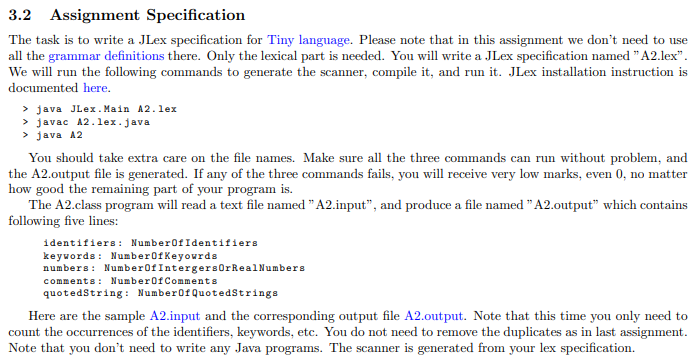
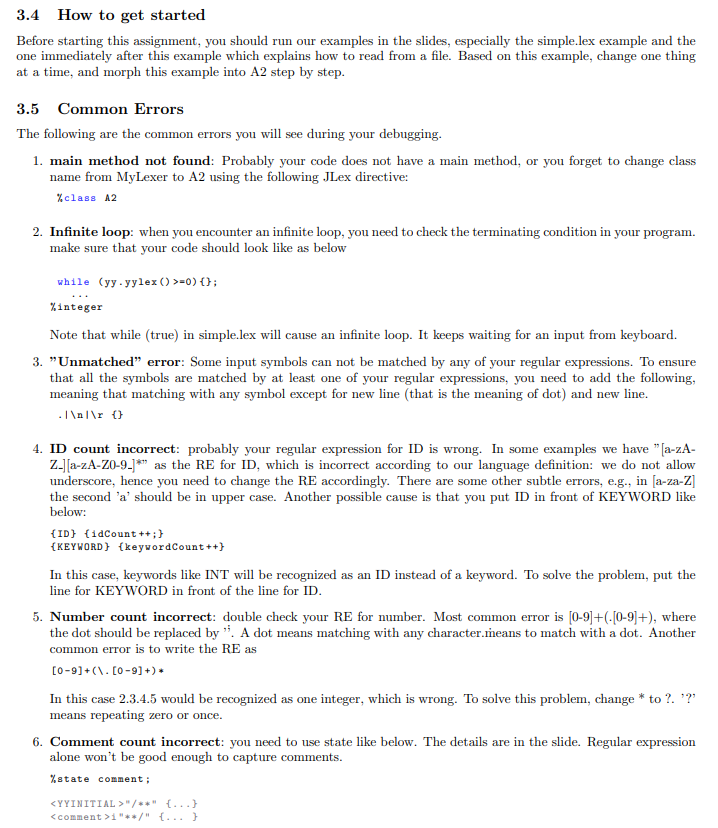
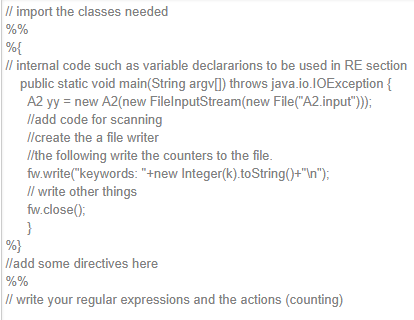
3.2 Assignment Specification The task is to write a JLex specification for Tiny language. Please note that in this assignment we don't need to use all the grammar definitions there. Only the lexical part is needed. You will write a JLex specification named "A2.lex. We will run the following commands to generate the scanner, compile it, and run it. JLex installation instruction is documented here. > java JLex.Main A2. lex > javac A2.lex.java > java A2 You should take extra care on the file names. Make sure all the three commands can run without problem, and the A2.output file is generated. If any of the three commands fails, you will receive very low marks, even 0, no matter how good the remaining part of your program is. The A2.class program will read a text file named "A2.input, and produce a file named "A2.output" which contains following five lines: identifiers: Number of Identifiers keywords : NumberOfKeyourds numbers: NumberOf IntergersOrRealNumbers comments: Number of Comments quotedString: Number of QuotedStrings Here are the sample A2.input and the corresponding output file A2.output. Note that this time you only need to count the occurrences of the identifiers, keywords, etc. You do not need to remove the duplicates as in last assignment. Note that you don't need to write any Java programs. The scanner is generated from your lex specification. 3.4 How to get started Before starting this assignment, you should run our examples in the slides, especially the simple.lex example and the one immediately after this example which explains how to read from a file. Based on this example, change one thing at a time, and morph this example into A2 step by step. 3.5 Common Errors The following are the common errors you will see during your debugging. 1. main method not found: Probably your code does not have a main method, or you forget to change class name from MyLexer to A2 using the following JLex directive: %class A2 2. Infinite loop: when you encounter an infinite loop, you need to check the terminating condition in your program. make sure that your code should look like as below while (yy yylex () >=0)(); %integer Note that while (true) in simple.lex will cause an infinite loop. It keeps waiting for an input from keyboard. 3. "Unmatched" error: Some input symbols can not be matched by any of your regular expressions. To ensure that all the symbols are matched by at least one of your regular expressions, you need to add the following, meaning that matching with any symbol except for new line (that is the meaning of dot) and new line. .I () 4. ID count incorrect: probably your regular expression for ID is wrong. In some examples we have " [a-zA- Z.) [a-zA-Z0-9-1*" as the RE for ID, which is incorrect according to our language definition: we do not allow underscore, hence you need to change the RE accordingly. There are some other subtle errors, e.g., in [a-za-Z] the second 'a' should be in upper case. Another possible cause is that you put ID in front of KEYWORD like below: {ID} {idCount++; } {KEYWORD} {keywordCount++} In this case, keywords like INT will be recognized as an ID instead of a keyword. To solve the problem, put the line for KEYWORD in front of the line for ID. 5. Number count incorrect: double check your RE for number. Most common error is [0-9]+(.[0-9]+), where the dot should be replaced by ". A dot means matching with any character.means to match with a dot. Another common error is to write the RE as [0-9]+(\.[0-9]+). In this case 2.3.4.5 would be recognized as one integer, which is wrong. To solve this problem, change * to ?. ??? means repeating zero or once. 6. Comment count incorrect: you need to use state like below. The details are in the slide. Regular expression alone won't be good enough to capture comments. %state comment; /**" {...} i"**/" {...} // import the classes needed %% %{ // internal code such as variable declararions to be used in RE section public static void main(String argv[l) throws java.io.IOException { A2 yy = new A2(new FileInputStream(new File("A2.input"))); lladd code for scanning Il create the a file writer l/the following write the counters to the file. fw.write("keywords: "+new Integer(k).toString(+" "); // write other things fw.close(); } %} lladd some directives here %% // write your regular expressions and the actions (counting) 3.2 Assignment Specification The task is to write a JLex specification for Tiny language. Please note that in this assignment we don't need to use all the grammar definitions there. Only the lexical part is needed. You will write a JLex specification named "A2.lex. We will run the following commands to generate the scanner, compile it, and run it. JLex installation instruction is documented here. > java JLex.Main A2. lex > javac A2.lex.java > java A2 You should take extra care on the file names. Make sure all the three commands can run without problem, and the A2.output file is generated. If any of the three commands fails, you will receive very low marks, even 0, no matter how good the remaining part of your program is. The A2.class program will read a text file named "A2.input, and produce a file named "A2.output" which contains following five lines: identifiers: Number of Identifiers keywords : NumberOfKeyourds numbers: NumberOf IntergersOrRealNumbers comments: Number of Comments quotedString: Number of QuotedStrings Here are the sample A2.input and the corresponding output file A2.output. Note that this time you only need to count the occurrences of the identifiers, keywords, etc. You do not need to remove the duplicates as in last assignment. Note that you don't need to write any Java programs. The scanner is generated from your lex specification. 3.4 How to get started Before starting this assignment, you should run our examples in the slides, especially the simple.lex example and the one immediately after this example which explains how to read from a file. Based on this example, change one thing at a time, and morph this example into A2 step by step. 3.5 Common Errors The following are the common errors you will see during your debugging. 1. main method not found: Probably your code does not have a main method, or you forget to change class name from MyLexer to A2 using the following JLex directive: %class A2 2. Infinite loop: when you encounter an infinite loop, you need to check the terminating condition in your program. make sure that your code should look like as below while (yy yylex () >=0)(); %integer Note that while (true) in simple.lex will cause an infinite loop. It keeps waiting for an input from keyboard. 3. "Unmatched" error: Some input symbols can not be matched by any of your regular expressions. To ensure that all the symbols are matched by at least one of your regular expressions, you need to add the following, meaning that matching with any symbol except for new line (that is the meaning of dot) and new line. .I () 4. ID count incorrect: probably your regular expression for ID is wrong. In some examples we have " [a-zA- Z.) [a-zA-Z0-9-1*" as the RE for ID, which is incorrect according to our language definition: we do not allow underscore, hence you need to change the RE accordingly. There are some other subtle errors, e.g., in [a-za-Z] the second 'a' should be in upper case. Another possible cause is that you put ID in front of KEYWORD like below: {ID} {idCount++; } {KEYWORD} {keywordCount++} In this case, keywords like INT will be recognized as an ID instead of a keyword. To solve the problem, put the line for KEYWORD in front of the line for ID. 5. Number count incorrect: double check your RE for number. Most common error is [0-9]+(.[0-9]+), where the dot should be replaced by ". A dot means matching with any character.means to match with a dot. Another common error is to write the RE as [0-9]+(\.[0-9]+). In this case 2.3.4.5 would be recognized as one integer, which is wrong. To solve this problem, change * to ?. ??? means repeating zero or once. 6. Comment count incorrect: you need to use state like below. The details are in the slide. Regular expression alone won't be good enough to capture comments. %state comment; /**" {...} i"**/" {...} // import the classes needed %% %{ // internal code such as variable declararions to be used in RE section public static void main(String argv[l) throws java.io.IOException { A2 yy = new A2(new FileInputStream(new File("A2.input"))); lladd code for scanning Il create the a file writer l/the following write the counters to the file. fw.write("keywords: "+new Integer(k).toString(+" "); // write other things fw.close(); } %} lladd some directives here %% // write your regular expressions and the actions (counting)









 Study Help