







Question: 2. Break-even Analysis for River Float Project 3 Revenue 4 Average Number of Guests (per day) 85 5 Days of Operations per Year 225 6
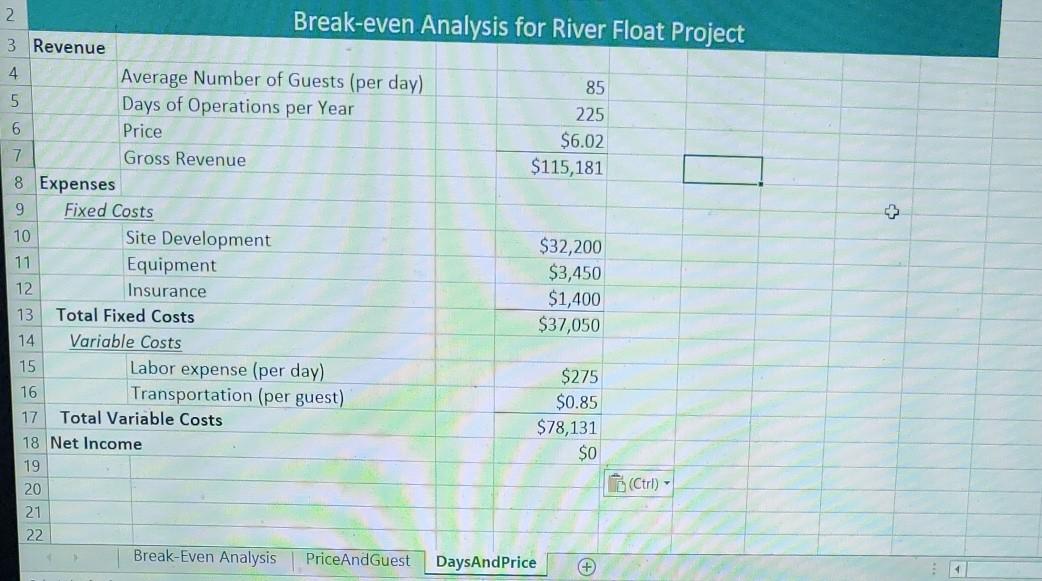
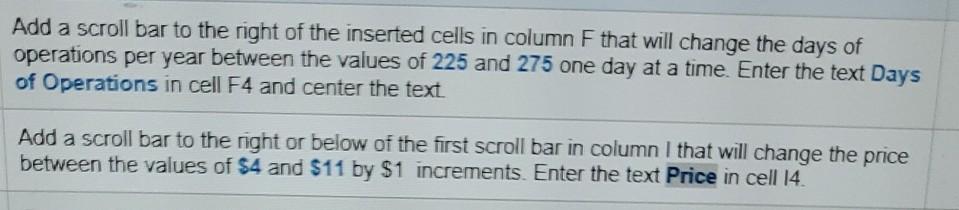
2. Break-even Analysis for River Float Project 3 Revenue 4 Average Number of Guests (per day) 85 5 Days of Operations per Year 225 6 Price $6.02 7 Gross Revenue $115,181 8 Expenses 9 Fixed Costs 10 Site Development $32,200 11 Equipment $3,450 12 Insurance $1,400 13 Total Fixed Costs $37,050 14 Variable Costs 15 Labor expense (per day) $275 16 Transportation (per guest) $0.85 17 Total Variable Costs $78,131 18 Net Income $0 19 (Ctrl) - 20 21 22 Break-Even Analysis PriceAndGuest DaysAndPrice + Add a scroll bar to the right of the inserted cells in column F that will change the days of operations per year between the values of 225 and 275 one day at a time. Enter the text Days of Operations in cell F4 and center the text. Add a scroll bar to the right or below of the first scroll bar in column I that will change the price between the values of $4 and $11 by $1 increments. Enter the text Price in cell 14. 2. Break-even Analysis for River Float Project 3 Revenue 4 Average Number of Guests (per day) 85 5 Days of Operations per Year 225 6 Price $6.02 7 Gross Revenue $115,181 8 Expenses 9 Fixed Costs 10 Site Development $32,200 11 Equipment $3,450 12 Insurance $1,400 13 Total Fixed Costs $37,050 14 Variable Costs 15 Labor expense (per day) $275 16 Transportation (per guest) $0.85 17 Total Variable Costs $78,131 18 Net Income $0 19 (Ctrl) - 20 21 22 Break-Even Analysis PriceAndGuest DaysAndPrice + Add a scroll bar to the right of the inserted cells in column F that will change the days of operations per year between the values of 225 and 275 one day at a time. Enter the text Days of Operations in cell F4 and center the text. Add a scroll bar to the right or below of the first scroll bar in column I that will change the price between the values of $4 and $11 by $1 increments. Enter the text Price in cell 14
Step by Step Solution
There are 3 Steps involved in it

Get step-by-step solutions from verified subject matter experts
 Study Help