







Question: 2. Create a Gantt chart in Microsoft Project for the following construction project. Activity List for a Reroofing Project Activity Description 1 Mobilize 2 Set
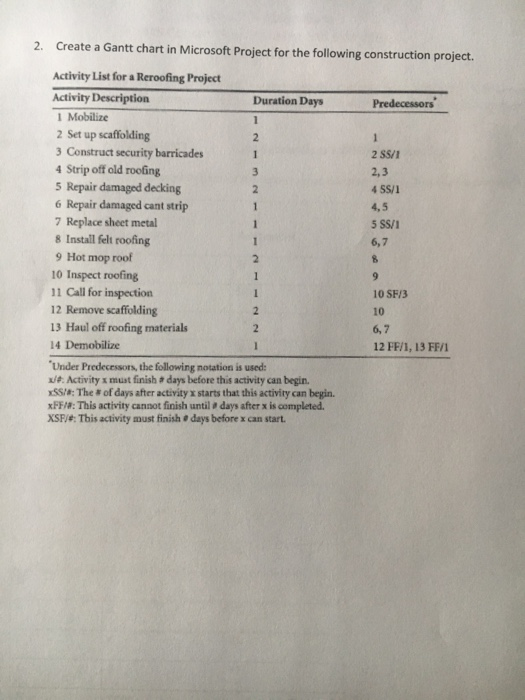
2. Create a Gantt chart in Microsoft Project for the following construction project. Activity List for a Reroofing Project Activity Description 1 Mobilize 2 Set up scaffolding 3 Construct security barricades Duration Days Predecessors Strip off old roofing 5 Repair damaged decking 6 Repair damaged cant strip 7 Replace sheet metal 8 Install felt roofing 9 Hot mop roof 10 Inspect roofing 11 Call for inspection 12 Remove scaffolding 13 Haul off roofing materials 14 Demobilize 2,3 4,5 6,7 10 SF/3 10 6,7 12 FF/1, 13 FF/ Under Predecessors, the following notation is used: /e. Activity x must finish a days before this activity can begin. xssa: The # of days after activity x starts that this activity can begin. xFF/: This activity cannot finish until days after x is completed XSFi: This activity must finish e days before x can start 2. Create a Gantt chart in Microsoft Project for the following construction project. Activity List for a Reroofing Project Activity Description 1 Mobilize 2 Set up scaffolding 3 Construct security barricades Duration Days Predecessors Strip off old roofing 5 Repair damaged decking 6 Repair damaged cant strip 7 Replace sheet metal 8 Install felt roofing 9 Hot mop roof 10 Inspect roofing 11 Call for inspection 12 Remove scaffolding 13 Haul off roofing materials 14 Demobilize 2,3 4,5 6,7 10 SF/3 10 6,7 12 FF/1, 13 FF/ Under Predecessors, the following notation is used: /e. Activity x must finish a days before this activity can begin. xssa: The # of days after activity x starts that this activity can begin. xFF/: This activity cannot finish until days after x is completed XSFi: This activity must finish e days before x can start
Step by Step Solution
There are 3 Steps involved in it

Get step-by-step solutions from verified subject matter experts
 Study Help