







Question: 2. Declare a table variable called VendorV. In that table, insert the following data which should be generated with a query that joins the Vendors
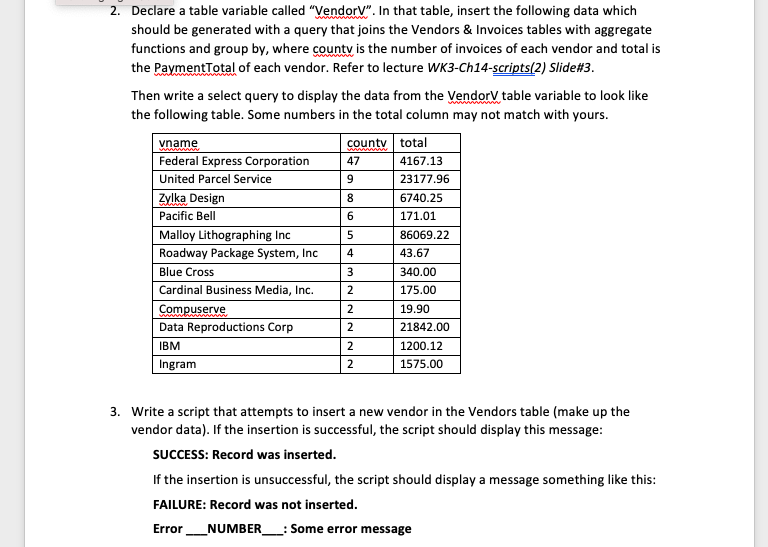
2. Declare a table variable called "VendorV". In that table, insert the following data which should be generated with a query that joins the Vendors & Invoices tables with aggregate functions and group by, where county is the number of invoices of each vendor and total is the PaymentTotal of each vendor. Refer to lecture WK3-Ch14-scripts(2) Slide#3. Then write a select query to display the data from the Vendory table variable to look like the following table. Some numbers in the total column may not match with yours. vname county total Federal Express Corporation 47 4167.13 United Parcel Service 9 23177.96 Zylka Design 6740.25 Pacific Bell 6 171.01 Malloy Lithographing Inc 5 86069.22 Roadway Package System, Inc 4 43.67 Blue Cross 3 340.00 Cardinal Business Media, Inc. 2 175.00 Compuserve 19.90 Data Reproductions Corp 2 21842.00 IBM 2 1200.12 Ingram 1575.00 8 2 2 3. Write a script that attempts to insert a new vendor in the Vendors table (make up the vendor data). If the insertion is successful, the script should display this message: SUCCESS: Record was inserted. If the insertion is unsuccessful, the script should display a message something like this: FAILURE: Record was not inserted. _NUMBER_ : Some error message Error 2. Declare a table variable called "VendorV". In that table, insert the following data which should be generated with a query that joins the Vendors & Invoices tables with aggregate functions and group by, where county is the number of invoices of each vendor and total is the PaymentTotal of each vendor. Refer to lecture WK3-Ch14-scripts(2) Slide#3. Then write a select query to display the data from the Vendory table variable to look like the following table. Some numbers in the total column may not match with yours. vname county total Federal Express Corporation 47 4167.13 United Parcel Service 9 23177.96 Zylka Design 6740.25 Pacific Bell 6 171.01 Malloy Lithographing Inc 5 86069.22 Roadway Package System, Inc 4 43.67 Blue Cross 3 340.00 Cardinal Business Media, Inc. 2 175.00 Compuserve 19.90 Data Reproductions Corp 2 21842.00 IBM 2 1200.12 Ingram 1575.00 8 2 2 3. Write a script that attempts to insert a new vendor in the Vendors table (make up the vendor data). If the insertion is successful, the script should display this message: SUCCESS: Record was inserted. If the insertion is unsuccessful, the script should display a message something like this: FAILURE: Record was not inserted. _NUMBER_ : Some error message Error
Step by Step Solution
There are 3 Steps involved in it

Get step-by-step solutions from verified subject matter experts
 Study Help