







Question: 2. In M6 create a calculation in excel to work out how many Clients have Bronze status. Copy the formula down to M9. 3. In
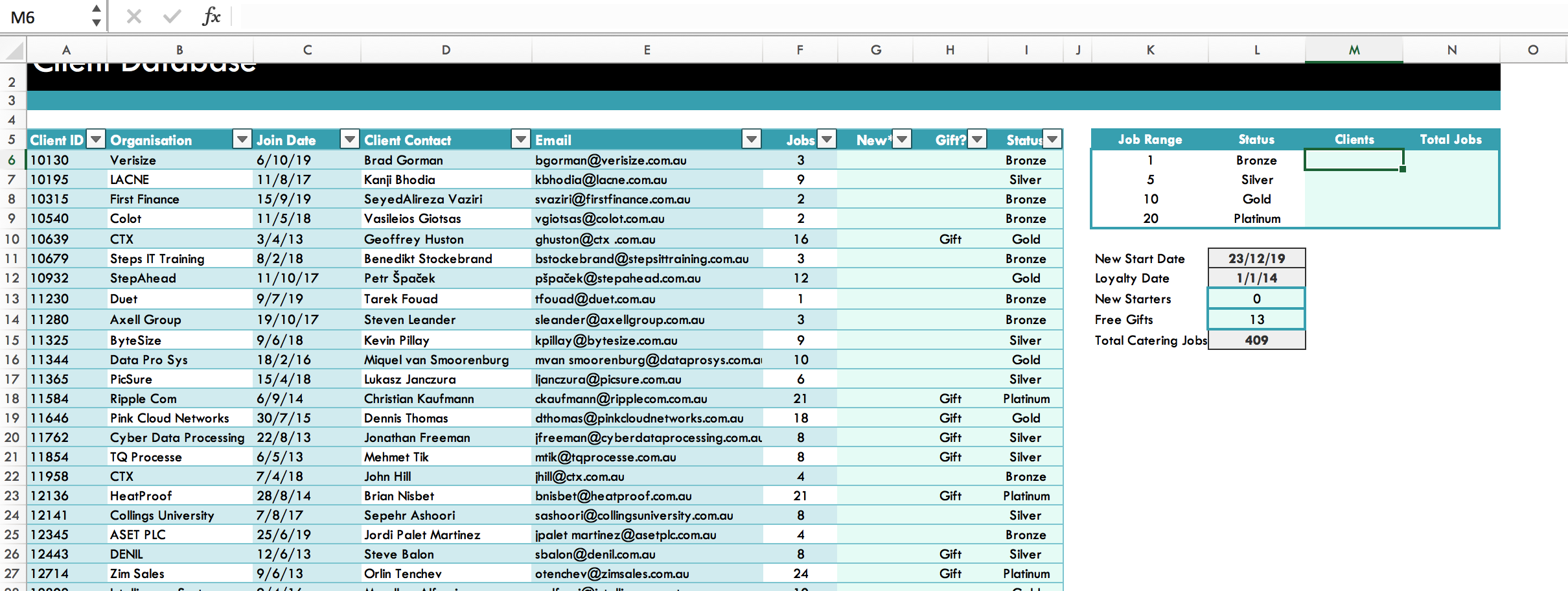 2. In M6 create a calculation in excel to work out how many Clients have Bronze status. Copy the formula down to M9.
3. In N6 create a calculation in excel to work out how many jobs Clients with Bronze status have booked. Copy the formula down to N9.
4. Create a Donut chart to show the percentage of clients of each status. Change the Chart Title to Client Status and add Data Labels to show percentages. Use Chart Element tools to position the legend at the bottom of the chart (do not drag)
M6 fx Au vurwust D E F G H J L N O CUICUIT 2 3 New Gift? Status Clients Total Jobs Jobs 3 Job Range 1 9 Status Bronze Silver Bronze Bronze Bronze Silver Gold Platinum 5 10 20 2 2 16 Gift Gold 3 Bronze 12 Gold New Start Date Loyalty Date New Starters Free Gifts 23/12/19 1/1/14 0 1 Bronze 13 3 9 Total Catering Jobs 4 5 Client ID Organisation Join Date 6 10130 Verisize 6/10/19 7 10195 LACNE 11/8/17 8 10315 First Finance 15/9/19 9 10540 Colot 11/5/18 10 10639 CTX 3/4/13 11 10679 Steps IT Training 8/2/18 12 10932 StepAhead 11/10/17 13 11230 Duet 9/7/19 14 11280 Axell Group 19/10/17 15 11325 Byte Size 9/6/18 16 11344 Data Pro Sys 18/2/16 17 11365 PicSure 15/4/18 18 11584 Ripple Com 6/9/14 19 11646 Pink Cloud Networks 30/7/15 20 11762 Cyber Data Processing 22/8/13 21 11854 TQ Processe 6/5/13 22 11958 CTX 7/4/18 23 12136 HeatProof 28/8/14 24 12141 Collings University 7/8/17 25 12345 ASET PLC 25/6/19 26 12443 DENIL 12/6/13 27 12714 Zim Sales 9/6/13 409 Client Contact Brad Gorman Kanji Bhodia SeyedAlireza Vaziri Vasileios Giotsas Geoffrey Huston Benedikt Stockebrand Petr paek Tarek Fouad Steven Leander Kevin Pillay Miquel van Smoorenburg Lukasz Janczura Christian Kaufmann Dennis Thomas Jonathan Freeman Mehmet Tik John Hill Brian Nisbet Sepehr Ashoori Jordi Palet Martinez Steve Balon Orlin Tenchev Bronze Silver Gold Email bgorman@verisize.com.au kbhodia@lacne.com.au svaziri@firstfinance.com.au vgiotsas@colot.com.au ghuston@ctx .com.au bstockebrand@stepsittraining.com.au ppaek@stepahead.com.au tfouad@duet.com.au sleander@axellgroup.com.au kpillay@bytesize.com.au mvan smoorenburg@dataprosys.com.ar lianczura@picsure.com.au ckaufmann@ripplecom.com.au dthomas@pinkcloudnetworks.com.au ifreeman@cyberdataprocessing.com.au mtik@tqprocesse.com.au jhill@ctx.com.au bnisbet@heatproof.com.au sashoori@collingsuniversity.com.au ipalet martinez@asetplc.com.au sbalon@denil.com.au otenchev@zimsales.com.au 10 6 21 18 Gift Gift Gift 8 Silver Platinum Gold Silver Silver Bronze Platinum Silver 8 Gift 4 21 Gift 8 4 Bronze 8 Gift Silver Platinum 24 Gift nl/
Step by Step Solution
There are 3 Steps involved in it

Get step-by-step solutions from verified subject matter experts
 Study Help