





Question: 23 c1 1 C2 1 NN DO C4 Section The following are to be completed in the Client Database Worksheet This sheet contains a list
23 c1 1 C2 1 NN DO C4 Section The following are
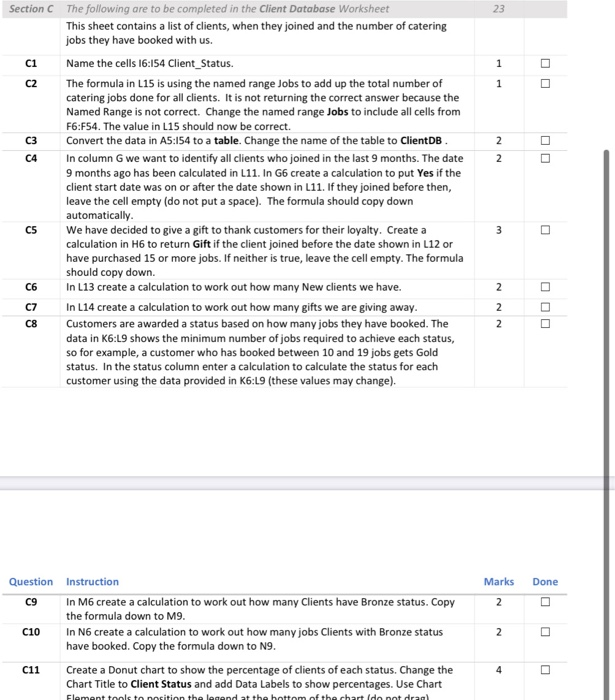
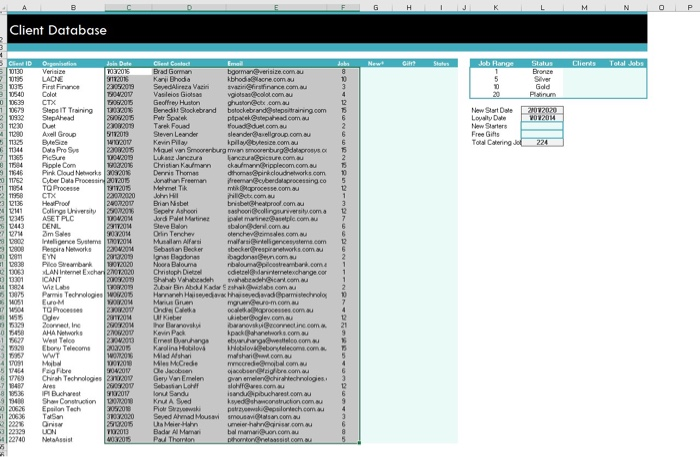
23 c1 1 C2 1 NN DO C4 Section The following are to be completed in the Client Database Worksheet This sheet contains a list of clients, when they joined and the number of catering jobs they have booked with us. Name the cells 16:154 Client_Status. The formula in L15 is using the named range Jobs to add up the total number of catering jobs done for all clients. It is not returning the correct answer because the Named Range is not correct. Change the named range Jobs to include all cells from F6:F54. The value in L15 should now be correct. C3 Convert the data in A5:154 to a table. Change the name of the table to ClientDB In column G we want to identify all clients who joined in the last 9 months. The date 9 months ago has been calculated in L11. In G6 create a calculation to put Yes if the client start date was on or after the date shown in L11. If they joined before then, leave the cell empty (do not put a space). The formula should copy down automatically We have decided to give a gift to thank customers for their loyalty. Create a calculation in H6 to return Gift if the client joined before the date shown in L12 or have purchased 15 or more jobs. If neither is true, leave the cell empty. The formula should copy down. C6 In L13 create a calculation to work out how many New clients we have. In L14 create a calculation to work out how many gifts we are giving away. C8 Customers are awarded a status based on how many jobs they have booked. The data in K6:L9 shows the minimum number of jobs required to achieve each status, so for example, a customer who has booked between 10 and 19 jobs gets Gold status. In the status column enter a calculation to calculate the status for each customer using the data provided in K6:19 (these values may change). CS 3 C7 NNN Marks Done 2 Question Instruction C9 In M6 create a calculation to work out how many Clients have Bronze status. Copy the formula down to M9. C10 In N6 create a calculation to work out how many jobs Clients with Bronze status have booked. Copy the formula down to N9. Create a Donut chart to show the percentage of clients of each status. Change the Chart Title to Client Status and add Data Labels to show percentages. Use Chart 2 C11 4 Element tools to position the legend at the bottom of the chart Ido not draal G H K M N 0 Newt Gil Status Clients Total Jobs daha 8 1 3 CT Step IT Trang Geoffrey Hutton Benedikt Stockebrand pustorets com Job Range Status Bronze 5 Silver Gold 20 Platinum New Start Date 2012020 Loyalty Date VO2201 New Starters Free Gifts Torel Catering 224 BS Mo WOO 10 5 12 USA HealPro Brian Niste Spel Ashoor Od Client Database Client ID Organisation Jain Dute 10130 Versie TOON 25 LACNE 9112055 2035 First Finance 23052019 20540 Color 10420V 10635 B0205 10679 19/03/2016 38/2015 100 22012079 T1280 Avell Group 917201 WW2O 11344 DistaPro 2209.2015 11365 Pesure 1042019 Podle Com 11646 Pink Cloud hook 309/2016 2 Cyber Data Processin 2072015 TO Process 19172015 CTX 22072020 MI 12345 Colling University 50 2016 ASET PLC TOV204 1443 DENL 2317.2014 1714 2m Ses 900 90204 100 Igence SOVOM 12900 Respiratore 229 1930 ProSverbank 13072020 13053 LAN Internet Excha 21072020 13301 ICANT 2009/2010 13824 Pormis Technologio 2015 MOS EuOM WOWO TO Proses 202.200 55 Ogley 2017.20 5129 Zorine 14 AHAN 16:27 2200 Wow To 2020 7820 Ebony Telecom 20.2.2015 1957 1701 7.2018 MA Pagibre SO4.2017 1789 Chirah Technologies 23/10/200 13:48 2009 200 IP Bucharest 2017 140 Show Construction 20626 Epsilon Tech 303.2018 TOS 30%2020 22216 Oris 20161206 22329 UON 2013 22740 Net 2015 33000 Client Conted Emel Brad Gorman bgerman@versize.com.au Konji Dhodia kbhodlne.com Sevedaliera Vaini vecififinance.com Vasileios Gita vglosanolol.com.au batackabrandaplaning.com Par Spek plocked.com Tarek Pound toudut.com.au Steven Leander sleder.com Kevin Play Ipilobyte.com uel von Smoorenburg amerburg lianceur picture.com.au Christian Kumar chamarnipple.com.com.au Dernit Thomas dhomark cloudnetworks.com Jonathan Freeman ifreeran cyber dalaprocessing.co Mehmet Tik mikroprocesse.com Ich HD price.com brisbethesiprool.com.au tashoorcollingwersity.com Jordi Palet Martinez pemain@selecom su Steve Balon balonderal.com.au Orin Tencher oferchev@amses com u Medio Alfarsi malfertigenceme.com Sebastian Becker beckerCrespiraneworks.com bod.Ben.com Noora Blouma balora@piloostreambar.com Christopheted cdieteldiere exchange.com Shub Vorbeadh behicort.com bir Bin Abdul Kader Shawls.com su Harna Hisevedia vedievad pisecolo Marius Grun more Onde Co processes.com Kiber Wimber Godev.com Bu ovisi www.correctin com Kevin Pack packnetworks.com.au Emet Duruhange bhagwelco.com Karolina Hobilov Hobloveboudelecom.com Mlad Mihai masharit.com.au Mies Crede mecredembal.com Jacobsen cobsenergore.com Gery Van Emelen Ovanemelervechirah technologies Sebastian LF iloves.com lonu Sandu sandpibucharest.com.au Ku A Sved kayesha construction.com.au Piotr Strzowiki potrzewikiloc.com Seyed Almed Mousavimousin.com Ula Meier Hohn umier-hairis.com su Bad Al Mam bal mamarion.com Poul Thornton photonnessis.com.au Wie 05 4 12 21 VOM WWT WOO Ae 3 12 6 9 536 LO20 6 8 5 23 c1 1 C2 1 NN DO C4 Section The following are to be completed in the Client Database Worksheet This sheet contains a list of clients, when they joined and the number of catering jobs they have booked with us. Name the cells 16:154 Client_Status. The formula in L15 is using the named range Jobs to add up the total number of catering jobs done for all clients. It is not returning the correct answer because the Named Range is not correct. Change the named range Jobs to include all cells from F6:F54. The value in L15 should now be correct. C3 Convert the data in A5:154 to a table. Change the name of the table to ClientDB In column G we want to identify all clients who joined in the last 9 months. The date 9 months ago has been calculated in L11. In G6 create a calculation to put Yes if the client start date was on or after the date shown in L11. If they joined before then, leave the cell empty (do not put a space). The formula should copy down automatically We have decided to give a gift to thank customers for their loyalty. Create a calculation in H6 to return Gift if the client joined before the date shown in L12 or have purchased 15 or more jobs. If neither is true, leave the cell empty. The formula should copy down. C6 In L13 create a calculation to work out how many New clients we have. In L14 create a calculation to work out how many gifts we are giving away. C8 Customers are awarded a status based on how many jobs they have booked. The data in K6:L9 shows the minimum number of jobs required to achieve each status, so for example, a customer who has booked between 10 and 19 jobs gets Gold status. In the status column enter a calculation to calculate the status for each customer using the data provided in K6:19 (these values may change). CS 3 C7 NNN Marks Done 2 Question Instruction C9 In M6 create a calculation to work out how many Clients have Bronze status. Copy the formula down to M9. C10 In N6 create a calculation to work out how many jobs Clients with Bronze status have booked. Copy the formula down to N9. Create a Donut chart to show the percentage of clients of each status. Change the Chart Title to Client Status and add Data Labels to show percentages. Use Chart 2 C11 4 Element tools to position the legend at the bottom of the chart Ido not draal G H K M N 0 Newt Gil Status Clients Total Jobs daha 8 1 3 CT Step IT Trang Geoffrey Hutton Benedikt Stockebrand pustorets com Job Range Status Bronze 5 Silver Gold 20 Platinum New Start Date 2012020 Loyalty Date VO2201 New Starters Free Gifts Torel Catering 224 BS Mo WOO 10 5 12 USA HealPro Brian Niste Spel Ashoor Od Client Database Client ID Organisation Jain Dute 10130 Versie TOON 25 LACNE 9112055 2035 First Finance 23052019 20540 Color 10420V 10635 B0205 10679 19/03/2016 38/2015 100 22012079 T1280 Avell Group 917201 WW2O 11344 DistaPro 2209.2015 11365 Pesure 1042019 Podle Com 11646 Pink Cloud hook 309/2016 2 Cyber Data Processin 2072015 TO Process 19172015 CTX 22072020 MI 12345 Colling University 50 2016 ASET PLC TOV204 1443 DENL 2317.2014 1714 2m Ses 900 90204 100 Igence SOVOM 12900 Respiratore 229 1930 ProSverbank 13072020 13053 LAN Internet Excha 21072020 13301 ICANT 2009/2010 13824 Pormis Technologio 2015 MOS EuOM WOWO TO Proses 202.200 55 Ogley 2017.20 5129 Zorine 14 AHAN 16:27 2200 Wow To 2020 7820 Ebony Telecom 20.2.2015 1957 1701 7.2018 MA Pagibre SO4.2017 1789 Chirah Technologies 23/10/200 13:48 2009 200 IP Bucharest 2017 140 Show Construction 20626 Epsilon Tech 303.2018 TOS 30%2020 22216 Oris 20161206 22329 UON 2013 22740 Net 2015 33000 Client Conted Emel Brad Gorman bgerman@versize.com.au Konji Dhodia kbhodlne.com Sevedaliera Vaini vecififinance.com Vasileios Gita vglosanolol.com.au batackabrandaplaning.com Par Spek plocked.com Tarek Pound toudut.com.au Steven Leander sleder.com Kevin Play Ipilobyte.com uel von Smoorenburg amerburg lianceur picture.com.au Christian Kumar chamarnipple.com.com.au Dernit Thomas dhomark cloudnetworks.com Jonathan Freeman ifreeran cyber dalaprocessing.co Mehmet Tik mikroprocesse.com Ich HD price.com brisbethesiprool.com.au tashoorcollingwersity.com Jordi Palet Martinez pemain@selecom su Steve Balon balonderal.com.au Orin Tencher oferchev@amses com u Medio Alfarsi malfertigenceme.com Sebastian Becker beckerCrespiraneworks.com bod.Ben.com Noora Blouma balora@piloostreambar.com Christopheted cdieteldiere exchange.com Shub Vorbeadh behicort.com bir Bin Abdul Kader Shawls.com su Harna Hisevedia vedievad pisecolo Marius Grun more Onde Co processes.com Kiber Wimber Godev.com Bu ovisi www.correctin com Kevin Pack packnetworks.com.au Emet Duruhange bhagwelco.com Karolina Hobilov Hobloveboudelecom.com Mlad Mihai masharit.com.au Mies Crede mecredembal.com Jacobsen cobsenergore.com Gery Van Emelen Ovanemelervechirah technologies Sebastian LF iloves.com lonu Sandu sandpibucharest.com.au Ku A Sved kayesha construction.com.au Piotr Strzowiki potrzewikiloc.com Seyed Almed Mousavimousin.com Ula Meier Hohn umier-hairis.com su Bad Al Mam bal mamarion.com Poul Thornton photonnessis.com.au Wie 05 4 12 21 VOM WWT WOO Ae 3 12 6 9 536 LO20 6 8 5

Step by Step Solution

There are 3 Steps involved in it

1 Expert Approved Answer
Step: 1 Unlock blur-text-image

Question Has Been Solved by an Expert!

Get step-by-step solutions from verified subject matter experts

Step: 2 Unlock
Step: 3 Unlock

Students Have Also Explored These Related General Management Questions!