







Question: 2 On the SalesData worksheet, in cell F4, create a formula that will perform a calculation that multiplies the Unit Price by the sum
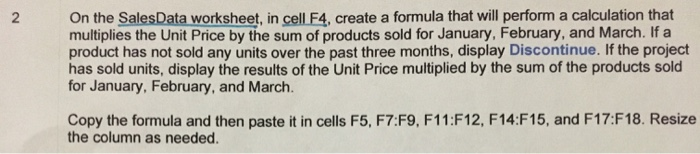
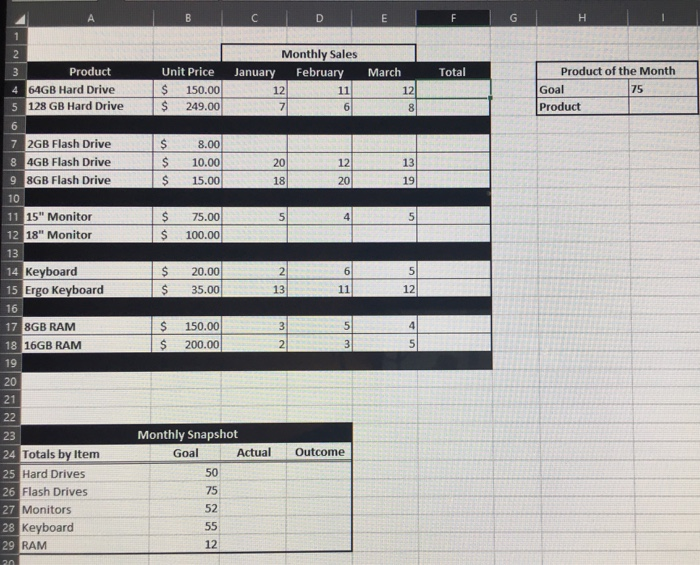
2 On the SalesData worksheet, in cell F4, create a formula that will perform a calculation that multiplies the Unit Price by the sum of products sold for January, February, and March. If a product has not sold any units over the past three months, display Discontinue. If the project has sold units, display the results of the Unit Price multiplied by the sum of the products sold for January, February, and March. Copy the formula and then paste it in cells F5, F7:F9, F11:F12, F14:F15, and F17:F18. Resize the column as needed. 3 Product 4 64GB Hard Drive 5 128 GB Hard Drive 6 7 2GB Flash Drive 8 4GB Flash Drive 9 8GB Flash Drive 10 11 15" Monitor 12 18" Monitor 13 14 Keyboard 15 Ergo Keyboard 16 17 8GB RAM 18 16GB RAM 19 20 21 22 23 24 Totals by Item 25 Hard Drives 26 Flash Drives 27 Monitors 28 Keyboard 29 RAM 20 Unit Price $ 150.00 $ 249.00 B 8.00 $ $ 10.00 $ 15.00 $ 75.00 $ 100.00 is s $ 20.00 35.00 $ $ 150.00 $ 200.00 Monthly Snapshot Goal January 50 75 52 55 12 Actual Monthly Sales 12 7 20 18 5 2 13 D 3 2 February March 11 6 12 20 4 6 11 5 3 E Outcome 12 8 13 19 5 5 12 4 5 F Total H Product of the Month 75 Goal Product
Step by Step Solution
3.49 Rating (156 Votes )
There are 3 Steps involved in it
Answer FORMULA IFSUMC4D4E4B40SUMC4D4E4B4Discontinue IFc... View full answer

Get step-by-step solutions from verified subject matter experts
 Study Help