







Question: 2- Please inspect the figure given below. Write a MikroC code that when we press on the push-button, two LED glows for two seconds. Use
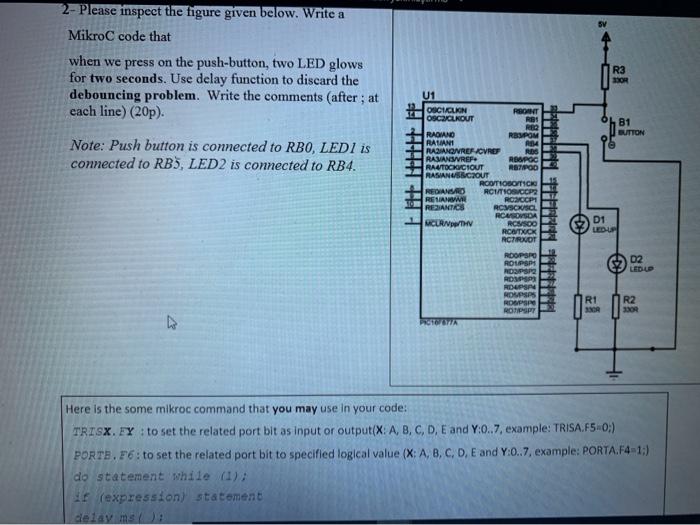
2- Please inspect the figure given below. Write a MikroC code that when we press on the push-button, two LED glows for two seconds. Use delay function to discard the debouncing problem. Write the comments (after ; at each line) (20p). R3 BOR 81 BUTTON Note: Push button is connected to RBO, LEDI is connected to RB5, LED2 is connected to RB4. RETROD HHH U1 OBCICLIGN RSANT OSCAGLKOUT RES RE RADIANO RBUPOM RALIAN R14 PAANOVREFCVRE RBS RAVANSREF: RAPOC RASTOCKICIOUT RASIANUSCOUT ROOTTOBOTICO RFIASRO RCITOSCOPE REHANOWE RCCCP REACH RCYCKSC CURNO RCASOSDA ROSSO RCATXIOK RCTROT ROOPSPO ROUPS ROOPSP ROSE RDUS ROUPSPS ROOPSP ROTIPSPT POMIA D1 LED UP FERN D2 LEDUD R1 NA R2 Here is the some mikroc command that you may use in your code: TRISX. FY to set the related port bit as input or output(X: A, B, C, D, E and Y:0..7, example: TRISA.F5.0;) PORTE. F6: to set the related port bit to specified logical value (X: A, B, C, D, E and Y:0..7, example: PORTA.F4-1:) do statement while (1) f (expression statement
Step by Step Solution
There are 3 Steps involved in it

Get step-by-step solutions from verified subject matter experts
 Study Help