







Question: 2 Problem Specification 1. Using an editor of your choice and the command prompt, create a Java file that contains one class: AsciiArt. java 2.
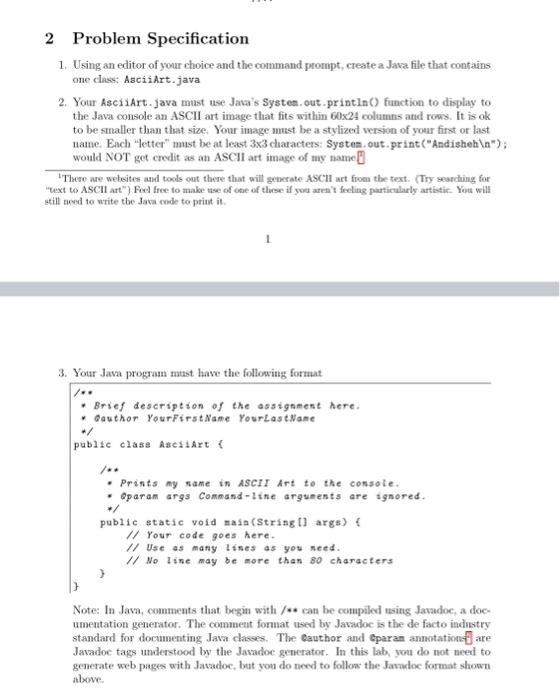
2 Problem Specification 1. Using an editor of your choice and the command prompt, create a Java file that contains one class: AsciiArt. java 2. Your AsciiArt. java must use Java's Systes. out.println() function to display to the Java console an ASCII art image that fits within 60x24 columns and rows. It is ok to be smaller than that size. Your image must be a stylized version of your first or last name. Each "letter" must be at least 33 characters: Systen . out. print ("Andisheh ); would NOT get credit as an ASCII art image of my name. 'Tlere are weleites and took out there that will generate ASCH art from the text. (Try searding for "lext to ASCII att") Feel free to make use of obe of these if you aren' fecling particularly artbtic. You will still need to write the Java code to print it. 3. Your Java program must have the following format Note: In Java, comments that begin with /*s can be conupiled using Javadoc, a doeumentation generator. The comnent format used by Javadoc is the de facto industry standard for documenting Java classes. The eauthor and Gparan annotation' are Javadoe tags understood by the Javadoc generator. In this lab, you do not need to generate web pages with Javadoc, but you do need to follow the Javadoc format shown abowe
Step by Step Solution
There are 3 Steps involved in it

Get step-by-step solutions from verified subject matter experts
 Study Help