







Question: please, I need help with this one java hashmap project. the required software is netbeans. Please follow all the steps. I have added the pictures.
please, I need help with this one java hashmap project. the required software is netbeans. Please follow all the steps. I have added the pictures. and please show comments and the output. thank you very much
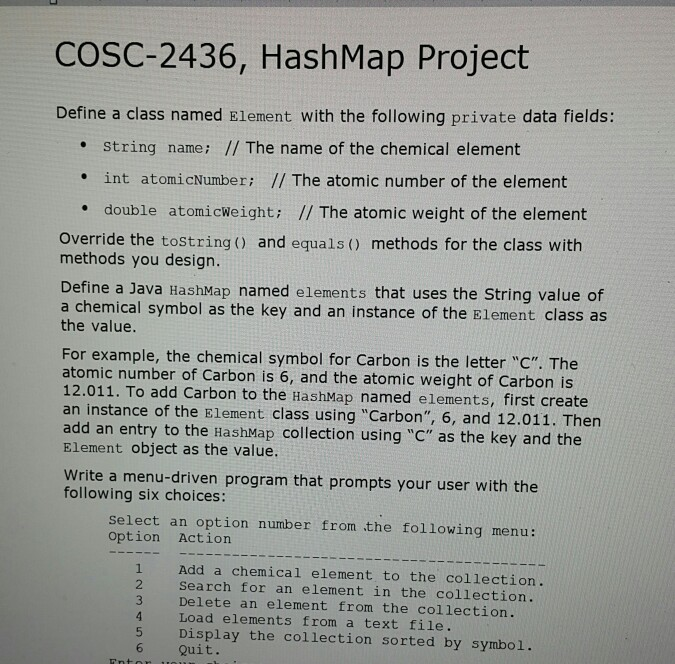
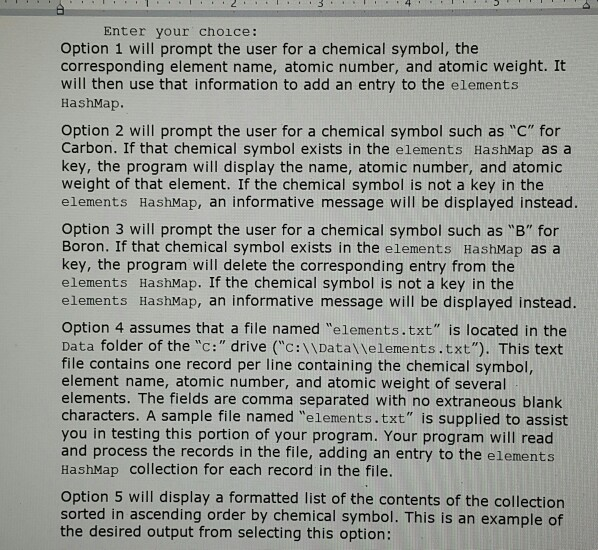
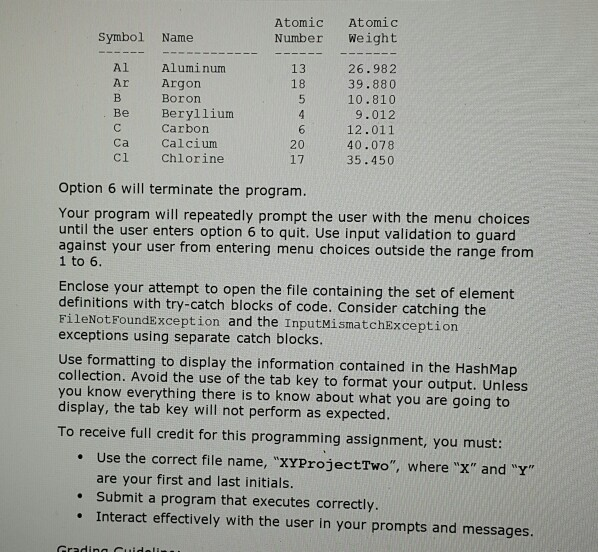
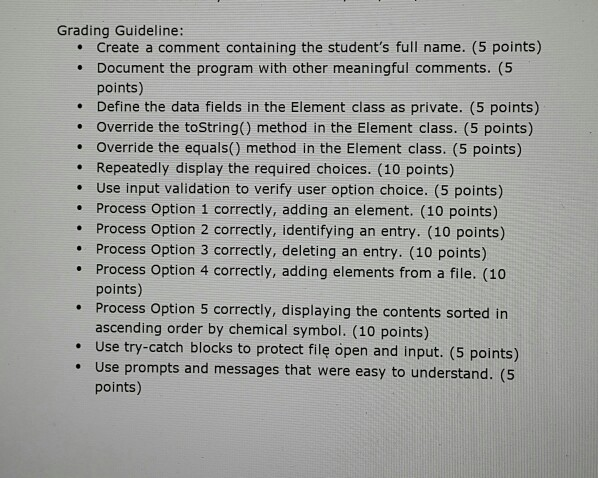
COSC-2436, Hash Map Project Define a class named Element with the following private data fields: String name; // The name of the chemical element int atomicNumber; // The atomic number of the element double atomicWeight; // The atomic weight of the element Override the toString() and equals() methods for the class with methods you design. Define a Java HashMap named elements that uses the String value of a chemical symbol as the key and an instance of the Element class as the value. For example, the chemical symbol for Carbon is the letter "C". The atomic number of Carbon is 6, and the atomic weight of Carbon is 12.011. To add Carbon to the HashMap named elements, first create an instance of the Element class using "Carbon", 6, and 12.011. Then add an entry to the HashMap collection using "C" as the key and the Element Object as the value. Write a menu-driven program that prompts your user with the following six choices: Select an option number from the following menu: Option Action Add a chemical element to the collection. Search for an element in the collection. Delete an element from the collection. Load elements from a text file. Display the collection sorted by symbol. Quit. I . 3 . . . 4 Enter your choice: Option 1 will prompt the user for a chemical symbol, the corresponding element name, atomic number, and atomic weight. It will then use that information to add an entry to the elements HashMap. Option 2 will prompt the user for a chemical symbol such as "C" for Carbon. If that chemical symbol exists in the elements HashMap as a key, the program will display the name, atomic number, and atomic weight of that element. If the chemical symbol is not a key in the elements HashMap, an informative message will be displayed instead. Option 3 will prompt the user for a chemical symbol such as "B" for Boron. If that chemical symbol exists in the elements HashMap as a key, the program will delete the corresponding entry from the elements HashMap. If the chemical symbol is not a key in the elements HashMap, an informative message will be displayed instead. Option 4 assumes that a file named "elements.txt" is located in the Data folder of the "c:" drive ("C:\\Data\\elements.txt"). This text file contains one record per line containing the chemical symbol, element name, atomic number, and atomic weight of several elements. The fields are comma separated with no extraneous blank characters. A sample file named "elements.txt" is supplied to assist you in testing this portion of your program. Your program will read and process the records in the file, adding an entry to the elements HashMap collection for each record in the file. Option 5 will display a formatted list of the contents of the collection sorted in ascending order by chemical symbol. This is an example of the desired output from selecting this option: Atomic Number Atomic Weight Symbol Name Al Ar 13 Be Aluminum Argon Boron Beryllium Carbon Calcium Chlorine 26.982 39.880 10.810 9.012 12.011 40.078 35.450 Ca ci Option 6 will terminate the program. Your program will repeatedly prompt the user with the menu choices until the user enters option 6 to quit. Use input validation to guard against your user from entering menu choices outside the range from 1 to 6. Enclose your attempt to open the file containing the set of element definitions with try-catch blocks of code. Consider catching the FileNotFoundException and the InputMismatchException exceptions using separate catch blocks. Use formatting to display the information contained in the HashMap collection. Avoid the use of the tab key to format your output. Unless you know everything there is to know about what you are going to display, the tab key will not perform as expected. To receive full credit for this programming assignment, you must: Use the correct file name, "XYProjectTwo", where "X" and "Y" are your first and last initials. Submit a program that executes correctly. Interact effectively with the user in your prompts and messages. GradinaCuidali Grading Guideline: Create a comment containing the student's full name. (5 points) Document the program with other meaningful comments. (5 points) Define the data fields in the Element class as private. (5 points) Override the toString() method in the Element class. (5 points) Override the equals() method in the Element class. (5 points) Repeatedly display the required choices. (10 points) Use input validation to verify user option choice. (5 points) Process Option 1 correctly, adding an element. (10 points) Process Option 2 correctly, identifying an entry. (10 points) Process Option 3 correctly, deleting an entry. (10 points) Process Option 4 correctly, adding elements from a file. (10 points) Process Option 5 correctly, displaying the contents sorted in ascending order by chemical symbol. (10 points) Use try-catch blocks to protect file open and input. (5 points) Use prompts and messages that were easy to understand. (5 points)
Step by Step Solution
There are 3 Steps involved in it

Get step-by-step solutions from verified subject matter experts
 Study Help