







Question: 2 System Description 2 . 1 Default.aspx You must use an object - oriented approach to state management. This means you need to write and
System Description
Default.aspx
You must use an objectoriented approach to state management. This means you need to write and use
classes to represent the data necessary to implement the system as described.
Create a class diagram using the class design tool in VS see Lab It should show only the domain classes
not the web form and should show: a all instance variables, b the full signature of all methods, c the
relationship between the classes.
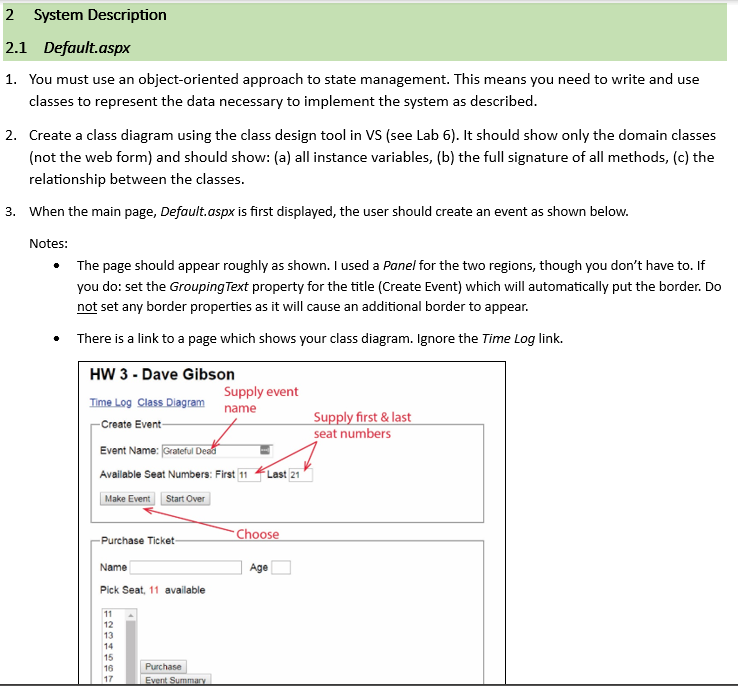
When the main page, Default.aspx is first displayed, the user should create an event as shown below.
Notes:
The page should appear roughly as shown. I used a Panel for the two regions, though you don't have to If
you do: set the GroupingText property for the title Create Event which will automatically put the border. Do
not set any border properties as it will cause an additional border to appear.
There is a link to a page which shows your class diagram. Ignore the Time Log link.
Purchase Ticket
Choose
Name
Age
Pick Seat, available
tableEvent Summary
Step by Step Solution
There are 3 Steps involved in it
1 Expert Approved Answer
Step: 1 Unlock

Question Has Been Solved by an Expert!
Get step-by-step solutions from verified subject matter experts
Step: 2 Unlock
Step: 3 Unlock
 Study Help