







Question: 2. The following program draws an BB-8 as shown below. Modify the program to move the BB-8 left or right using the arrow keys. The
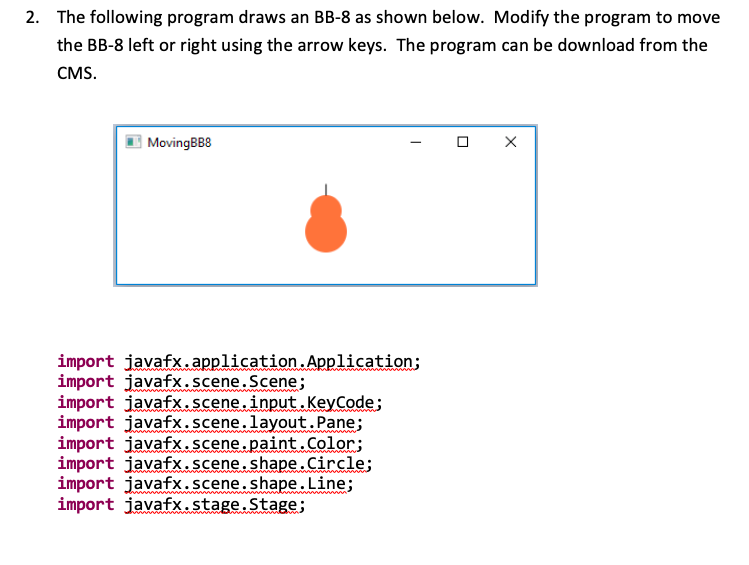
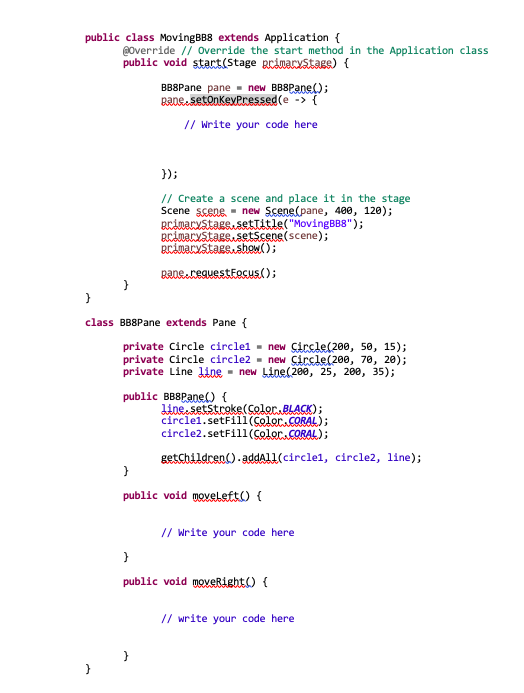
2. The following program draws an BB-8 as shown below. Modify the program to move the BB-8 left or right using the arrow keys. The program can be download from the CMS. import javafx.application.Application; import javafx.scene.Scene; import javafx.scene.input.Keycode; import javafx.scene.layout.Pane; import javafx.scene.paint.Color; import javafx.scene.shape.Circle; import javafx.scene.shape.Line; import javafx.stage.Stage; public class MovingBB8 extends Application \{ Qoverride // Override the start method in the Application class public void start(Stage primarystage) \{ BB8Pane pane = new BBBPane(); pane.setonkeypressed (e f // Write your code here \}); // Create a scene and place it in the stage Scene scene - new Scene(pane, 400,120); pcimarystage,setTitle( "MovingBB8"); pcinarystage setScene(scene); pcinarystage show( ); pane. requestFocus(); \} class BB8Pane extends Pane \{ private Circle circle1 = new Circle(200, 50, 15); private Circle circle2 = new Circle(200, 70, 20); private Line line = new Lide (200,25,260,35); public B88Pane() \{ linessetstroke(Golor BLACK); circle1.setFill (Golor, GORAL); circle2.setFill(Golor, CORAL); getchildden() addAll( (circle1, circle2, line); \} public void moveleft() \{ // Write your code here \} public void moyeright() \{ // write your code here \}
Step by Step Solution
There are 3 Steps involved in it

Get step-by-step solutions from verified subject matter experts
 Study Help