







Question: 2. Throwing a ball Below are all the steps you need to follow, but you should also add your own meaningful comments to the code
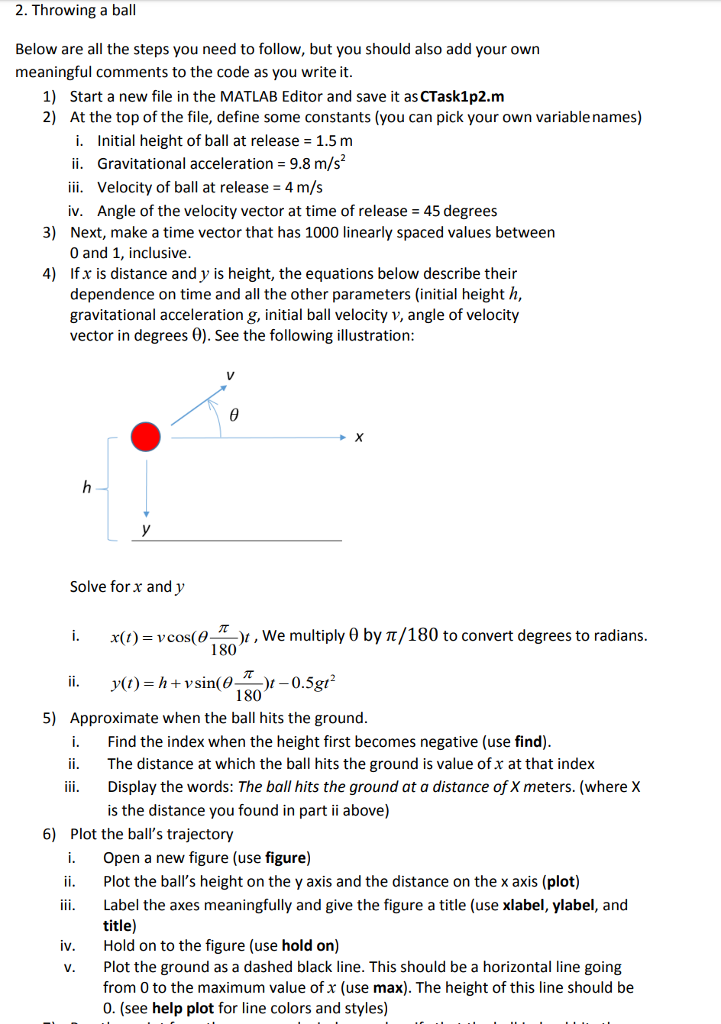
2. Throwing a ball Below are all the steps you need to follow, but you should also add your own meaningful comments to the code as you write it. 1) 2) Start a new file in the MATLAB Editor and save it as CTask1p2.m At the top of the file, define some constants (you can pick your own variable names) i. Initial height of ball at release 1.5 rm ii. Gravitational acceleration 9.8 m/s ii. Velocity of ball at release 4 m/s iv. Angle of the velocity vector at time of release Next, make a time vector that has 1000 linearly spaced values between 0 and 1, inclusive Ifx is distance and y is height, the equations below describe their dependence on time and all the other parameters (initial height h, gravitational acceleration g, initial ball velocity v, angle of velocity vector in degrees 0). See the following illustration 45 degrees 3) 4) Solve for x and y i. x(1)-vcos(JT-)l , we multiply ? by ?/180 to convert degrees to radians 180 180 5) Approximate when the ball hits the ground i. Find the index when the height first becomes negative (use find) ii. The distance at which the ball hits the ground is value of x at that index iii. Display the words: The ball hits the ground at a distance of X meters. (where X is the distance you found in part ii above) 6) Plot the ball's trajectory i. Open a new figure (use figure) ii. Plot the ball's height on the y axis and the distance on the x axis (plot) ii Label the axes meaningfully and give the figure a title (use xlabel, ylabel, and title) Hold on to the figure (use hold on) Plot the ground as a dashed black line. This should be a horizontal line going from 0 to the maximum value of x (use max). The height of this line should be 0. (see help plot for line colors and styles) iv. v
Step by Step Solution
There are 3 Steps involved in it

Get step-by-step solutions from verified subject matter experts
 Study Help