







Question: Can you view your test file with the type command now? yes no QUESTION 16 If yes, what is the content; if no, what is
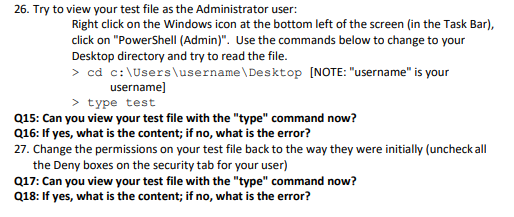
Can you view your test file with the "type" command now?
| yes | ||
| no |
QUESTION 16
If yes, what is the content; if no, what is the error?
| access denied | ||
| hello | ||
| disk full | ||
| invalid password |
QUESTION 17
Can you view your test file with the "type" command now?
| no | ||
| yes |
QUESTION 18
If yes, what is the content; if no, what is the error?
| hello | ||
| access denied | ||
| invalid password | ||
| disk full |
plsss
26. Try to view your test file as the Administrator user: Right click on the Windows icon at the bottom left of the screen (in the Task Bar), click on "PowerShell (Admin)". Use the commands below to change to your Desktop directory and try to read the file. username] > type test Q15: Can you view your test file with the "type" command now? Q16: If yes, what is the content; if no, what is the error? 27. Change the permissions on your test file back to the way they were initially (uncheckall the Deny boxes on the security tab for your user) Q17: Can you view your test file with the "type" command now? Q18: If yes, what is the content; if no, what is the error
Step by Step Solution
There are 3 Steps involved in it

Get step-by-step solutions from verified subject matter experts
 Study Help