







Question: 2. (total marks 10) Using your own Doctor-Treats-Patient database instance from assignment 1, login to the SQL query processor on our cs server called Oracle
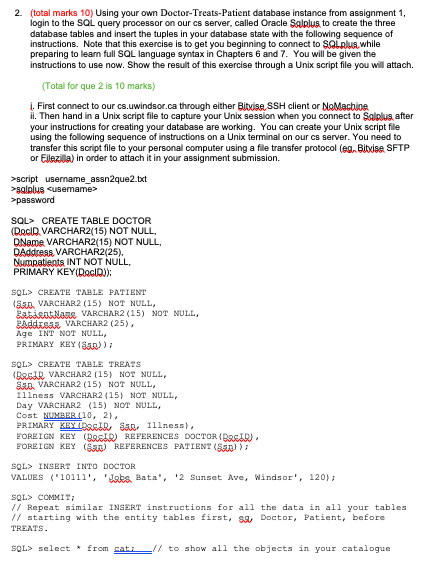
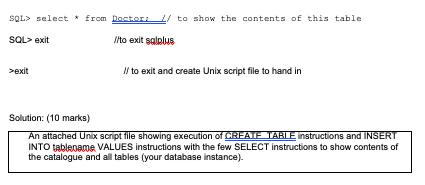
2. (total marks 10) Using your own Doctor-Treats-Patient database instance from assignment 1, login to the SQL query processor on our cs server called Oracle Salplus to create the three database tables and insert the tuples in your database state with the following sequence of instructions. Note that this exercise is to get you beginning to connect to SQLplus while preparing to leam full SOL language syntax in Chapters 6 and 7. You will be given the Instructions to use now. Show the result of this exercise through a Unix script file you will attach. (Total for que 2 is 10 marks) First connect to our cs.uwindsor.ca through either Bitvise SSH client or No Machine il. Then hand in a Unix script file to capture your Unix session when you connect to Salplus, after your instructions for creating your database are working. You can create your Unix script file using the following sequence of instructions on a Unix terminal on our server. You need to transfer this script file to your personal computer using a file transfer protocol (eg. Bitxiso, SFTP or Elezila) in order to attach it in your assignment submission >script username_assn2que2.bct >giplus cusemame> >password SQL> CREATE TABLE DOCTOR (DocID VARCHAR2(15) NOT NULL, DName VARCHAR2(15) NOT NULL, DAddress, VARCHAR2(25), Numpatients INT NOT NULL, PRIMARY KEY(Docid)): SQL> CREATE TABLE PATIENT 1 . VARCHAR2 (15) NOT NULL, Babideat None VARCHAR2(15) NOT NULL, Raddose VARCHAR2 (25), Age INT NOT NULL, PRIMARY KEY (San)) SQL> CREATE TABLE TREATS RRGIR VARCHAR2 (15) NOT NULL, S. VARCHAR2 (15) NOT NULL, Illness VARCHAR2 (15) NOT NULL, Day VARCHAR2 (15) NOT NULL, Cost NUMBERLL10, 2). PRIMARY KEYIDAGIDSan Illness) FOREIGN KEY (RAID REFERENCES DOCTOR (BASID. FOREIGN KRYEN REFERENCES PATIENT (SED)); SQL> INSERT INTO DOCTOR VALUES ('10111', 'Baks. Bata', '2 Sunset Ave, Windsor', 120); SOL COMIT: // Repeat similar INSERT instructions for all the data in all your tables // starting with the entity tables first, $ Doctor, Patient, before TREATS. SQL> select from cat to show all the objects in your catalogue SQL> select * from Doctor / to show the contents of this table SQL> exit Ilto exit salplus >exit // to exit and create Unix script file to hand in Solution: (10 marks) An attached Unix script file showing execution of CREAFTARLE Instructions and INSERT INTO tablepame VALUES instructions with the few SELECT instructions to show contents of the catalogue and all tables (your database instance) 2. (total marks 10) Using your own Doctor-Treats-Patient database instance from assignment 1, login to the SQL query processor on our cs server called Oracle Salplus to create the three database tables and insert the tuples in your database state with the following sequence of instructions. Note that this exercise is to get you beginning to connect to SQLplus while preparing to leam full SOL language syntax in Chapters 6 and 7. You will be given the Instructions to use now. Show the result of this exercise through a Unix script file you will attach. (Total for que 2 is 10 marks) First connect to our cs.uwindsor.ca through either Bitvise SSH client or No Machine il. Then hand in a Unix script file to capture your Unix session when you connect to Salplus, after your instructions for creating your database are working. You can create your Unix script file using the following sequence of instructions on a Unix terminal on our server. You need to transfer this script file to your personal computer using a file transfer protocol (eg. Bitxiso, SFTP or Elezila) in order to attach it in your assignment submission >script username_assn2que2.bct >giplus cusemame> >password SQL> CREATE TABLE DOCTOR (DocID VARCHAR2(15) NOT NULL, DName VARCHAR2(15) NOT NULL, DAddress, VARCHAR2(25), Numpatients INT NOT NULL, PRIMARY KEY(Docid)): SQL> CREATE TABLE PATIENT 1 . VARCHAR2 (15) NOT NULL, Babideat None VARCHAR2(15) NOT NULL, Raddose VARCHAR2 (25), Age INT NOT NULL, PRIMARY KEY (San)) SQL> CREATE TABLE TREATS RRGIR VARCHAR2 (15) NOT NULL, S. VARCHAR2 (15) NOT NULL, Illness VARCHAR2 (15) NOT NULL, Day VARCHAR2 (15) NOT NULL, Cost NUMBERLL10, 2). PRIMARY KEYIDAGIDSan Illness) FOREIGN KEY (RAID REFERENCES DOCTOR (BASID. FOREIGN KRYEN REFERENCES PATIENT (SED)); SQL> INSERT INTO DOCTOR VALUES ('10111', 'Baks. Bata', '2 Sunset Ave, Windsor', 120); SOL COMIT: // Repeat similar INSERT instructions for all the data in all your tables // starting with the entity tables first, $ Doctor, Patient, before TREATS. SQL> select from cat to show all the objects in your catalogue SQL> select * from Doctor / to show the contents of this table SQL> exit Ilto exit salplus >exit // to exit and create Unix script file to hand in Solution: (10 marks) An attached Unix script file showing execution of CREAFTARLE Instructions and INSERT INTO tablepame VALUES instructions with the few SELECT instructions to show contents of the catalogue and all tables (your database instance)
Step by Step Solution
There are 3 Steps involved in it

Get step-by-step solutions from verified subject matter experts
 Study Help