







Question: 2. Using the figure below, the requirements listed on the next page, and the attached Excel file, perform resource-limited scheduling and, to an extent, some
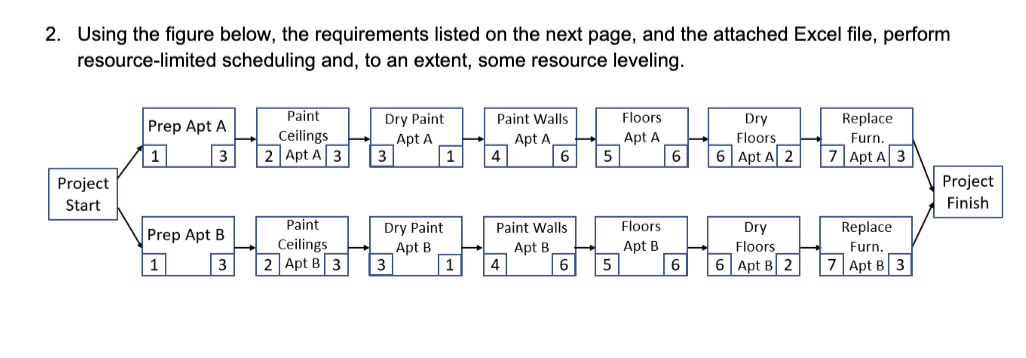
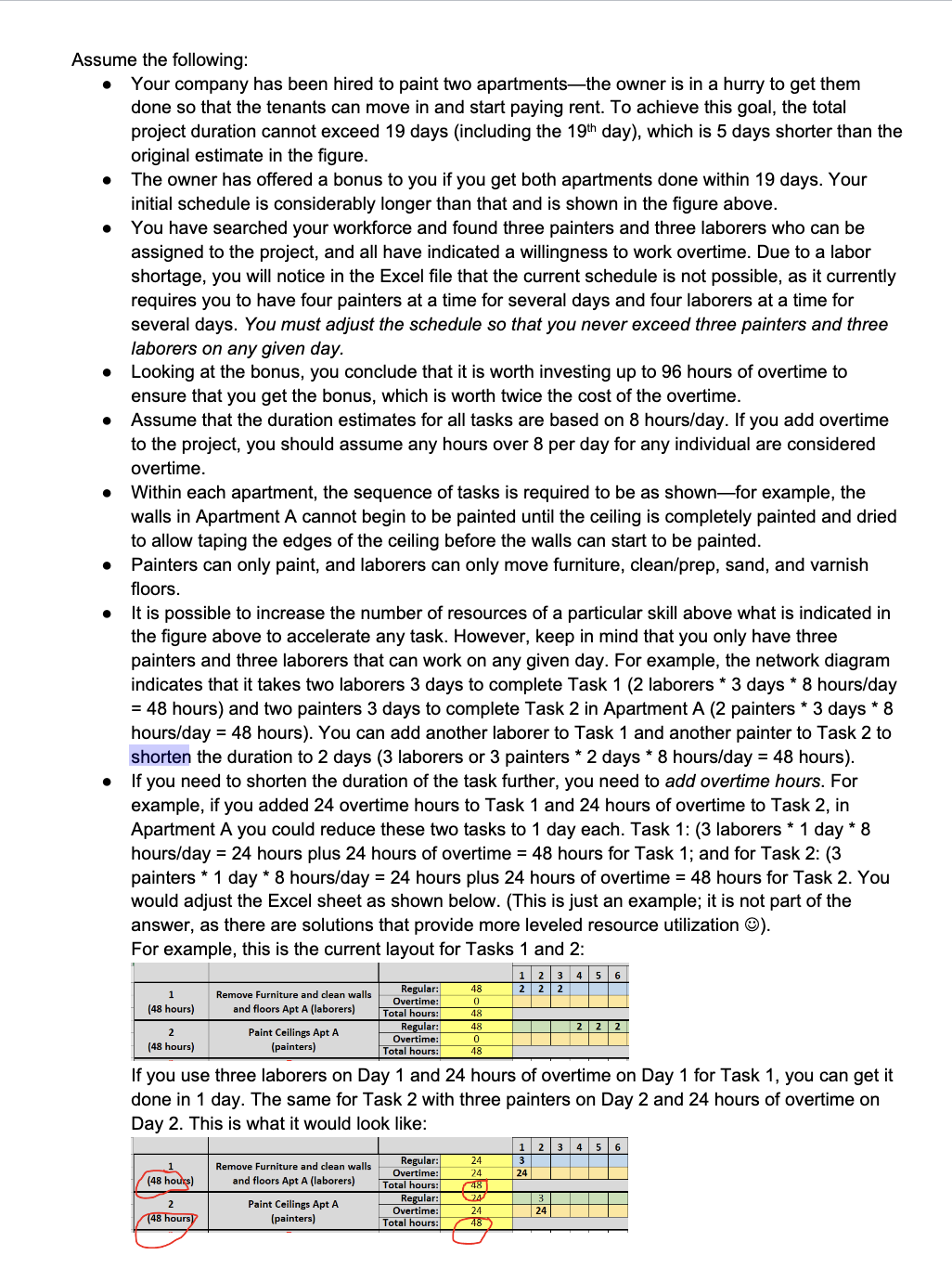
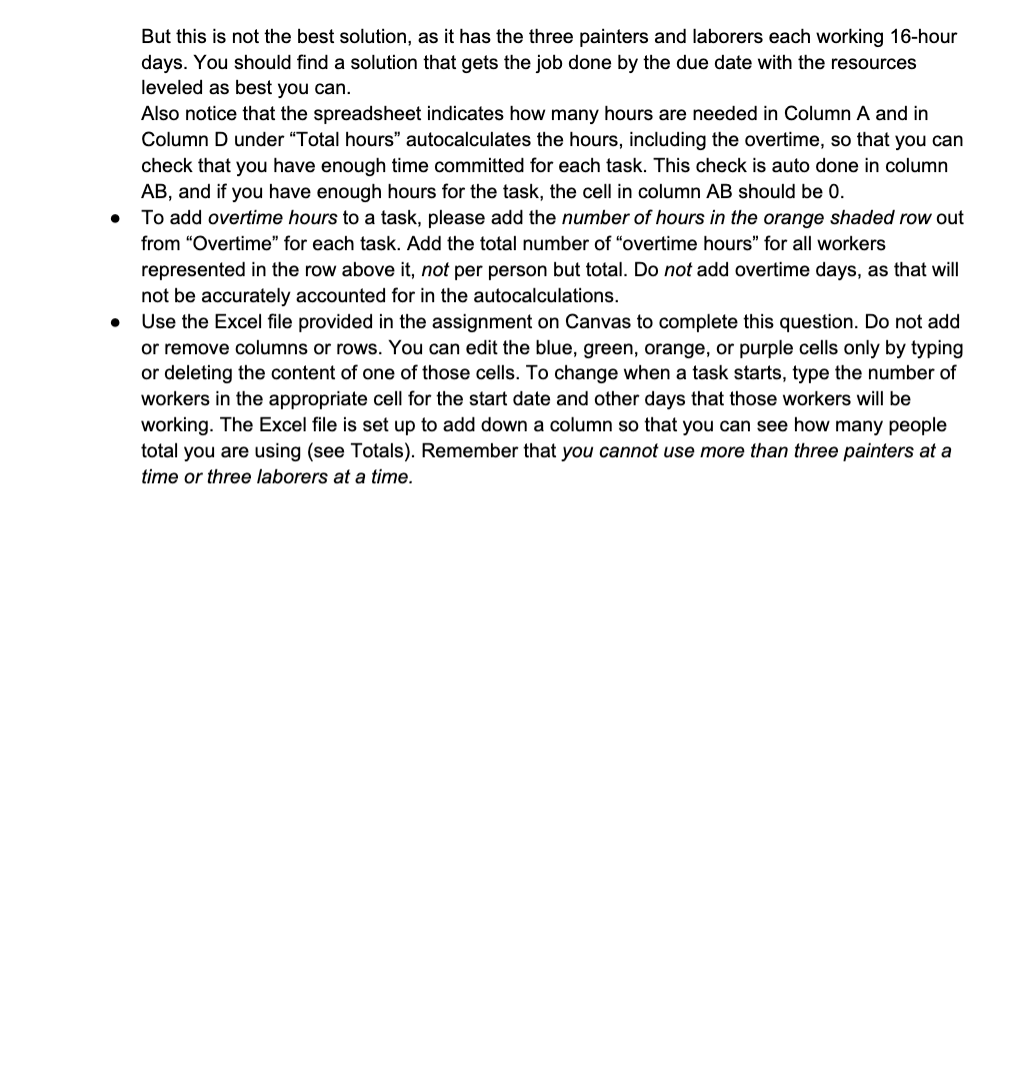
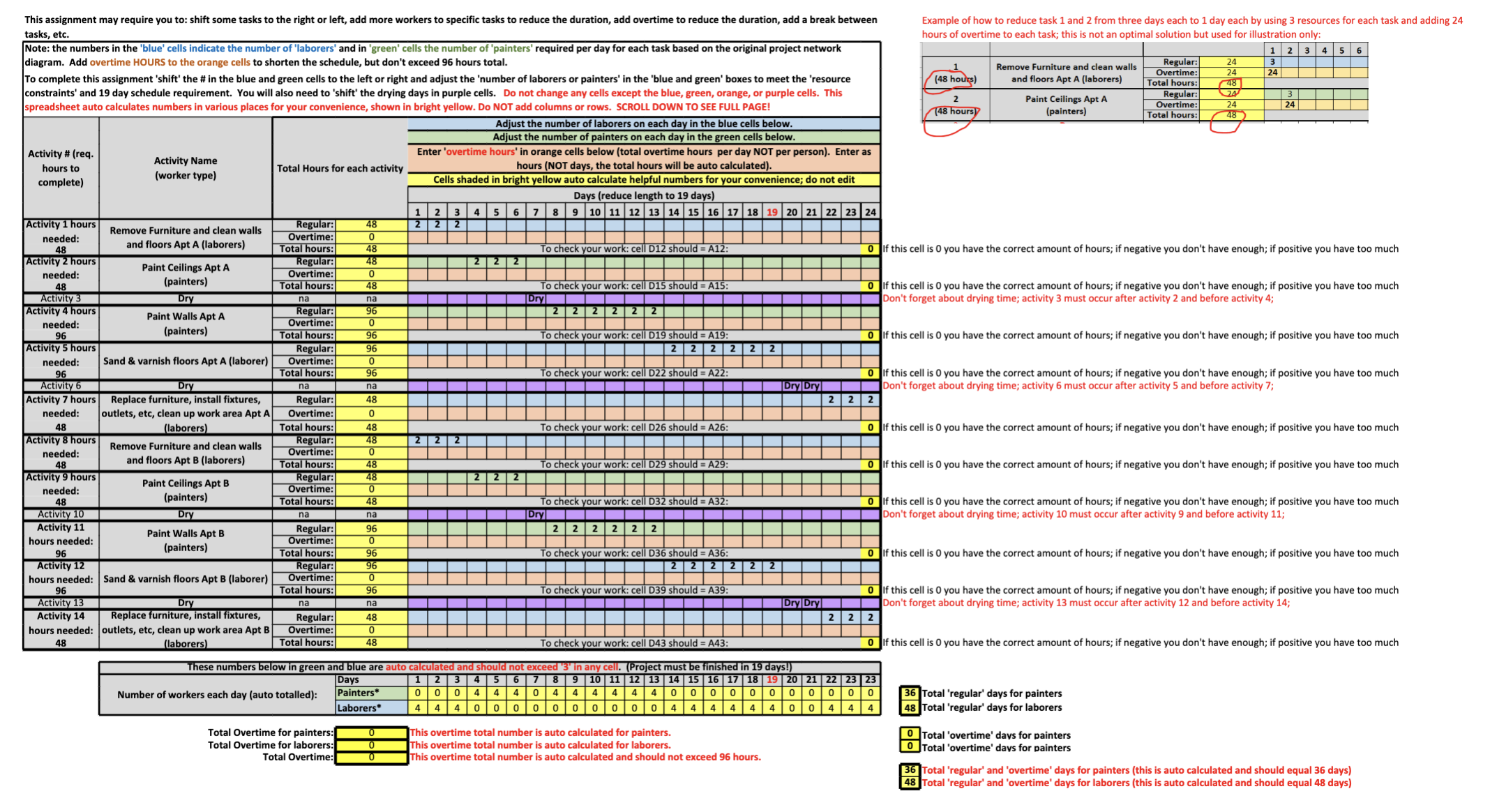
2. Using the figure below, the requirements listed on the next page, and the attached Excel file, perform resource-limited scheduling and, to an extent, some resource leveling. Assume the following: - Your company has been hired to paint two apartments-the owner is in a hurry to get them done so that the tenants can move in and start paying rent. To achieve this goal, the total project duration cannot exceed 19 days (including the 19th day), which is 5 days shorter than the original estimate in the figure. - The owner has offered a bonus to you if you get both apartments done within 19 days. Your initial schedule is considerably longer than that and is shown in the figure above. - You have searched your workforce and found three painters and three laborers who can be assigned to the project, and all have indicated a willingness to work overtime. Due to a labor shortage, you will notice in the Excel file that the current schedule is not possible, as it currently requires you to have four painters at a time for several days and four laborers at a time for several days. You must adjust the schedule so that you never exceed three painters and three laborers on any given day. - Looking at the bonus, you conclude that it is worth investing up to 96 hours of overtime to ensure that you get the bonus, which is worth twice the cost of the overtime. - Assume that the duration estimates for all tasks are based on 8 hours/day. If you add overtime to the project, you should assume any hours over 8 per day for any individual are considered overtime. - Within each apartment, the sequence of tasks is required to be as shown-for example, the walls in Apartment A cannot begin to be painted until the ceiling is completely painted and dried to allow taping the edges of the ceiling before the walls can start to be painted. - Painters can only paint, and laborers can only move furniture, clean/prep, sand, and varnish floors. - It is possible to increase the number of resources of a particular skill above what is indicated in the figure above to accelerate any task. However, keep in mind that you only have three painters and three laborers that can work on any given day. For example, the network diagram indicates that it takes two laborers 3 days to complete Task 1 ( 2 laborers * 3 days * 8 hours/day =48 hours) and two painters 3 days to complete Task 2 in Apartment A ( 2 painters * 3 days * 8 hours/day =48 hours). You can add another laborer to Task 1 and another painter to Task 2 to shorten the duration to 2 days ( 3 laborers or 3 painters 2 days 8 hours/day =48 hours). - If you need to shorten the duration of the task further, you need to add overtime hours. For example, if you added 24 overtime hours to Task 1 and 24 hours of overtime to Task 2 , in Apartment A you could reduce these two tasks to 1 day each. Task 1: (3 laborers * 1 day * 8 hours/day =24 hours plus 24 hours of overtime =48 hours for Task 1 ; and for Task 2 : (3 painters * 1 day * 8 hours/day =24 hours plus 24 hours of overtime =48 hours for Task 2 . You would adjust the Excel sheet as shown below. (This is just an example; it is not part of the answer, as there are solutions that provide more leveled resource utilization (:). For example, this is the current layout for Tasks 1 and 2 : If you use three laborers on Day 1 and 24 hours of overtime on Day 1 for Task 1 , you can get it done in 1 day. The same for Task 2 with three painters on Day 2 and 24 hours of overtime on Day 2 . This is what it would look like: But this is not the best solution, as it has the three painters and laborers each working 16-hour days. You should find a solution that gets the job done by the due date with the resources leveled as best you can. Also notice that the spreadsheet indicates how many hours are needed in Column A and in Column D under "Total hours" autocalculates the hours, including the overtime, so that you can check that you have enough time committed for each task. This check is auto done in column AB, and if you have enough hours for the task, the cell in column AB should be 0 . To add overtime hours to a task, please add the number of hours in the orange shaded row out from "Overtime" for each task. Add the total number of "overtime hours" for all workers represented in the row above it, not per person but total. Do not add overtime days, as that will not be accurately accounted for in the autocalculations. Use the Excel file provided in the assignment on Canvas to complete this question. Do not add or remove columns or rows. You can edit the blue, green, orange, or purple cells only by typing or deleting the content of one of those cells. To change when a task starts, type the number of workers in the appropriate cell for the start date and other days that those workers will be working. The Excel file is set up to add down a column so that you can see how many people total you are using (see Totals). Remember that you cannot use more than three painters at a time or three laborers at a time. This assignment may require you to: shift some tasks to the right or left, add more workers to specific tasks to reduce the duration, add overtime to reduce the duration, add a break between tasks, etc. Note: the numbers in the 'blue' cells indicate the number of 'laborers' and in 'green' cells the number of 'pain diagram. Add overtime HOURS to the orange cells to shorten the schedule, but don't exceed 96 hours total. To complete this assignment 'shift' the \# in the blue and green cells to the left or right and adjust the 'number of laborers or painters' in the 'blue and green' boxes to meet the 'resource constraints' and 19 day schedule requirement. You will also need to 'shift' the drying days in purple cells. Do not change any cells except the blue, green, orange, or purple cells. This spreadsheet auto calculates numbers in various places for your convenience, shown in bright yellow. Do NOT add columns or rows. SCROLL DOWN TO SEE FULL PAGE! These numbers below in green and blue are auto calculated and should not exceed ' 3 ' in any cell. (Project must be finished in 19 days!) Total Overtime for painters: Total Overtime for laborers: This overtime total number is auto calculated for painters. Total Overtime for laborers: This overtime total number is auto calculated for laborers. This overtime total number is auto calculated and should not exceed 96 hours. Example of how to reduce task 1 and 2 from three days each to 1 day each by using 3 resources for each task and adding 24 hours of overtime to each task; this is not an optimal solution but used for illustration only: f this cell is 0 you have the correct amount of hours; if negative you don't have enough; if positive you have too much 36 Total 'regular' days for painters Total 'regular' days for laborers \begin{tabular}{|l|l|} \hline 0 & Total 'overtime' davs for painters \\ \hline 0 & Total 'overtime' davs for painters \\ \hline \end{tabular} 36 Total 'regular' and 'overtime' days for painters (this is auto calculated and should equal 36 days) 2. Using the figure below, the requirements listed on the next page, and the attached Excel file, perform resource-limited scheduling and, to an extent, some resource leveling. Assume the following: - Your company has been hired to paint two apartments-the owner is in a hurry to get them done so that the tenants can move in and start paying rent. To achieve this goal, the total project duration cannot exceed 19 days (including the 19th day), which is 5 days shorter than the original estimate in the figure. - The owner has offered a bonus to you if you get both apartments done within 19 days. Your initial schedule is considerably longer than that and is shown in the figure above. - You have searched your workforce and found three painters and three laborers who can be assigned to the project, and all have indicated a willingness to work overtime. Due to a labor shortage, you will notice in the Excel file that the current schedule is not possible, as it currently requires you to have four painters at a time for several days and four laborers at a time for several days. You must adjust the schedule so that you never exceed three painters and three laborers on any given day. - Looking at the bonus, you conclude that it is worth investing up to 96 hours of overtime to ensure that you get the bonus, which is worth twice the cost of the overtime. - Assume that the duration estimates for all tasks are based on 8 hours/day. If you add overtime to the project, you should assume any hours over 8 per day for any individual are considered overtime. - Within each apartment, the sequence of tasks is required to be as shown-for example, the walls in Apartment A cannot begin to be painted until the ceiling is completely painted and dried to allow taping the edges of the ceiling before the walls can start to be painted. - Painters can only paint, and laborers can only move furniture, clean/prep, sand, and varnish floors. - It is possible to increase the number of resources of a particular skill above what is indicated in the figure above to accelerate any task. However, keep in mind that you only have three painters and three laborers that can work on any given day. For example, the network diagram indicates that it takes two laborers 3 days to complete Task 1 ( 2 laborers * 3 days * 8 hours/day =48 hours) and two painters 3 days to complete Task 2 in Apartment A ( 2 painters * 3 days * 8 hours/day =48 hours). You can add another laborer to Task 1 and another painter to Task 2 to shorten the duration to 2 days ( 3 laborers or 3 painters 2 days 8 hours/day =48 hours). - If you need to shorten the duration of the task further, you need to add overtime hours. For example, if you added 24 overtime hours to Task 1 and 24 hours of overtime to Task 2 , in Apartment A you could reduce these two tasks to 1 day each. Task 1: (3 laborers * 1 day * 8 hours/day =24 hours plus 24 hours of overtime =48 hours for Task 1 ; and for Task 2 : (3 painters * 1 day * 8 hours/day =24 hours plus 24 hours of overtime =48 hours for Task 2 . You would adjust the Excel sheet as shown below. (This is just an example; it is not part of the answer, as there are solutions that provide more leveled resource utilization (:). For example, this is the current layout for Tasks 1 and 2 : If you use three laborers on Day 1 and 24 hours of overtime on Day 1 for Task 1 , you can get it done in 1 day. The same for Task 2 with three painters on Day 2 and 24 hours of overtime on Day 2 . This is what it would look like: But this is not the best solution, as it has the three painters and laborers each working 16-hour days. You should find a solution that gets the job done by the due date with the resources leveled as best you can. Also notice that the spreadsheet indicates how many hours are needed in Column A and in Column D under "Total hours" autocalculates the hours, including the overtime, so that you can check that you have enough time committed for each task. This check is auto done in column AB, and if you have enough hours for the task, the cell in column AB should be 0 . To add overtime hours to a task, please add the number of hours in the orange shaded row out from "Overtime" for each task. Add the total number of "overtime hours" for all workers represented in the row above it, not per person but total. Do not add overtime days, as that will not be accurately accounted for in the autocalculations. Use the Excel file provided in the assignment on Canvas to complete this question. Do not add or remove columns or rows. You can edit the blue, green, orange, or purple cells only by typing or deleting the content of one of those cells. To change when a task starts, type the number of workers in the appropriate cell for the start date and other days that those workers will be working. The Excel file is set up to add down a column so that you can see how many people total you are using (see Totals). Remember that you cannot use more than three painters at a time or three laborers at a time. This assignment may require you to: shift some tasks to the right or left, add more workers to specific tasks to reduce the duration, add overtime to reduce the duration, add a break between tasks, etc. Note: the numbers in the 'blue' cells indicate the number of 'laborers' and in 'green' cells the number of 'pain diagram. Add overtime HOURS to the orange cells to shorten the schedule, but don't exceed 96 hours total. To complete this assignment 'shift' the \# in the blue and green cells to the left or right and adjust the 'number of laborers or painters' in the 'blue and green' boxes to meet the 'resource constraints' and 19 day schedule requirement. You will also need to 'shift' the drying days in purple cells. Do not change any cells except the blue, green, orange, or purple cells. This spreadsheet auto calculates numbers in various places for your convenience, shown in bright yellow. Do NOT add columns or rows. SCROLL DOWN TO SEE FULL PAGE! These numbers below in green and blue are auto calculated and should not exceed ' 3 ' in any cell. (Project must be finished in 19 days!) Total Overtime for painters: Total Overtime for laborers: This overtime total number is auto calculated for painters. Total Overtime for laborers: This overtime total number is auto calculated for laborers. This overtime total number is auto calculated and should not exceed 96 hours. Example of how to reduce task 1 and 2 from three days each to 1 day each by using 3 resources for each task and adding 24 hours of overtime to each task; this is not an optimal solution but used for illustration only: f this cell is 0 you have the correct amount of hours; if negative you don't have enough; if positive you have too much 36 Total 'regular' days for painters Total 'regular' days for laborers \begin{tabular}{|l|l|} \hline 0 & Total 'overtime' davs for painters \\ \hline 0 & Total 'overtime' davs for painters \\ \hline \end{tabular} 36 Total 'regular' and 'overtime' days for painters (this is auto calculated and should equal 36 days)
Step by Step Solution
There are 3 Steps involved in it

Get step-by-step solutions from verified subject matter experts
 Study Help