







Question: 2.2 Question 2 Implement Java Interface (assesses the ET2 CEAB indicator) In the same project file, create a new package and named Question2. In this
2.2 Question 2 Implement Java Interface (assesses the ET2 CEAB indicator)
-
In the same project file, create a new package and named Question2.
-
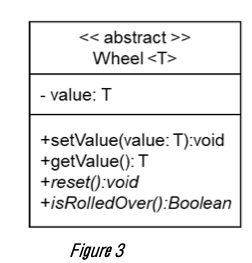
In this package, create a new generic type abstract class as shown in Figure 3.
-
This class maintain the value of the wheel stored in the field value. You need to implement the body of the methods setValue() and getValue, and define the method reset() and isRolledOver() as abstract methods.
-
The purpose of rest() method is to set the value field to the minimum value of the wheel, and the purpose of isRolledOver() method is to return whether the last wheel step caused a rollover.
Figure 3
-
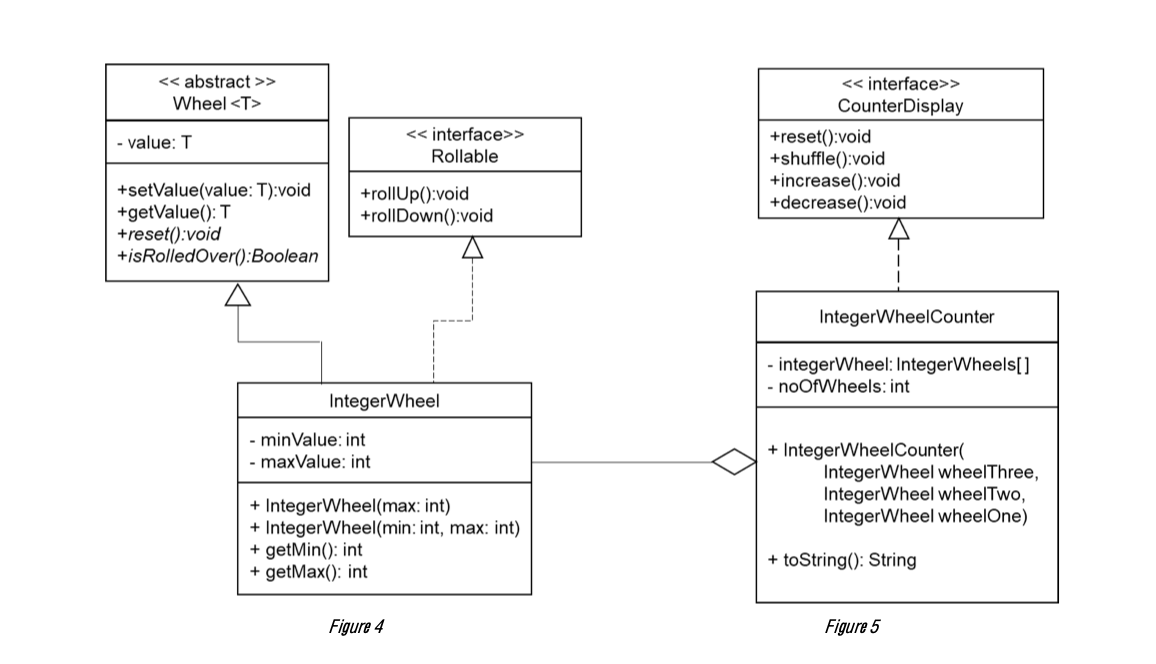
In the same Question2 package, create a new class and name it IntegerWheel as shown in Figure 4. This class should provide body implementation for the rest() and isRolledOver() methods in addition to a full implementation to the interface Rollable.
-
The constructor with one argument will initialize the minValue by 0, and the maxValue by max, and set the wheel value to max. The constructor with two arguments will initialize the minValue by min and the maxValue by max, and set the wheel value to min.
-
This class records a non-negative count value that is between a minimum and a maximum value. Rolling up the wheel beyond its maximum will roll it over to the minimum value. Rolling down the wheel below its minimum will roll it over to the maximum value.
-
Write a new class named IntegerWheelCounter that implements the CounterDisplay interface and references the IntegerWheel class, see Figure 5 above. This class maintains a collection of three wheels of type IntegerWheel.
-
Implement the toString() method to return a string that represent the IntegerWheelCounter object as shown in the given video ClockDemo.mp4.

ClockDemo.java file:
package Question2; import java.util.Timer; import java.util.TimerTask; public class ClockDemo extends TimerTask { static IntegerWheel seconds = new IntegerWheel(0, 59); static IntegerWheel minutes = new IntegerWheel(0, 59); static IntegerWheel hours = new IntegerWheel(0, 23); static IntegerWheelCounter theClock = new IntegerWheelCounter(hours, minutes, seconds); public void run() { System.out.print(" " + theClock); theClock.increase(); } public static void main(String[] args) { System.out.println("Wheels based clock"); System.out.println("=================="); System.out.println("HH:MM:SS"); // Starts at any random time theClock.shuffle(); Timer timer = new Timer(); timer.schedule(new ClockDemo(), 0, 1000); } }TimerDemo.java file:
package Question2; import java.util.Timer; import java.util.TimerTask; public class TimerDemo extends TimerTask { static IntegerWheel seconds = new IntegerWheel(20); static IntegerWheel minutes = new IntegerWheel(0); static IntegerWheel hours = new IntegerWheel(0); static IntegerWheelCounter theTimer = new IntegerWheelCounter(hours, minutes, seconds); static Timer timer = new Timer(); public void run() { System.out.print(" " + theTimer); if (theTimer.toString().equals("00:00:00") ) { { timer.cancel(); timer.purge(); return; } } theTimer.decrease(); } public static void main(String[] args) { System.out.println("Wheels based timer"); System.out.println("=================="); timer.schedule(new TimerDemo(), 0, 1000); } }
> Wheel
Step by Step Solution
There are 3 Steps involved in it

Get step-by-step solutions from verified subject matter experts
 Study Help