Question: code for rollable interface & CounterDisplay interface package Question1; interface Rollable { public void rollUp(); public void rollDown(); } interface CounterDisplay { public void reset();
code for rollable interface & CounterDisplay interface
package Question1;
interface Rollable { public void rollUp(); public void rollDown(); }
interface CounterDisplay { public void reset(); public void shuffle(); public void increase(); public void decrease(); }
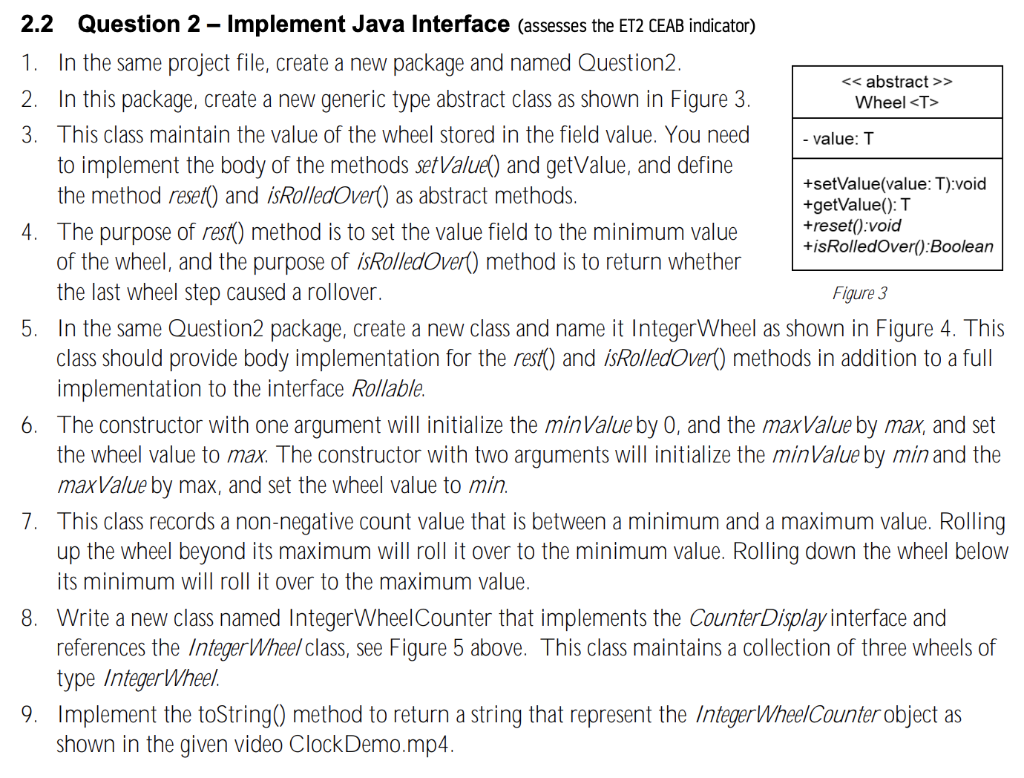
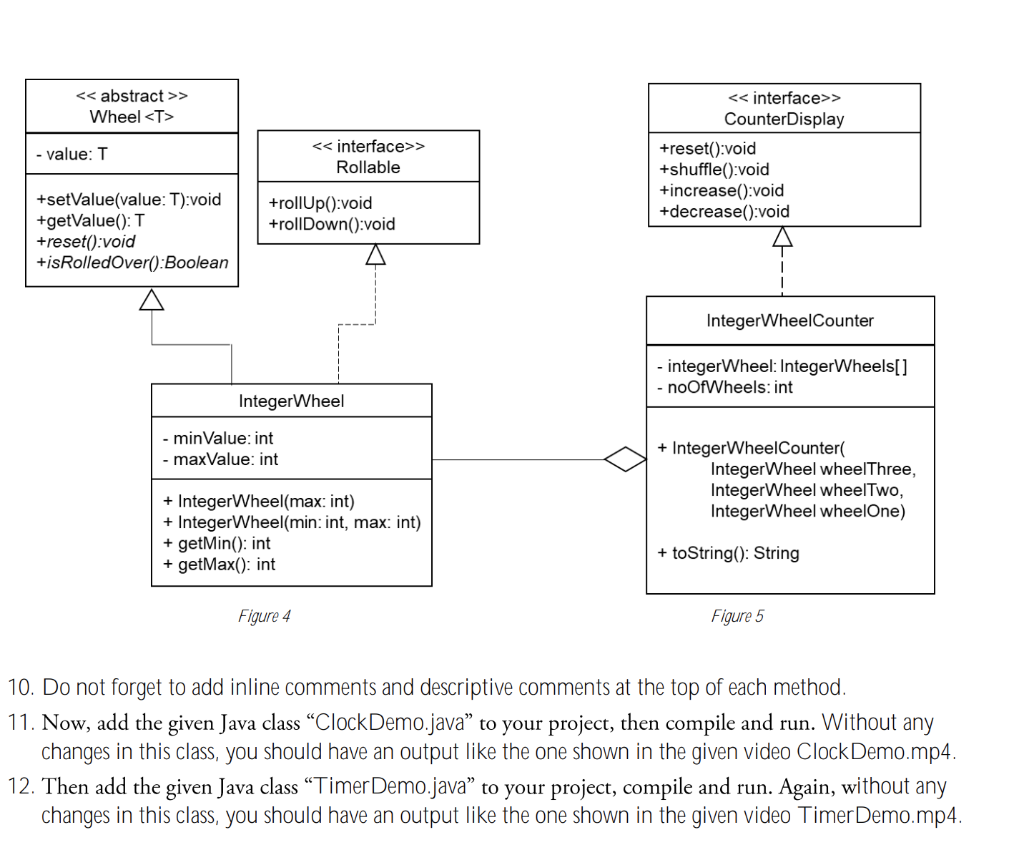
> Wheel - value: T 2.2 Question 2 Implement Java Interface (assesses the ET2 CEAB indicator) 1. In the same project file, create a new package and named Question2. 2. In this package, create a new generic type abstract class as shown in Figure 3. 3. This class maintain the value of the wheel stored in the field value. You need to implement the body of the methods set Valuel) and getValue, and define the method reset() and isRolledOver() as abstract methods. +setValue(value: T):void +getValue(): T 4. The purpose of rest() method is to set the value field to the minimum value +reset():void +isRolledOver():Boolean of the wheel, and the purpose of isRolledOver() method is to return whether the last wheel step caused a rollover. Figure 3 5. In the same Question2 package, create a new class and name it Integer Wheel as shown in Figure 4. This class should provide body implementation for the rest() and isRolledOver() methods in addition to a full implementation to the interface Rollable. 6. The constructor with one argument will initialize the minValue by 0, and the maxValue by max, and set the wheel value to max. The constructor with two arguments will initialize the minValue by min and the maxValue by max, and set the wheel value to min. 7. This class records a non-negative count value that is between a minimum and a maximum value. Rolling up the wheel beyond its maximum will roll it over to the minimum value. Rolling down the wheel below its minimum will roll it over to the maximum value. 8. Write a new class named Integer WheelCounter that implements the Counter Display interface and references the Integer Wheel class, see Figure 5 above. This class maintains a collection of three wheels of type IntegerWheel. 9. Implement the toString() method to return a string that represent the Integer WheelCounter object as shown in the given video Clock Demo.mp4. > Wheel - value: T > Rollable > CounterDisplay +reset():void +shuffle():void +increase():void +decrease():void +setValue(value: T):void +getValue(): T +reset():void +isRolledOver():Boolean +rollUp():void +rollDown():void IntegerWheelCounter - integerWheel: IntegerWheels[] - noOfWheels: int Integer Wheel - minValue: int - maxValue: int + IntegerWheelCounter Integer Wheel wheelThree, Integer Wheel wheelTwo, Integer Wheel wheelOne) Integer Wheel(max: int) + Integer Wheel(min: int, max: int) + getMin(): int + getMax(): int + toString(): String Figure 4 Figure 5 10. Do not forget to add inline comments and descriptive comments at the top of each method. 11. Now, add the given Java class Clock Demo.java to your project, then compile and run. Without any changes in this class, you should have an output like the one shown in the given video Clock Demo.mp4. 12. Then add the given Java class Timer Demo.java to your project, compile and run. Again, without any changes in this class, you should have an output like the one shown in the given video Timer Demo.mp4. > Wheel - value: T 2.2 Question 2 Implement Java Interface (assesses the ET2 CEAB indicator) 1. In the same project file, create a new package and named Question2. 2. In this package, create a new generic type abstract class as shown in Figure 3. 3. This class maintain the value of the wheel stored in the field value. You need to implement the body of the methods set Valuel) and getValue, and define the method reset() and isRolledOver() as abstract methods. +setValue(value: T):void +getValue(): T 4. The purpose of rest() method is to set the value field to the minimum value +reset():void +isRolledOver():Boolean of the wheel, and the purpose of isRolledOver() method is to return whether the last wheel step caused a rollover. Figure 3 5. In the same Question2 package, create a new class and name it Integer Wheel as shown in Figure 4. This class should provide body implementation for the rest() and isRolledOver() methods in addition to a full implementation to the interface Rollable. 6. The constructor with one argument will initialize the minValue by 0, and the maxValue by max, and set the wheel value to max. The constructor with two arguments will initialize the minValue by min and the maxValue by max, and set the wheel value to min. 7. This class records a non-negative count value that is between a minimum and a maximum value. Rolling up the wheel beyond its maximum will roll it over to the minimum value. Rolling down the wheel below its minimum will roll it over to the maximum value. 8. Write a new class named Integer WheelCounter that implements the Counter Display interface and references the Integer Wheel class, see Figure 5 above. This class maintains a collection of three wheels of type IntegerWheel. 9. Implement the toString() method to return a string that represent the Integer WheelCounter object as shown in the given video Clock Demo.mp4. > Wheel - value: T > Rollable > CounterDisplay +reset():void +shuffle():void +increase():void +decrease():void +setValue(value: T):void +getValue(): T +reset():void +isRolledOver():Boolean +rollUp():void +rollDown():void IntegerWheelCounter - integerWheel: IntegerWheels[] - noOfWheels: int Integer Wheel - minValue: int - maxValue: int + IntegerWheelCounter Integer Wheel wheelThree, Integer Wheel wheelTwo, Integer Wheel wheelOne) Integer Wheel(max: int) + Integer Wheel(min: int, max: int) + getMin(): int + getMax(): int + toString(): String Figure 4 Figure 5 10. Do not forget to add inline comments and descriptive comments at the top of each method. 11. Now, add the given Java class Clock Demo.java to your project, then compile and run. Without any changes in this class, you should have an output like the one shown in the given video Clock Demo.mp4. 12. Then add the given Java class Timer Demo.java to your project, compile and run. Again, without any changes in this class, you should have an output like the one shown in the given video Timer Demo.mp4









 Study Help