







Question: 22 Software engineering Step Action Get key codes from the input; store in the buffer as they are received. Test each code after receipt and
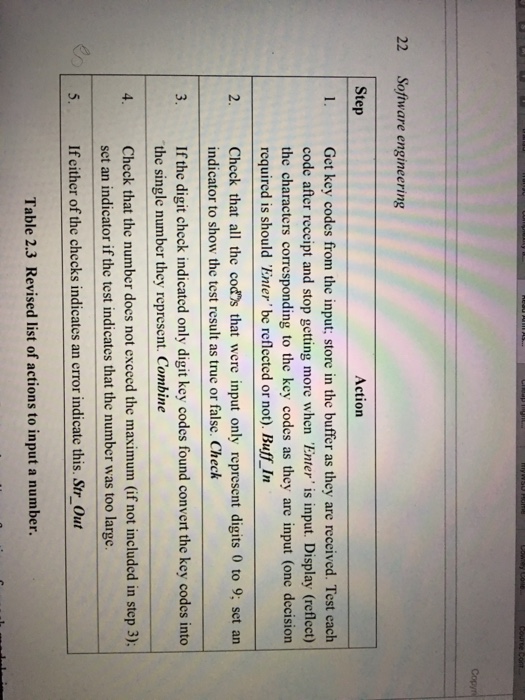
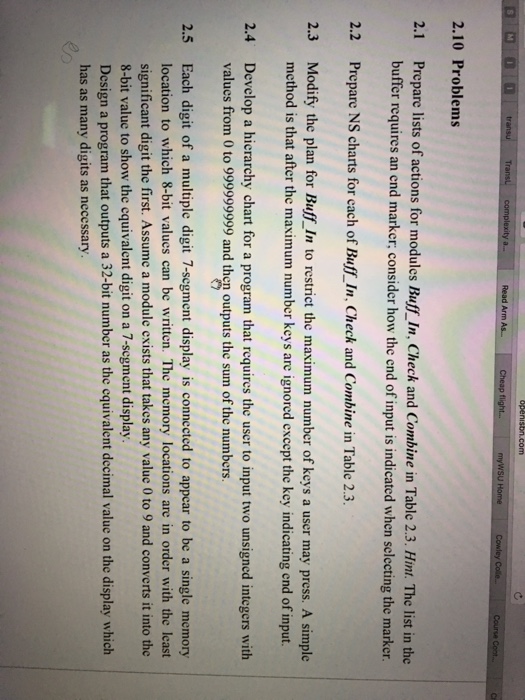
22 Software engineering Step Action Get key codes from the input; store in the buffer as they are received. Test each code after receipt and stop getting more when 'Enter' is input. Display (reflect) the characters corresponding to the key codes as they are input (one decision I. required is should 'Enter be reflected or not). Buff In 2. Chcck that all the cod's that were input only represent digits 0 to 9: set an 3. If the digit check indicated only digit key codes found convert the key codes into 4. Check that the number does not exceed the maximum (if not included in step 3); indicator to show the test result as truc or false. Check the single number they represent. Combine set an indicator if the test indicates that the number was too large Ifeither of the checks indicates an error indicate this. Str Out Table 2.3 Revised list of actions to input a number. 22 Software engineering Step Action Get key codes from the input; store in the buffer as they are received. Test each code after receipt and stop getting more when 'Enter' is input. Display (reflect) the characters corresponding to the key codes as they are input (one decision I. required is should 'Enter be reflected or not). Buff In 2. Chcck that all the cod's that were input only represent digits 0 to 9: set an 3. If the digit check indicated only digit key codes found convert the key codes into 4. Check that the number does not exceed the maximum (if not included in step 3); indicator to show the test result as truc or false. Check the single number they represent. Combine set an indicator if the test indicates that the number was too large Ifeither of the checks indicates an error indicate this. Str Out Table 2.3 Revised list of actions to input a number
Step by Step Solution
There are 3 Steps involved in it

Get step-by-step solutions from verified subject matter experts
 Study Help