





Question: 24) Where would you find the command to wrap text in Excel? a. Insert font b. Page Layout font c. Alignment d. General alignment 25)
24) Where would you find the command to wrap text
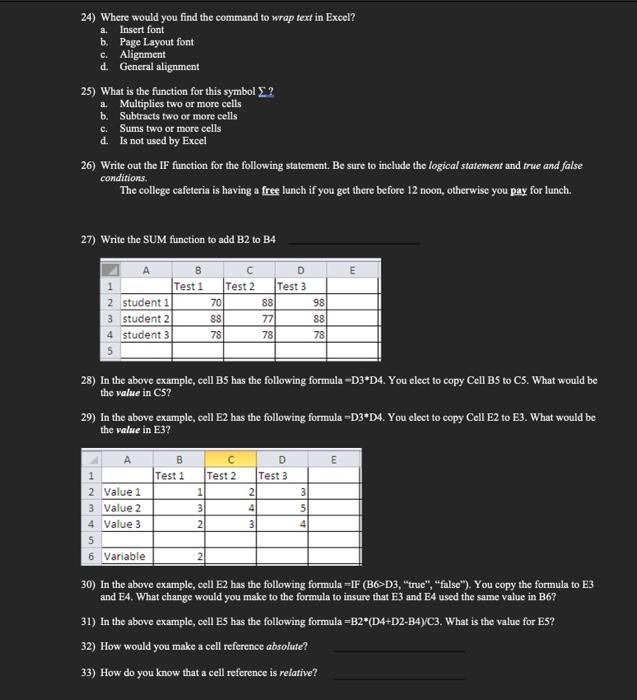
24) Where would you find the command to wrap text in Excel? a. Insert font b. Page Layout font c. Alignment d. General alignment 25) What is the function for this symbol ? a. Multiplies two or more cells b. Subtracts two or more cells c. Sums two or more cells d. Is not used by Excel 26) Write out the IF function for the following statement. Be sure to include the logical statement and true and false conditions. The college cafeteria is having a free lunch if you get there before 12 noon, otherwise you pay for lunch. 27) Write the SUM function to add B2 to B4 28) In the above example, cell B5 has the following formula D3D4. You elect to copy Cell B5 to C5. What would be the value in C5 ? 29) In the above example, cell E2 has the following formula = D3*D4. You elect to copy Cell E2 to E3. What would be the value in E3 ? 30) In the above example, cell E2 has the following formula =IF (B6>D3, "true", "false"). You copy the formula to B3 and E4. What change would you make to the formula to insure that E3 and E4 used the same value in B6 ? 31) In the above example, cell E5 has the following formula =B2(D4+D2B4)C3. What is the value for E5 ? 32) How would you make a cell reference absolute? 33) How do you know that a cell reference is relative

Step by Step Solution

There are 3 Steps involved in it

1 Expert Approved Answer
Step: 1 Unlock blur-text-image

Question Has Been Solved by an Expert!

Get step-by-step solutions from verified subject matter experts

Step: 2 Unlock
Step: 3 Unlock

Students Have Also Explored These Related General Management Questions!