





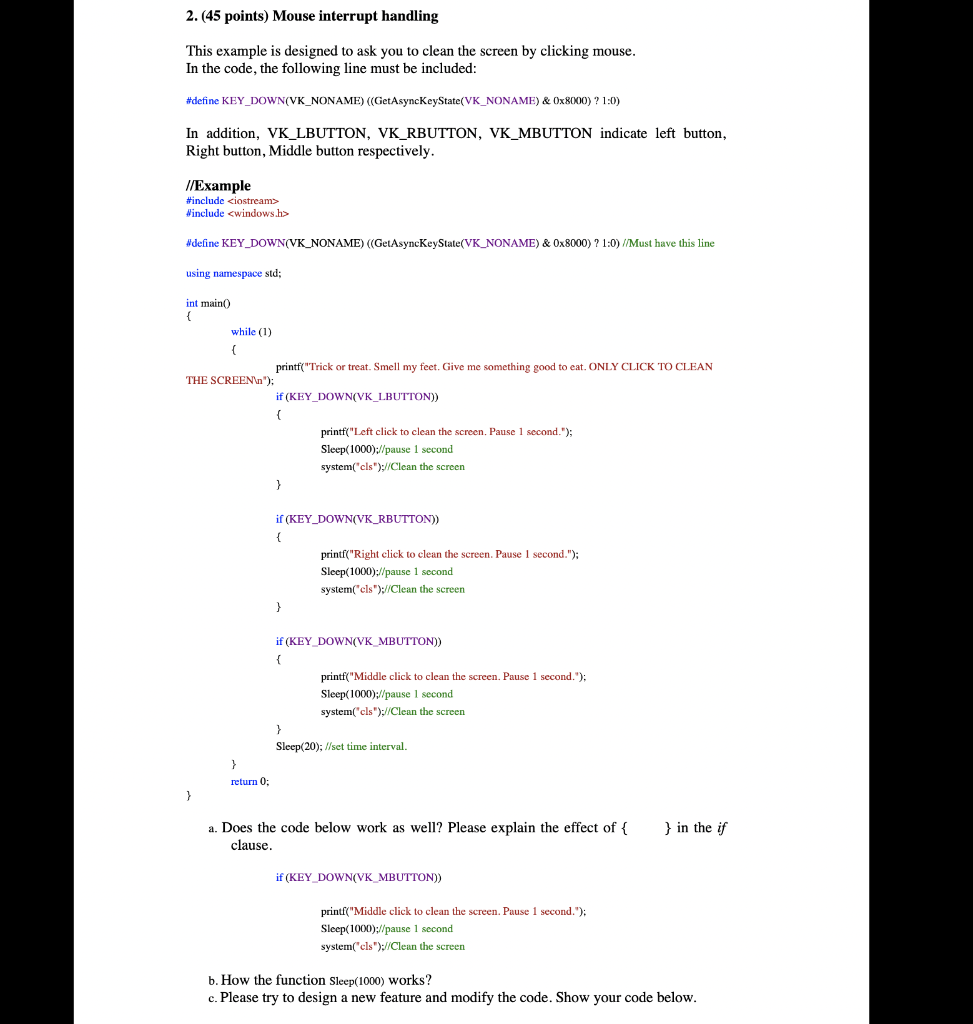
Question: 2.(45 points) Mouse interrupt handling This example is designed to ask you to clean the screen by clicking mouse. In the code, the following line
 2.(45 points) Mouse interrupt handling This example is designed to ask

2.(45 points) Mouse interrupt handling This example is designed to ask you to clean the screen by clicking mouse. In the code, the following line must be included: #define KEY_DOWN(VK_NONAME) ((GetAsynckeyState(VK_NONAME) & 0x8000) ? 1:0) In addition, VK_LBUTTON, VK_RBUTTON, VK_MBUTTON indicate left button, Right button, Middle button respectively. //Example #include #include #define KEY_DOWN(VK_NONAME) ((GetAsyncKeyState(VK_NONAME) & 0x8000) ? 1:0) //Must have this line using namespace std; int main() { while (1) ( printf("Trick or treat. Smell my feet. Give me something good to eat. ONLY CLICK TO CLEAN THE SCREEN "); if (KEY DOWN(VK_LBUTTON)) printf("Left click to clean the screen. Pause 1 second."); Sleep(1000);//pause 1 second system("cls");//Clean the screen } if (KEY_DOWN(VK_RBUTTON)) { printf("Right click to clean the screen. Pause 1 second."); Sleep(1000)://pause 1 second system("cls");//Clean the screen } if (KEY_DOWN(VK_MBUTTON)) { printf("Middle click to clean the screen. Pause 1 second."); Sleep(1000);//pause l second system("cls");//Clean the screen } Sleep(20); //set time interval. return 0; } a. Does the code below work as well? Please explain the effect of { clause. } in the if if (KEY_DOWN(VK_MBUTTON)) printf("Middle click to clean the screen. Puuse 1 second."); Sleep(1000)://pause 1 second system("cls");//Clean the screen b. How the function Sleep(1000) works? c. Please try to design a new feature and modify the code. Show your code below

Step by Step Solution

There are 3 Steps involved in it

1 Expert Approved Answer
Step: 1 Unlock blur-text-image
Question Has Been Solved by an Expert!

Get step-by-step solutions from verified subject matter experts

Step: 2 Unlock
Step: 3 Unlock

Students Have Also Explored These Related Databases Questions!