







Question: 3. Create an application to write your friends data to a file and read them back from the file. You may reuse the code from
3. Create an application to write your friends data to a file and read them back from the file. You may reuse the code from steps 1 and 2 but need to modify it so that it will ask the user to input the number of friends to enter, and will detect the end of the input file when reading it. Refer to Tutorial 9-3 for an example. (5 points) 4. Modify the application from step 2 to use a Structure to hold names and phone numbers. (5 points) CODE for WRITING _______________
Imports System.IO
Public Class Form1 Private Sub btnCreateFile_Click(sender As Object, e As EventArgs) Handles btnCreateFile.Click ' Constant for the number of friends Const intNUM_FRIENDS As Integer = 3
' Local variables Dim strFilename As String ' File name Dim strFriend As String ' Name of a friend Dim strPhone As String ' To hold a phone number Dim intCount As Integer ' Loop counter Dim friendFile As StreamWriter ' Object variable
' Get the file name from the user. strFilename = InputBox("Enter the filename.")
Try ' Open the file. friendFile = File.CreateText(strFilename)
' Get the data and write it to the file. For intCount = 1 To intNUM_FRIENDS ' Get a friend's name. strFriend = InputBox("Enter the name of friend " & "number " & intCount.ToString())
' Get a friend's phone number. strPhone = InputBox("Enter the that friend's " & "phone number.")
' Write the data to the file. friendFile.WriteLine(strFriend) friendFile.WriteLine(strPhone)
Next
' Close the file. friendFile.Close() Catch ' Error message MessageBox.Show("That file cannot be created.") End Try
End Sub
Private Sub btnExit_Click(sender As Object, e As EventArgs) Handles btnExit.Click ' Close the form Me.Close() End Sub End Class ____________ CODE FOR READING ___________
Imports System.IO
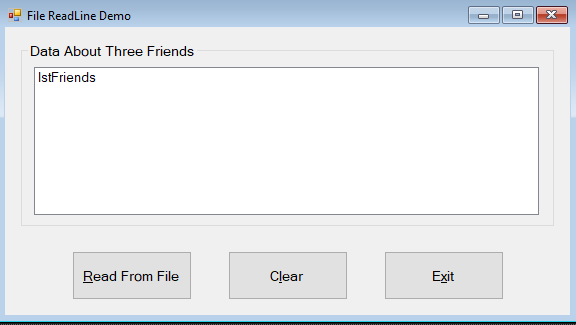
Public Class Form1 Private Sub btnRead_Click(sender As Object, e As EventArgs) Handles btnRead.Click ' Constant for the number of friends Const intNUM_FRIENDS As Integer = 3
' Local variables Dim friendFile As StreamReader ' Object variable Dim strFilename As String ' File name Dim strFriend As String ' Name of a friend Dim strPhone As String ' To hold a phone number Dim intCount As Integer ' Loop counter
' Get the file name from the user. strFilename = InputBox("Enter the filename.")
Try ' Open the file. friendFile = File.OpenText(strFilename)
' Read the data. For intCount = 1 To intNUM_FRIENDS ' Read a name and phone number from the file. strFriend = friendFile.ReadLine() strPhone = friendFile.ReadLine()
' Display the data in the list box. lstFriends.Items.Add("Friend Number " & intCount.ToString()) lstFriends.Items.Add("Name: " & strFriend) lstFriends.Items.Add("Phone: " & strPhone) lstFriends.Items.Add("") ' Add a blank line Next intCount
' Close the file. friendFile.Close() Catch MessageBox.Show("That file cannot be opened.") End Try
End Sub
Private Sub btnClear_Click(sender As Object, e As EventArgs) Handles btnClear.Click ' Clear the list box. lstFriends.Items.Clear() End Sub
Private Sub btnExit_Click(sender As Object, e As EventArgs) Handles btnExit.Click ' Close the form Me.Close() End Sub End Class 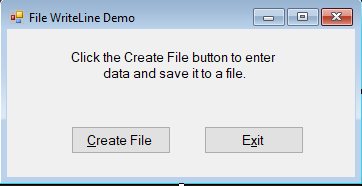
File WriteLine Demo Click the Create File button to enter data and save it to a file. Create File Exit
Step by Step Solution
There are 3 Steps involved in it

Get step-by-step solutions from verified subject matter experts
 Study Help