







Question: Starting out With VB 7th ed, Chapter 9, Programming Challenge #3 Hi! I'm trying to figure out Programming Challenge #3 in Chapter 9 of Starting
Starting out With VB 7th ed, Chapter 9, Programming Challenge #3
Hi! I'm trying to figure out Programming Challenge #3 in Chapter 9 of Starting Out with Visual Basic 7th edition. I tried using the posted solution guide and it was very difficult to follow. I just need help figuring out the errors. Here's a screenshot of the problem:
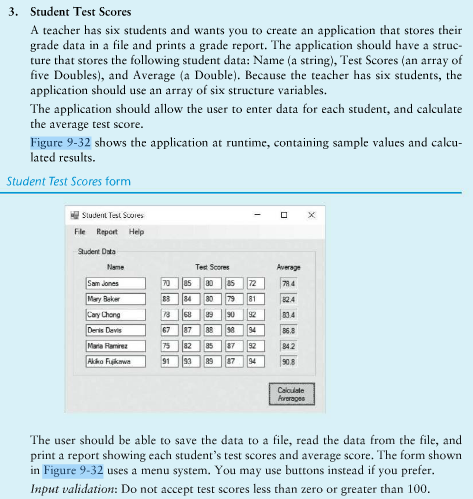
And here's what I have so far in the code:
Imports System.IO Imports System.IO.FileStream
Public Class StudentTestScores Public Function isValid(ByVal score As Integer) As Integer
If score >= 0 And score
End Function
Private Sub btnCalculate_Click(sender As Object, e As EventArgs) Handles btnCalculate.Click For inc1 = 0 To 5 s(inc1) = New MyStudent() ReDim (inc1).tScore(4) Next Try 'Student 1 scores s(0).strName = txtStudent1 s(0).tScores(0) = isValid(Convert.ToInt32(Student1Grade1.Text)) s(0).tScores(1) = isValid(Convert.ToInt32(Student1Grade2.Text)) s(0).tScores(2) = isValid(Convert.ToInt32(Student1Grade3.Text)) s(0).tScores(3) = isValid(Convert.ToInt32(Student1Grade4.Text)) s(0).tScores(4) = isValid(Convert.ToInt32(Student1Grade5.Text)) 'Student 2 scores s(1).strName = txtStudent2 s(1).tScores(0) = isValid(Convert.ToInt32(Student2Grade1.Text)) s(1).tScores(1) = isValid(Convert.ToInt32(Student2Grade2.Text)) s(1).tScores(2) = isValid(Convert.ToInt32(Student2Grade3.Text)) s(1).tScores(3) = isValid(Convert.ToInt32(Student2Grade4.Text)) s(1).tScores(4) = isValid(Convert.ToInt32(Student2Grade5.Text)) 'Student 3 scores s(2).strName = txtStudent3 s(2).tScores(0) = isValid(Convert.ToInt32(Student3Grade1.Text)) s(2).tScores(1) = isValid(Convert.ToInt32(Student3Grade2.Text)) s(2).tScores(2) = isValid(Convert.ToInt32(Student3Grade3.Text)) s(2).tScores(3) = isValid(Convert.ToInt32(Student3Grade4.Text)) s(2).tScores(4) = isValid(Convert.ToInt32(Student3Grade5.Text)) 'Student 4 scores s(3).strName = txtStudent2 s(3).tScores(0) = isValid(Convert.ToInt32(Student4Grade1.Text)) s(3).tScores(1) = isValid(Convert.ToInt32(Student4Grade2.Text)) s(3).tScores(2) = isValid(Convert.ToInt32(Student4Grade3.Text)) s(3).tScores(3) = isValid(Convert.ToInt32(Student4Grade4.Text)) s(3).tScores(4) = isValid(Convert.ToInt32(Student4Grade5.Text)) 'Student 5 scores s(4).strName = txtStudent2 s(4).tScores(0) = isValid(Convert.ToInt32(Student5Grade1.Text)) s(4).tScores(1) = isValid(Convert.ToInt32(Student5Grade2.Text)) s(4).tScores(2) = isValid(Convert.ToInt32(Student5Grade3.Text)) s(4).tScores(3) = isValid(Convert.ToInt32(Student5Grade4.Text)) s(4).tScores(4) = isValid(Convert.ToInt32(Student5Grade5.Text)) 'Student 6 scores s(5).strName = txtStudent2 s(5).tScores(0) = isValid(Convert.ToInt32(Student6Grade1.Text)) s(5).tScores(1) = isValid(Convert.ToInt32(Student6Grade2.Text)) s(5).tScores(2) = isValid(Convert.ToInt32(Student6Grade3.Text)) s(5).tScores(3) = isValid(Convert.ToInt32(Student6Grade4.Text)) s(5).tScores(4) = isValid(Convert.ToInt32(Student6Grade5.Text)) Catch ex As Exception MessageBox.Show("Enter a value between 0 to 100") End Try For inc1 = 0 To 5 s(inc1).intAverage += s(inc1).intScores(inc2) Next s(inc1).sAverage /= 5 Next lblAvg1.Text = s(0).sAverage.ToString("n2") lblAvg2.Text = s(1).sAverage.ToString("n2") lblAvg3.Text = s(2).sAverage.ToString("n2") lblAvg4.Text = s(3).sAverage.ToString("n2") lblAvg5.Text = s(4).sAverage.ToString("n2") lblAvg6.Text = s(5).sAverage.ToString("n2")
For inc1 = 0 To 5 Dim strStdRecord As String strStdRecord = s(inc1).strName For inc2 = 0 To 4 strStdRecord += "" + s(inc1).intScores(inc2).ToString("n2") Next strStdRecord += "" + inc1.sAverage.ToString Next End Sub
Private Sub mnuFileSave_Click(sender As Object, e As EventArgs) Handles mnuFileSave.Click Dim strFileName As String = InputBox("Enter filename :", "Filename prompt", "Testscores.txt") Dim saveFile As IO.StreamWriter = IO.File.CreateText(nameOfFile) For i = 0 To 5 saveFile.WriteLine(s(i).strName) saveFile.WriteLine(s(i).intScores(0)) saveFile.WriteLine(s(i).intScores(1)) saveFile.WriteLine(s(i).intScores(2)) saveFile.WriteLine(s(i).intScores(3)) saveFile.WriteLine(s(i).intScores(4))
saveFile.Close() Next End Sub
Private Sub mnuGenerateReport_Click(sender As Object, e As EventArgs) Handles mnuGenerateReport.Click Dim reportString As String = "" For i = 0 To 5 reportString = s(i).strName & vbTab reportString = s(i).intScores(0) & vbTab reportString = s(i).intScores(1) & vbTab reportString = s(i).intScores(2) & vbTab reportString = s(i).intScores(3) & vbTab reportString = s(i).intScores(4) & vbTab
reportString = s(i).intAverage & vbNewLine Next End Sub
Private Sub mnuHelpAbout_Click(sender As Object, e As EventArgs) Handles mnuHelpAbout.Click MessageBox.Show("This application allows you to enter the names and scores of 6 students. " & "It will average them, save them to a text file, and allow you to read " & "print a report out.") End Sub End Class Public Class MyStudent Public Property sName() As String Public tScore() As Integer Public Property sAverage() As Decimal End Class
3. Student Test Scores A teacher has six students and wants you to create an application that stores their grade data in a file and prints a grade report. The application should have a struc- ture that stores the following student data: Name (a string), Test Scores (an array of five Doubles), and Average (a Double). Because the teacher has six students, the application should use an array of six structure variables. The application should allow the user to enter data for each student, and calculate the average test score. Figure 9-32 shows the application at runtime, containing sample values and calcu- lated results Student Test Scores form Student Test Suures File Report Help Student Data Test Scores BOA B42 908 The user should be able to save the data to a file, read the data from the file, and print a report showing each student's test scores and average score. The form shown in Figure 9-32 uses a menu system. You may use buttons instead if you prefer Input validation: Do not accept test scores less than zero or greater than 100 3. Student Test Scores A teacher has six students and wants you to create an application that stores their grade data in a file and prints a grade report. The application should have a struc- ture that stores the following student data: Name (a string), Test Scores (an array of five Doubles), and Average (a Double). Because the teacher has six students, the application should use an array of six structure variables. The application should allow the user to enter data for each student, and calculate the average test score. Figure 9-32 shows the application at runtime, containing sample values and calcu- lated results Student Test Scores form Student Test Suures File Report Help Student Data Test Scores BOA B42 908 The user should be able to save the data to a file, read the data from the file, and print a report showing each student's test scores and average score. The form shown in Figure 9-32 uses a menu system. You may use buttons instead if you prefer Input validation: Do not accept test scores less than zero or greater than 100
Step by Step Solution
There are 3 Steps involved in it

Get step-by-step solutions from verified subject matter experts
 Study Help