







Question: 3. Create sequence for customer number start with 1 and end with 999. 4. Create view for all customers with their orders. 7. Create a
3. Create sequence for customer number start with 1 and end with 999.
4. Create view for all customers with their orders.
7. Create a query to display the cname,No_of_orders, Avg_order_amt, where the middle column is the total number of orders and last column is the average order amount for that customer.
8. Create a query to display the orders that were not shipped within 30 days of ordering.
10.Delete all orders for customer named "Sara".
12.Find the item with the maximum unit price.
13.List all customer names whose orders were shipped from a warehouse in the same city as they live in.
USE Oracle SQL
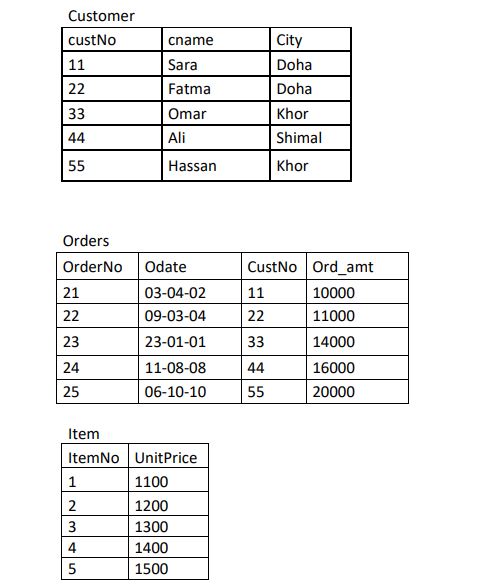
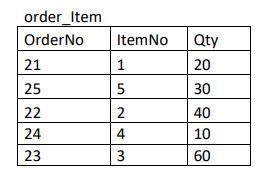
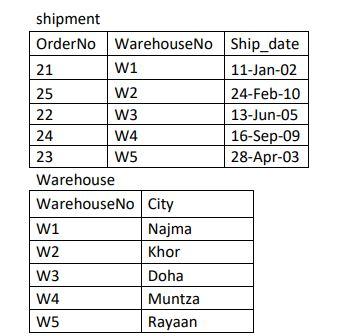
Customer custNo 11 22 33 cname Sara Fatma Omar Ali City Doha Doha Khor Shimal Khor 44 55 Hassan Orders Order No 21 22 Odate 03-04-02 09-03-04 23-01-01 CustNo Ord_amt 11 10000 22 11000 33 14000 23 44 24 25 11-08-08 06-10-10 16000 20000 55 Item ItemNo Unit Price 1 1100 2 1200 3 1300 4 1400 5 1500 Qty 20 order_Item Order No 21 25 22 24 23 un 30 Item No 1 5 2 4 3 40 10 60 shipment Order No WarehouseNo Ship_date 21 W1 11-Jan-02 25 W2 24-Feb-10 22 W3 13-Jun-05 24 W4 16-Sep-09 23 W5 28-Apr-03 Warehouse WarehouseNo City W1 Najma W2 Khor W3 Doha W4 Muntza W5 Rayaan
Step by Step Solution
There are 3 Steps involved in it

Get step-by-step solutions from verified subject matter experts
 Study Help