







Question: 3 D input file concept: Modify CubePers.java ( page 1 4 6 of the textbook ) , so that it reads in a data file
D input file concept: Modify CubePers.java page of the textbook so that it reads in a data file cubedatinstead of hardcoding in the program and displays the cube in perspective as output. You may run the program by typing the following: java CubePers cube.dat
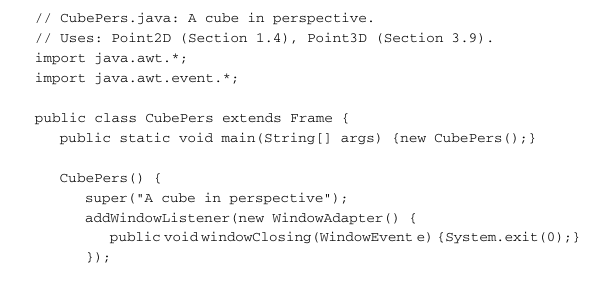
CubePers.java: A cube in perspective.
Uses: PointD Section PointD Section
import java.awt.;
import java.awt.event.;
public class CubePers extends Frame
public static void mainString argsnew CubePers;
CubePers
superA cube in perspective";
addwindowListenernew WindowAdapter
public voidwindowClosingWindowEvent eSystemexit;
;
setLayout new BorderLayout ;
add Center new CvCubePers;
Dimension dim getToolkitgetScreenSize;
setSizedimwidth dim.height ;
setLocationdimwidth dim.height ;
setVisibletrue;
class CvCubePers extends Canvas
int centerX, centerY;
Obj obj new Obj ;
int iXfloat x
return Math.roundcenterX x;
int iYfloat y
return Math.roundcenterY y;
void lineGraphics g int i int j
PointD p obj.vScri q obj.vScrj;
gdrawLineiXpx iYpy iXqx iYqy;
public void paintGraphics g
Dimension dim getSize;
int maxX dim.width maxY dim.height
minMaxXY Math.minmaxX maxY;
centerX maxX ; centerY maxY ;
obj.d obj.rho minMaxXY obj.objSize;
obj.eyeAndScreen ;
Horizontal edges at the bottom:
lineg; lineg; lineg; lineg;
Horizontal edges at the top:
lineg; lineg; lineg; lineg;
Vertical edges:
lineg; lineg; lineg; lineg;
class Obj Contains D object data
float rho, theta F phi F d objSize,
v v v v v v v v v;
Elements of viewing matrix V
PointD w; World coordinates
PointDl vScr; Screen coordinates
Obj
w new PointD;
vScr new PointD;
Bottom surface:
w new PointD;
w new PointD;
w new PointD;
w new PointD;
Top surface:
w new PointD;
w new PointD;
w new PointD;
w new PointD;
objSize float Math.sqrtF;
sqrt
distance between two opposite vertices.
rho objSize; For reasonable perspective effect
void initPersp
float costh float Math.costheta
sinth float Math.sintheta
cosph float Math.cosphi
sinph float Math.sinphi;
vsinth; vcosph costh; v sinph costh;
v costh; vcosph sinth; v sinph sinth;
v sinph; v cosph;
vrho;
void eyeAndScreen
initPersp;
for int i ; i ; i
PointD p wi;
float x v px v py
y v px v py v pz
z v px v py v pz v;
vScri new PointDd x zd y z;
Step by Step Solution
There are 3 Steps involved in it
1 Expert Approved Answer
Step: 1 Unlock

Question Has Been Solved by an Expert!
Get step-by-step solutions from verified subject matter experts
Step: 2 Unlock
Step: 3 Unlock
 Study Help