







Question: Principles of Web Technology a) Save this document with your name and the homework number somewhere in the file name. b) Type/paste your answers into
Principles of Web Technology
a) Save this document with your name and the homework number somewhere in the file name.
b) Type/paste your answers into the document.
c) Gather the following files into a ZIP file:
? This document
? Database Build script (.SQL)
? Inventory Manager page (.HTML)
? Database Interface page (.PHP)
? CSS file (.CSS)
? Any other optional files specific to your implementation
d) Submit the ZIP file to the Blackboard item where you downloaded this document.
You're continuing to operate your storefront business to sell products and/or services. Now you need to store and manage your product data in a database. Enhance the web site you created in Homework 4 with the following changes. You may start with your Homework 4 or the Homework 4 key on Blackboard.
YourCompany-DatabaseBuild.sql
This included SQL script creates database dbYourCompany and its one table tbProducts. Before you run the script in MySQL Workbench, edit the script to include your company name, and specify your product data in lines 41-43.
YourCompany-DatabaseInterface.php
This included PHP script is the interface to and handles communication with database dbYourCompany and its table. Modify the connection parameters in lines 31-34 per your MySQL installation. The script responds to the following three AJAX (XMLHttpRequest) requests from your Manager page:
? read this reads the entire tbProducts table and returns it as a JSON array. A pound sign precedes and follows the JSON data such that it may be parsed on the client side.
? updateCount this retrieves two GET parameters, count and id, and uses them to update the inventory count for the specified product ID. A pound sign precedes and follows the status message such that it may be parsed on the client side.
? updateCost this retrieves two GET parameters, cost and id, and uses them to update the inventory count for the specified product ID. A pound sign precedes and follows the status message such that it may be parsed on the client side.
Inventory Manager page
? Add ", v5" to the end of the page title and heading. This indicates that the page belongs to version 5 of the web site.
? Replace function getJSONFile with function getProductData. The data is no longer coming from a single file but from the database. Submit an AJAX request to the database interface to get the product data. Use a split("#") command to parse the response from the server, locate the product data, and parse it. In addition, loop through the product array to convert the product count, cost, and ID to numeric values.
? Modify function updateCount so that it replaces the current inventory count with the updated inventory count. Add a call to function updateDBCount defined below.
? Create function updateDBCount to submit an AJAX request to the database interface to update the product count for the selected product. Show an alert box containing the message returned from the server.
? Add label and text box to hold a new cost value.
? Add button Update to trigger update of the product cost for the selected product.
? Create function updateCost so that it validates the entered value, and stores it in the products array. Add a call to function updateDBCost defined below.
? Create function updateDBCost to submit an AJAX request to the database interface to update the product cost for the selected product. Show an alert box containing the message returned from the server.
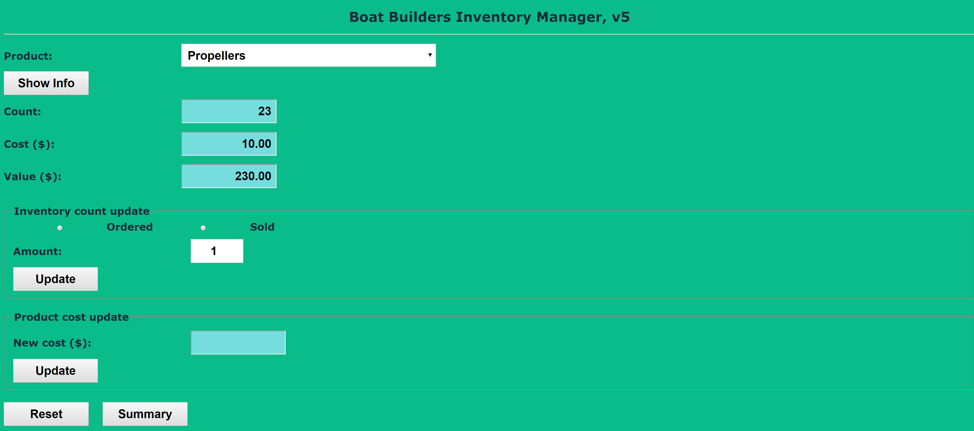
The updated interface should look like the following:
Database Build script
[your Database Build script here]*
If possible, format your code like this:
Font Courier New
Font size 9
Bold
[your Database Build run screenshot here]**
Database Interface page
[your Database Interface code here]*
If possible, format your code like this:
Font Courier New
Font size 9
Bold
Inventory Manager page
[your Inventory Manager page HTML code here]*
If possible, format your code like this:
Font Courier New
Font size 9
Bold
[your Inventory Manager page screenshot here]**
****DATABASE INTERFACE.PHP CODE****
// ---------------------------------------------------------------
// Set connection parameters and create connection
// ---------------------------------------------------------------
$host = "127.0.0.1";
$user = "root";
$password = "dano";
$database = "dbYourCompany";
$cxn = mysqli_connect($host, $user, $password, $database);
// Test which database request to perform
switch ($_GET["request"])
{
// -------------------------------------------------------------
// Read products data
// -------------------------------------------------------------
case "read":
// Create and submit query
$sql = "select * from tbProducts;";
$result = mysqli_query($cxn, $sql);
// Test if query failed
if($result == false)
echo "Read operation FAILED.";
else
{
$products = array();
while($row = mysqli_fetch_row($result))
array_push($products, array($row[0], $row[1], $row[2], $row[3]));
echo "#";
echo json_encode($products);
echo "#";
}
break;
// -------------------------------------------------------------
// Update count
// -------------------------------------------------------------
case "updateCount":
// Create and submit update query
$sql = "UPDATE tbProducts SET ProdCount=" . $_GET["count"] .
" WHERE ProdID =" . $_GET["id"];
$result = mysqli_query($cxn, $sql);
// Test if query failed
echo "#";
if($result == false)
echo "Update count operation FAILED.";
else
echo "Update count operation successful.";
echo "#";
break;
// -------------------------------------------------------------
// Update cost
// -------------------------------------------------------------
case "updateCost":
// Create and submit update query
$sql = "UPDATE tbProducts SET ProdCost=" . $_GET["cost"] .
" WHERE ProdID =" . $_GET["id"];
$result = mysqli_query($cxn, $sql);
// Test if query failed
echo "#";
if($result == false)
echo "Update cost operation FAILED.";
else
echo "Update cost operation successful.";
echo "#";
break;
// -------------------------------------------------------------
// Handle unknown request
// -------------------------------------------------------------
default:
echo "Error: unknown database request.";
}
?>
****DATABASE BUILD.SQL CODE****
-- ===================================================================
-- YourCompany-DatabaseBuild
-- This script builds the Boat Builders database and its table.
-- It also inserts data into the table.
-- ===================================================================
-- -------------------------------------------------------------------
-- Save selected MySQL settings
-- -------------------------------------------------------------------
SET @OLD_UNIQUE_CHECKS=@@UNIQUE_CHECKS, UNIQUE_CHECKS=0;
SET @OLD_FOREIGN_KEY_CHECKS=@@FOREIGN_KEY_CHECKS, FOREIGN_KEY_CHECKS=0;
SET @OLD_SQL_MODE=@@SQL_MODE, SQL_MODE='TRADITIONAL,ALLOW_INVALID_DATES';
-- -------------------------------------------------------------------
-- Delete and create database
-- -------------------------------------------------------------------
DROP SCHEMA IF EXISTS `dbYourCompany` ;
CREATE SCHEMA IF NOT EXISTS `dbYourCompany` DEFAULT CHARACTER SET utf8 ;
-- -------------------------------------------------------------------
-- Switch to dbYourCompany database
-- -------------------------------------------------------------------
USE dbYourCompany;
-- -------------------------------------------------------------------
-- Delete and create table `dbYourCompany`.`tbProducts`
-- -------------------------------------------------------------------
DROP TABLE IF EXISTS `dbYourCompany`.`tbProducts` ;
CREATE TABLE IF NOT EXISTS `dbYourCompany`.`tbProducts` (
`ProdName` VARCHAR(45) NOT NULL,
`ProdCount` INT NOT NULL,
`ProdCost` DECIMAL(10,2) NOT NULL,
`ProdID` INT NOT NULL AUTO_INCREMENT,
PRIMARY KEY (`ProdID`))
ENGINE = InnoDB;
-- -------------------------------------------------------------------
-- Insert data into table `dbYourCompany`.`tbProducts`
-- -------------------------------------------------------------------
INSERT INTO tbProducts (ProdName, ProdCount, ProdCost) VALUES
-- -------------------------------------------------------------------
-- Your data here
-- -------------------------------------------------------------------
SELECT * FROM tbProducts;
-- -------------------------------------------------------------------
-- Restore saved MySQL settings
-- -------------------------------------------------------------------
SET SQL_MODE=@OLD_SQL_MODE;
SET FOREIGN_KEY_CHECKS=@OLD_FOREIGN_KEY_CHECKS;
SET UNIQUE_CHECKS=@OLD_UNIQUE_CHECKS;
***FILE ADMIN PAGE SOLUTION CODE***
href="BoatBuilders-ExternalStyles.css">
Boat Builders File Admin, v4
***FILE ADMIN RESPONSE .PHP FILE SOLUTION***
href="BoatBuilders-ExternalStyles.css">
Boat Builders File Admin Response, v4
define(UPLOAD_FOLDER, 'uploads/');
define(SAFE_EXTENSION, 'json');
?>
****INVENTORY MANAGER FILE SOLUTION CODE***
href="BoatBuilders-ExternalStyles.css">
"use strict";
//================================================================
// Script-level variables
//================================================================
// Declare product variables
var count;
var cost;
var value;
var index;
// Declare products array
// -Columns include:
// Product name
// Inventory count
// Unit cost
var products;
//================================================================
// loadProductData
//================================================================
function loadProductData()
{
// Declare variables
var rawData;
var opt;
var txt;
// Get products data from server
getJSONFile();
// Loop to add products to combo box
for (var i = 0; i
{
opt = document.createElement("option");
txt = document.createTextNode(products[i][0]);
opt.appendChild(txt);
cmbProducts.appendChild(opt);
}
}
//================================================================
// getJSONFile
//================================================================
function getJSONFile()
{
// Attempt to get file from server
try
{
// Create server request
var xhttp = new XMLHttpRequest();
// Define callback function
xhttp.onreadystatechange = function()
{
if (this.readyState == 4 && this.status == 200)
{
products = JSON.parse(this.responseText);
}
};
// Define command and send
xhttp.open("GET", "uploads/Products.json", false);
xhttp.send();
}
catch (ex)
{
window.alert("Error" + " Name: " + ex.name +
" Message: " + ex.message + " Stack: " + ex.stack);
}
}
//================================================================
// resetControls
//================================================================
function resetControls()
{
cmbProducts.selectedIndex = 0;
resetProductInfo();
resetUpdateInfo();
}
//================================================================
// resetProductInfo
//================================================================
function resetProductInfo()
{
tCount.value = "";
tCost.value = "";
tValue.value = "";
rbOrdered.checked = false;
rbSold.checked = false;
tChange.value = 1;
}
//================================================================
// resetUpdateInfo
//================================================================
function resetUpdateInfo()
{
tNewCount.value = "";
tNewValue.value = "";
}
//================================================================
// roundNumber
//================================================================
function roundNumber(num)
{
return Math.round(num*100)/100;
}
//================================================================
// showProductInfo
//================================================================
function showProductInfo()
{
// Test whether product selected
resetProductInfo();
resetUpdateInfo();
if (cmbProducts.selectedIndex == 0)
alert("Error: no product selected.");
else
{
// Get index and corresponding values
index = cmbProducts.selectedIndex;
count = products[index][1];
cost = products[index][2];
// Show values
tCount.value = count;
tCost.value = cost.toFixed(2);
value = roundNumber(count * cost);
tValue.value = value.toFixed(2);
}
}
//================================================================
// showSummary
//================================================================
function showSummary()
{
// Declare variables
var inventoryCount;
var inventoryValue;
var qstring;
// Loop to count product inventory and show
inventoryCount = 0;
inventoryValue = 0;
for (var index = 1; index
{
// Get product values
count = products[index][1];
cost = products[index][2];
// Update inventory count and value
inventoryCount = inventoryCount + count;
inventoryValue = inventoryValue + (count * cost);
}
// Round inventory value
inventoryValue = roundNumber(inventoryValue);
inventoryValue = inventoryValue.toFixed(2);
// Create query string
qstring = "productCount=" + products.length;
qstring = qstring + "&inventoryCount=" + inventoryCount;
qstring = qstring + "&inventoryValue=" + inventoryValue;
open("BoatBuilders-InventorySummary.php?" + qstring, "_self");
}
//================================================================
// updateInventory
//================================================================
function updateInventory()
{
// Declare variables
var change;
var validChange;
// Test whether product selected
resetUpdateInfo();
if (cmbProducts.selectedIndex == 0)
alert("Error: no product selected.");
else
{
// Get index and corresponding values
index = cmbProducts.selectedIndex;
count = products[index][1];
cost = products[index][2];
// Get value
change = parseInt(tChange.value);
// Test if order or sale
if (rbOrdered.checked)
{
count = count + change;
validChange = true;
}
else if (rbSold.checked)
{
count = count - change;
if (count
{
alert("Error: number sold cannot exceed number in inventory.");
validChange = false;
}
else
{
validChange = true;
}
}
else
{
alert("Error: no transaction type selected.");
validChange = false;
}
// Test whether to show update info
if (validChange)
{
// Update inventory
products[index][1] = count;
// Clear and set storage fields
localStorage.removeItem("localArray");
localStorage.setItem("localArray", JSON.stringify(products));
// Show values
tNewCount.value = count;
value = roundNumber(count * cost);
tNewValue.value = value.toFixed(2);
}
}
}
Boat Builders Inventory Manager, v4
***INVENTORY SUMMARY .PHP FILE SOLUTION CODE***
href="BoatBuilders-ExternalStyles.css">
"use strict";
//================================================================
// showManager
//================================================================
function showManager()
{
window.open("BoatBuilders-InventoryManager.html", "_self");
}
Boat Builders Inventory Summary, v4
echo '
'" readonly>';
?>
echo '
'" readonly>';
?>
echo '
'" readonly>';
?>
Boat Builders Inventory Manager,v5 Product: Propellers Show Info 23 10.00 230.00 Count: Cost ($): Value ($): Inventory count update Ordered Sold Amount: Update Product cost update New cost ($): Update Reset Summary Boat Builders Inventory Manager,v5 Product: Propellers Show Info 23 10.00 230.00 Count: Cost ($): Value ($): Inventory count update Ordered Sold Amount: Update Product cost update New cost ($): Update Reset Summary
Step by Step Solution
There are 3 Steps involved in it

Get step-by-step solutions from verified subject matter experts
 Study Help