







Question: 3. In SSAS, What is Calculated Member? Based on exercise 5, create two new calculated memebers: total profit and Gross Profit Margin GPM = (Sales
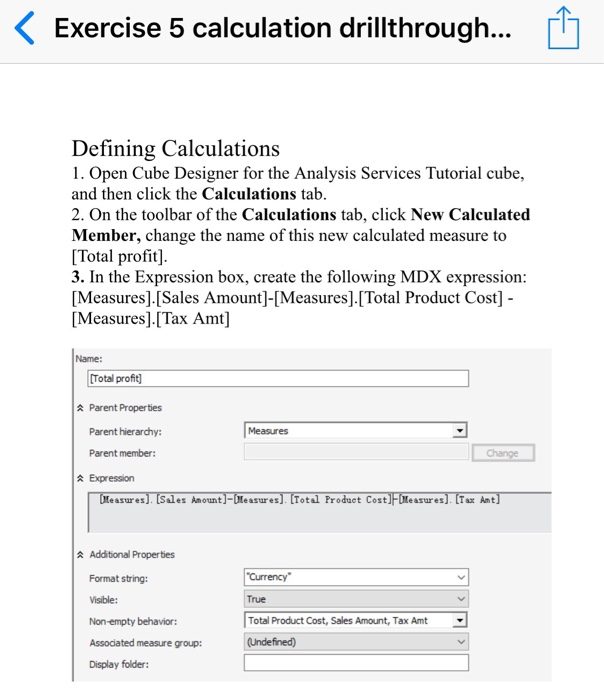
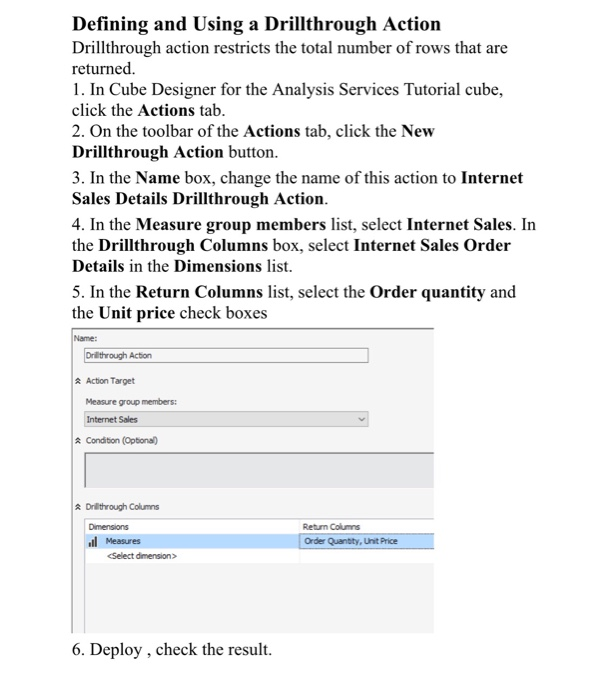
Exercise 5 calculation drillthrough Defining Calculations 1. Open Cube Designer for the Analysis Services Tutorial cube and then click the Calculations tab 2. On the toolbar of the Calculations tab, click New Calculated Member, change the name of this new calculated measure to [Total profit] 3. In the Expression box, create the following MDX expression [Measures].[Sales Amount-Measures],[Total Product Cost- Measures].[Tax Amt] Name: Total profit Parent Properties Parent hierarchy: Parent member: Measures A Expression easures). [Sales Amount]-Measures). Total Froduct Cost] Measures). [Tax Amt A Additional Properties Format string: Visible: Non-empty behavior: Assodiated measure group: Display folder: Currency True Total Product Cost, Sales Amount, Tax Amt (Undefined)
Step by Step Solution
There are 3 Steps involved in it

Get step-by-step solutions from verified subject matter experts
 Study Help