







Question: 3 . Multi - page registration site. Modify the registration.html page as described below. This assignment must be completed using JavaScript, without modifying any of
Multipage registration site. Modify the registration.html page as described below. This
assignment must be completed using JavaScript, without modifying any of the HTML
code, unless stated otherwise.
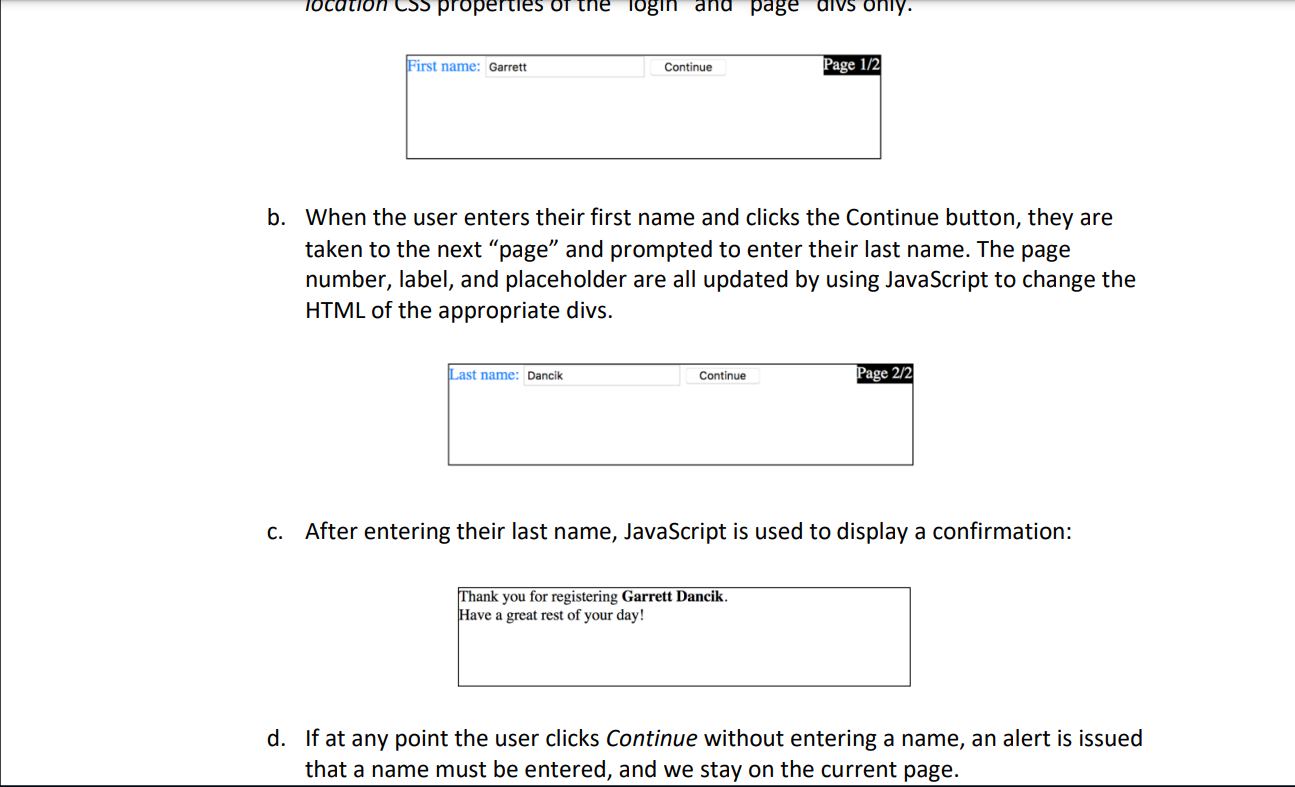
a Use CSS to change the layout of the page div so that this div is displayed on the
top right of the login div as shown below: Hint: should the page div be
staticrelativefixed or absolute with respect to the login div? Once
set, where should its position be Does the login div position need to be
changed? Note: you must complete this question by changing the position and
location CSS properties of the login and page divs only.
b When the user enters their first name and clicks the Continue button, they are
taken to the next page and prompted to enter their last name. The page
number, label, and placeholder are all updated by using JavaScript to change the
HTML of the appropriate divs.
c After entering their last name, JavaScript is used to display a confirmation:
d If at any point the user clicks Continue without entering a name, an alert is issued
that a name must be entered, and we stay on the current page.b When the user enters their first name and clicks the Continue button, they are
taken to the next "page" and prompted to enter their last name. The page
number, label, and placeholder are all updated by using JavaScript to change the
HTML of the appropriate divs.
c After entering their last name, JavaScript is used to display a confirmation:
Thank you for registering Garrett Dancik.
Have a great rest of your day!
d If at any point the user clicks Continue without entering a name, an alert is issued
that a name must be entered, and we stay on the current page.
Step by Step Solution
There are 3 Steps involved in it
1 Expert Approved Answer
Step: 1 Unlock

Question Has Been Solved by an Expert!
Get step-by-step solutions from verified subject matter experts
Step: 2 Unlock
Step: 3 Unlock
 Study Help